USING THE REMOTE
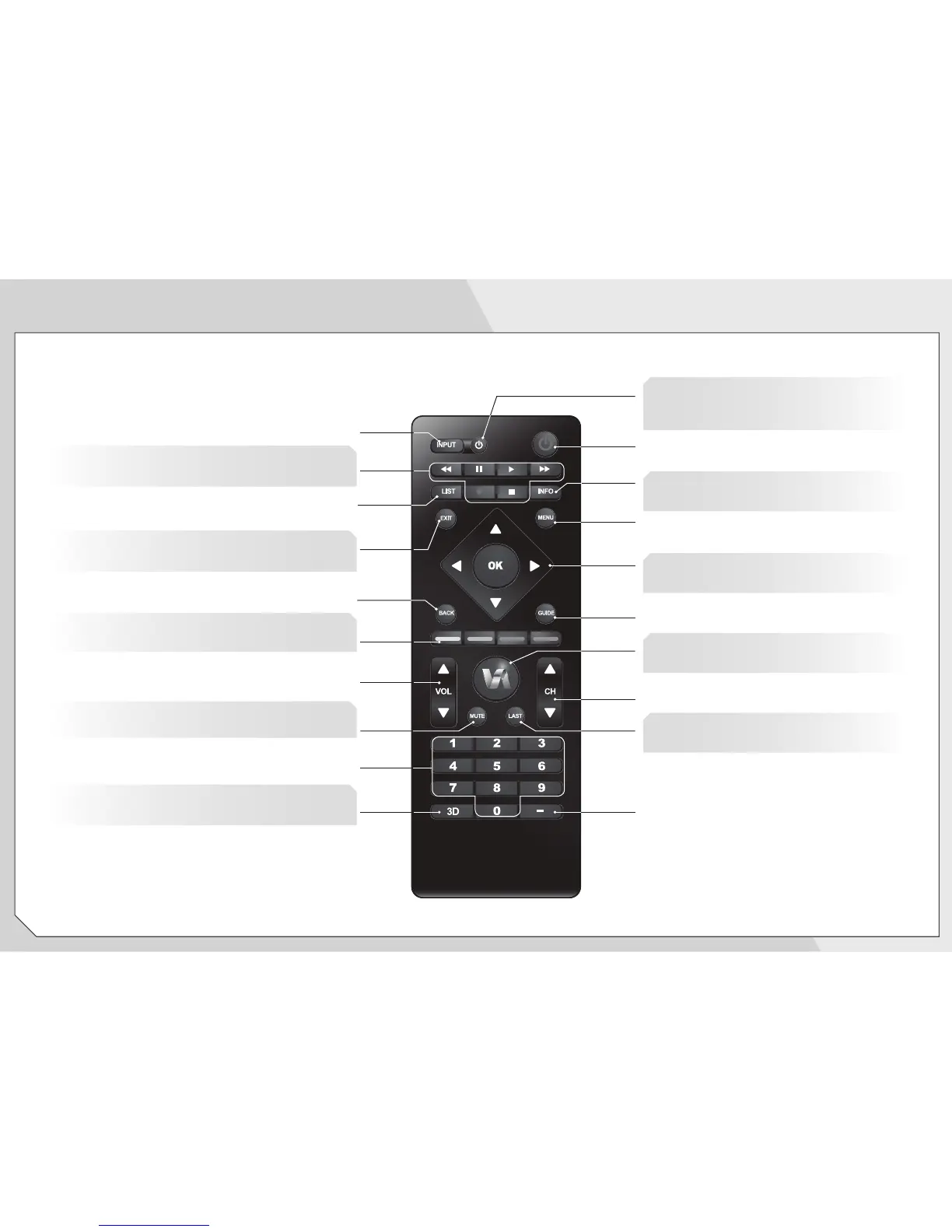
INPUT
Change the currently-displayed input.
ARROW
Navigate the on-screen menu.
EXIT
Close the on-screen menu.
LIST
Open the channel list menu.
A/V CONTROLS
Control USB photo slideshow and V.I.A. apps.
3D
Change the 3D mode.
MUTE
Turn the sound off or on.
V.I.A. SHORTCUT BUTTONS
Control VIZIO Internet Apps.
POWER
Turn TV on or off.
MENU
Display the on-screen menu.
INFO
Display the info window.
DEVICE POWER
Turn a connected device on or off when
using universal remote function.
DASH
Use with number pad to manually enter
a digital sub-channel. (For example,
18-4 or 18-5.)
CHANNEL UP/DOWN
Change the channel.
GUIDE
Display the info window.
LAST
Return to the channel last viewed.
NUMBER PAD
Manually enter a channel.
VOLUME UP/DOWN
Increase or decrease loudness of the TV audio.
BACK
Go to the previous on-screen menu.
V BUTTON
Open the VIZIO Internet Apps dock.


 To Next Page
 Loading...