RS-232 Connections
Manual Documentation Number: ESP901-902-3704 Appendix A 71
B&B Electronics Mfg Co Inc – 707 Dayton Rd - PO Box 1040 - Ottawa IL 61350 - Ph 815-433-5100 - Fax 815-433-5104 – www.bb-elec.com
B&B Electronics Ltd – Westlink Commercial Pk – Oranmore, Galway, Ireland – Ph +353 91-792444 – Fax +353 91-792445 – www.bb-europe.com
A
A
P
P
P
P
E
E
N
N
D
D
I
I
X
X
A
A
:
:
R
R
S
S
-
-
2
2
3
3
2
2
C
C
O
O
N
N
N
N
E
E
C
C
T
T
I
I
O
O
N
N
S
S
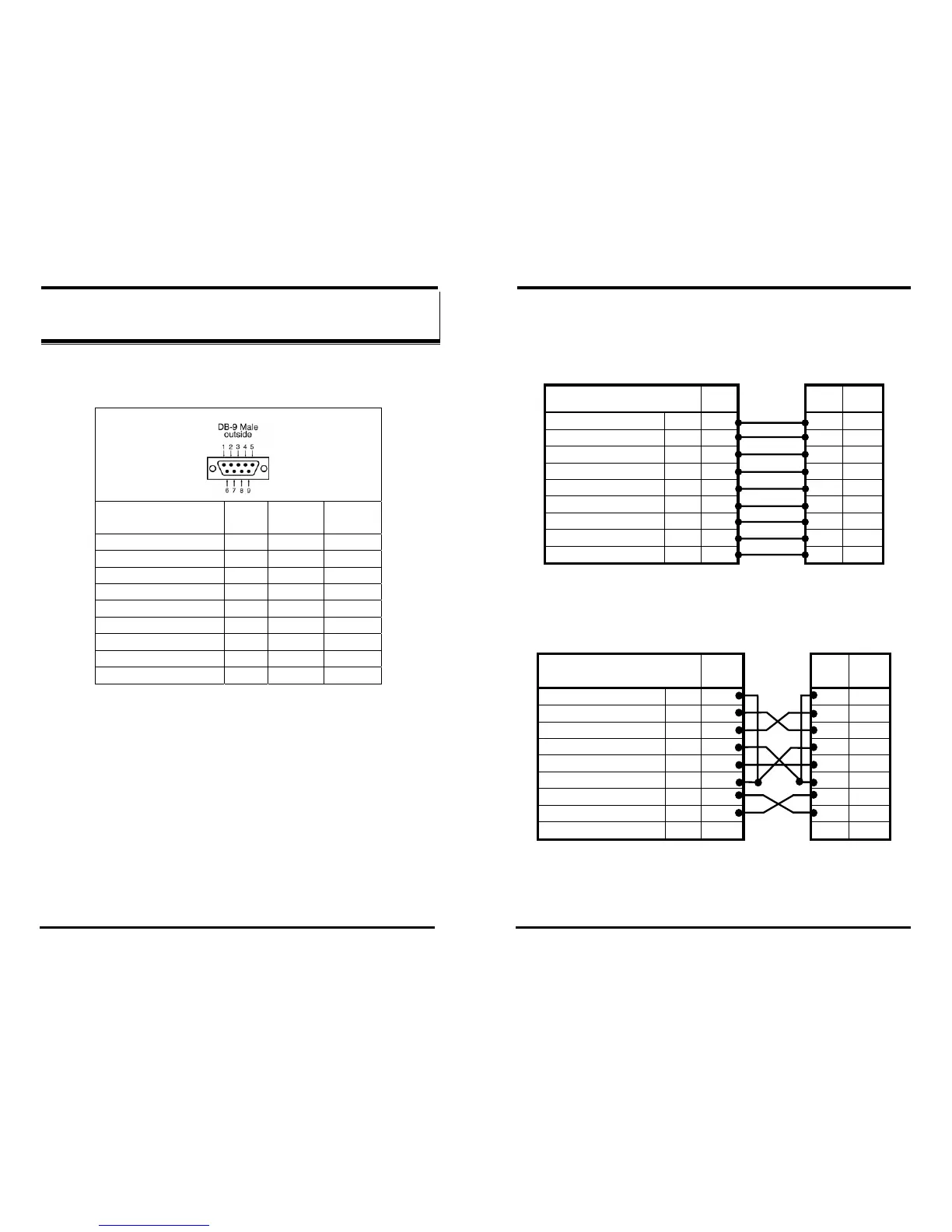
Serial Server DB-9 Pin-outs in RS-232 Mode
RS-232
Signal Name
DTE RS-232 DB-9M
Pin
Carrier Detect In DCD 1
Receive Data In RXD 2
Transmit Data Out TXD 3
Data Terminal Ready Out DTR 4
Signal Ground --- GND 5
Data Set Ready In DSR 6
Request To Send Out RTS 7
Clear To Send In CTS 8
Ring Indicator In RI 9
Figure 60. RS-232 Connections in a DB-9 Connector
RS-232 Connections
72 Appendix A Manual Documentation Number: ESP901-902-3704
B&B Electronics Mfg Co Inc – 707 Dayton Rd - PO Box 1040 - Ottawa IL 61350 - Ph 815-433-5100 - Fax 815-433-5104 – www.bb-elec.com
B&B Electronics Ltd – Westlink Commercial Pk – Oranmore, Galway, Ireland – Ph +353 91-792444 – Fax +353 91-792445 – www.bb-europe.com
RS-232 Straight-through Cable Connections
In the RS-232 mode, the Serial Server’s ports are configured as DTEs
like a computer. If the device connected to the
Serial Server is
configured as a DCE use a straight through cable wired as shown
below:
Figure 61. Straight-through DB-9 to DB-9 RS-232 Serial Cable
RS-232 Crossover (null modem) Cable Connections
When connecting to a PC or another DTE device, use a crossover cable
(also called a null modem cable).
Figure 62. Crossover DB-9 to DB-9 RS-232 Serial Cable
RS-232 Signal Names DB-9
Pin#
Connections DB-9
Pin#
Signal
Carrier Detect CD 1 1 CD
Receive Data RD 2 2 RD
Transmit Data TD 3 3 TD
Data Terminal Ready DTR 4 4 DTR
Signal Ground/Common GND 5 5 GND
Data Set Ready DSR 6 6 DSR
Request to Send RTS 7 7 RTS
Clear to Send CTS 8 8 CTS
Ring Indicator RI 9 9 RI
RS-232 Signal Names DB-9
Pin#
Connections DB-9
Pin#
Signal
Carrier Detect CD 1 1 CD
Receive Data RD 2 2 RD
Transmit Data TD 3 3 TD
Data Terminal Ready DTR 4 4 DTR
Signal Ground/Common GND 5 5 GND
Data Set Ready DSR 6 6 DSR
Request to Send RTS 7 7 RTS
Clear to Send CTS 8 8 CTS
Ring Indicator RI 9 9 RI



 To Next Page