Need help?
Do you have a question about the VOCA V543 and is the answer not in the manual?
Instructions to remove the battery cover from the bottom left-hand corner of the phone.
Guide on sliding the SIM card into the holder with gold contacts facing down.
Steps to charge the phone by inserting the battery and connecting the cradle.
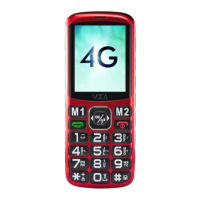
Identifies the phone's display and navigation pad.
Labels and identifies keys like Dial, Soft Keys, and Power Key.
Describes the Dial Key's role in dialing, answering, and call history.
Explains short press for hangup/home and long press for power on/off.
Details the Left Soft Key's use for menu and confirmation.
Explains the Right Soft Key's use for contacts and back navigation.
Details how to use the Confirm Key for menu navigation and selection.
Describes long press for speed dial and short press for characters/space.
Explains the '#' key for silence mode and input method switching.
Details how the SOS key triggers emergency processes.
Explains the Navigation Pad's role as shortcut keys and navigation.
Describes the Volume Boost Key for earpiece amplification and torch.
Guide to customizing four profiles with ringtones, volumes, and ring types.
Instructions for setting up speed dial numbers for various keys.
Details on setting up SOS contacts and messages for emergency.
Configuring SMS alerts to contacts when battery level is low.
Setting time, date, language, shortcuts, and factory reset.
Configuration options for call divert and call waiting.
Customizing clock faces, contrast, backlight, font, and wallpaper.
Activating voice prompts for dial pad input.
Activating voice prompts for reading incoming numbers.
Using blacklist to block unwanted calls or messages.
Controlling front cover signal lights for events like missed calls.
 General
| Brand | VOCA |
|---|---|
| Model | V543 |
| Category | Cell Phone |
| Language | English |

 To Next Page