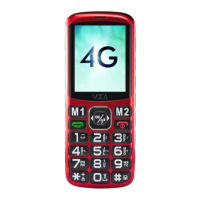
6.1 Input phone number via keypad. For
international call with + at the front, press *
twice.
6.2 Press dial key. Please select a SIM card
if two SIM cards inserted.
6.3
To end call, press End/ Power key or simp ly
fold V543.
6. DIAL OUT
7. ANSWER CALL
Press dial key or flip open V543
8. ADD CONTACT
1. Select Contacts > Add contacts
2. Select where to save the contact
3. Press Edit and fill in the details of contact
4. Select Save
9. ADD PHOTO CONTACT
1. Select Menu > Photo Contact
2. Use navigation pad to select where to save
the contact
3. Press Edit and fill in the details of contact
4. Select Save
11
EN


 To Next Page