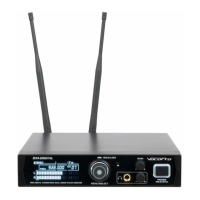
The VocoPro IEM-DIGITAL is a professional digital stereo/dual mono in-ear monitor system designed for vocalists and performers. It operates in the 900MHz range, ensuring freedom from TV broadcast interference, and offers 24-bit digital, dual-frequency (true stereo) transmission and reception. The system is built with a rugged all-metal design for both the transmitter and receiver belt pack, ensuring durability in various venues.
Function Description:
The IEM-DIGITAL system provides in-ear monitoring, allowing performers to hear their instrument and microphone signals directly and clearly, without relying on traditional stage monitors. This helps to reduce stage volume, prevent feedback, and provide a consistent sound mix for the performer regardless of their position on stage. The system supports both stereo and dual mono output configurations, offering flexibility for different monitoring needs.
Important Technical Specifications:
- Frequency Range: Operates in the 900MHz range, avoiding TV broadcast interference.
- Audio Quality: 24-bit digital audio transmission.
- Transmission Modes: Dual frequency (true stereo) transmission.
- Channels: 9 selectable channels, each consisting of two output frequencies.
- Transmission Power: Features Hi and Low transmission preference to disperse across various venues.
- Sync Method: One-touch IR sync for instantaneous connection and setup.
- Construction: Rugged all-metal design for both transmitter and receiver belt pack.
- Receiver Battery: Rechargeable battery in the belt pack, charged via a 5V USB connection.
- Included Accessories: Professional ear-bud earphones.
- Transmitter Power: DC IN 12-15V/500mA power adapter.
Usage Features:
Transmitter (IEM-DIGITAL):
- Display: A clear display shows crucial operational settings, including:
- CH: Current channel number (1-9).
- Freq: Actual frequency transmissions in megahertz.
- L/R: Input level meter for incoming left and right audio.
- Stereo/MX Mono: Indicates the aural configuration of the wireless output transmission (stereo or mixed mono).
- Menu/Select Knob: A dial knob used to cycle through available menu settings and push to select and confirm preferences. Press and hold this button to lock menu navigation.
- IR Sensor: Communicates frequency information to the body pack receivers for re-syncing or changing channels.
- Headphone with Volume Knob: A 3.5mm jack for wired headphones to monitor the wireless audio feed being sent to the body pack receivers. The knob adjusts the headphone volume.
- Master Output Volume Knob: Adjusts the overall loudness of the audio transmission signal.
- Power/Sync Button:
- Press once to turn the unit ON or OFF.
- Press and hold to start the IR sync process.
- Rear Panel Connections:
- DC IN: Power input for the provided 12-15V 500mA power adapter.
- Loop Out: A jack for sending audio output to a separate audio effects processor.
- R Audio In: Input for audio intended for the right channel.
- L Audio In: Input for audio intended for the left channel.
- Ant A & B: Dual diversity antenna terminals (TNC threaded) to ensure a solid wireless connection.
Body Pack Receiver:
- Antenna Terminal: TNC threaded terminal for assembling the included antenna.
- Volume +/- OFF Knob: Rotates clockwise to power the body pack ON and increase audio reception volume. Turning counter-clockwise lowers the volume and turns the unit OFF.
- Phones Jack: Connects a pair of headphones or in-ear monitors.
- IR Sensor: Used for re-syncing the body pack to communicate with the transmitter on a different frequency channel.
- USB Port: For plugging in a USB charging cable to recharge the body pack battery.
- AF/RF L and AF/RF R LEDs: These lights illuminate to confirm an established connection and indicate the true stereo spectrum of the audio being received.
Getting Started and Connection:
- Power On Transmitter: Plug the DC Power Adapter into the DC-IN on the rear panel of the IEM-Digital transmitter and press the Power button once.
- Connect Audio Inputs: Plug external audio sources (from a mixer's monitor or pre-out) into the R Audio In and L Audio In connectors on the transmitter's rear panel.
- Attach Antennas: Securely fasten the two antennas to Ant A and Ant B on the transmitter.
- Power On Receiver: Attach the antenna to the body pack receiver. Turn the volume knob clockwise to activate the body pack.
- Sync Frequency:
- On the transmitter, press the Menu/Select knob (the CH display should blink).
- Rotate the knob to select the desired channel number.
- Raise the body pack's IR sensor close to the transmitter's IR sensor.
- Press and hold the Power/Sync button on the body pack.
- The AF/RF L and/or AF/RF R LEDs on the body pack should illuminate, confirming a successful connection.
- Adjust Volume: Adjust the volume knob on the body pack to the preferred listening level.
Configuration Suggestion:
- Route instruments and microphones into a mixer.
- Connect the mixer's monitor or pre-out audio output to the R/L audio input connectors on the IEM Digital transmitter.
- Ensure the body pack receiver is synced to provide in-ear monitoring.
- Verify that the AF/RF R and AF/RF L LED lights on the body packs are illuminated, indicating true stereo reception.
- Adjust the body pack's volume knob to personal preference.
Maintenance Features:
- Cleaning: Use a clean, dry cloth for cleaning. Avoid chemical solvents.
- Storage: Store the unit in a cool, dry, clean place, away from windows, heat sources, excessive vibration, dust, moisture, or cold.
- Power Disconnection: Unplug the power cord from the wall outlet if the unit will not be used for a long time to save electricity and prevent fire hazards. Always pull by grasping the plug, not the cord itself.
- Troubleshooting: The manual provides a troubleshooting section for common issues like no audio output, no music audio, or audible distortion, offering solutions such as checking sync status, battery levels, connections, and trying different frequency channels.
- Service: Do not attempt to service the appliance beyond what is described in the operating instructions. All other servicing should be referred to qualified service personnel.
- Battery Charging: The body pack receiver features a rechargeable battery that can be charged via a 5V USB connection, ensuring continuous operation.

 Need help?
 General

 To Next Page