8
2
1
3
5
6
7
The information within this guide must be used in conjunction with the information in the Volkswagen Owner’s Manual. You should refer to your vehicle’s
Owner’s Manual, and Infotainment System Supplement for all information, warnings and feature limitations. Always pay careful attention to the road and do
not drive while distracted. Some Infotainment features can only be accessed and operated when the vehicle is standing still.
Optional features shown.
Introduction to Your Jetta
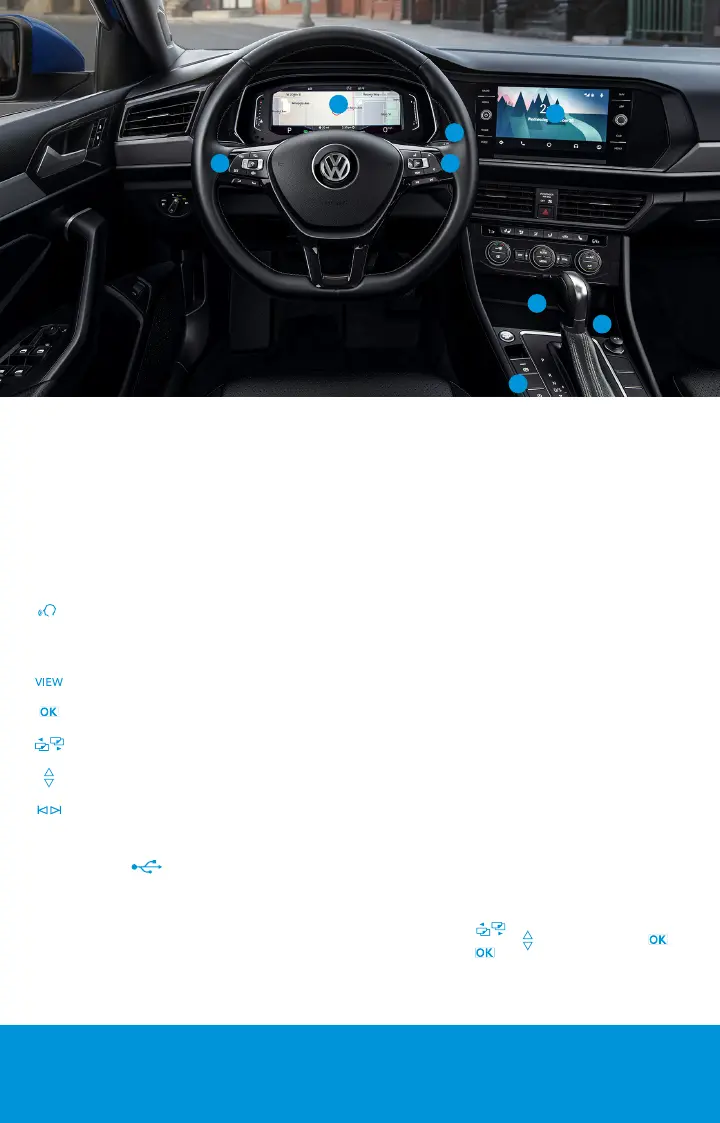
1. Steering Wheel Left Side Controls
Buttons control Driver Assistance features,* Cruise
Control and volume settings for radio, navigation and
phone.
2. Steering Wheel Right Side Controls
The buttons on the right side of the multi-function
steering wheel are used to access functions in the
instrument cluster display:
Voice Control Button: Activates the Voice
Recognition System. Short press to activate
Volkswagen Voice Control.* Long press to activate
third party voice control with a compatible smart
phone connected to App-Connect.
VIEW Button: For vehicles with a Digital Cockpit, it
switches between wide and standard display.
OK Button: Used to open a menu or select a
setting in the instrument cluster display.
Horizontal Menu Buttons: Used to navigate
through the instrument cluster’s main menus.
Vertical Arrow Buttons: Push to navigate inside a
specific menu.
Horizontal Arrow Buttons: Push to change radio
stations, scroll through radio presets or select the
next or previous media track.
3. USB-C Port
USB Type C ports allow you to connect your mobile
phone to your Jetta using the latest generation of USB. To
utilize USB Type C, you must have a compatible cable. To
find a cable that converts your phone’s charging port to a
USB Type C connector, click here.
4. Wireless Charging
Can charge a Qi-capable mobile phone without the need
to plug in a cable. Simply place it securely in the center of
the surface with the display facing up. An alert in the
Infotainment system indicates when charging begins.
5. Windshield Wiper and Washer Lever
Intermittent/Low/High functions activated by moving
the stalk into the desired position. Intermittent or
rain-sensing* wiper speed is controlled by the switch on
top of stalk. Pull stalk toward steering wheel to wash.
Press stalk down for single wipe.
6. Infotainment
Dedicated buttons and touchscreen commands control
radio, media selections, compatible phones, car functions,
ambient lighting* and the optional navigation system.*
7. Start-Stop System*
Switches off the engine automatically when vehicle
stops. When needed, the engine switches back on
automatically. The feature is activated every time the
ignition is switched on. Press button to deactivate.
Status of system is displayed in the Vehicle Status
instrument cluster menu. See operating conditions in
your Owner’s Manual.
8. Digital Cockpit*
Allows you to customize the presentation of vehicle
information in the instrument cluster display. VIEW
button on the steering wheel toggles between two map
sizes. The display can also be personalized using the
Infotainment System. Select CAR > Settings > Active
Info Display.
Reset Trip Odometer: On the Steering Wheel Right Side
Controls, press until you see “driving data” on the
instrument cluster. Use to select Trip, press , then
press and hold to reset.
*Available on select trim lines.
4









 To Next Page