Driver Assistance Features
Warnings: See Cruise Control in your Owner’s Manual for more detailed information and for important safety warnings.
Assistance System Settings
If your vehicle is equipped with Driver Assistance features,
you can access the Assistance system settings menu in the
Infotainment system, allowing modification to the Driver
Assistance feature operation.
1. Press the Menu button.
2. Press the Assist Syst. icon on the display.
3. Touch the image that represents the feature.
OR
Touch to access Assistance system settings.
Watch the Adaptive Cruise Control video.
Deactivate Adaptive Cruise Control
Applies to vehicles equipped with Adaptive Cruise Control.
To deactivate Adaptive Cruise Control, and use Conventional
Cruise Control:
1. Press the button on the steering wheel.
2. Using the vertical menu buttons on the steering wheel
scroll to Speed.
3. Select Cruise Control in the instrument cluster display then
press the button.
Adaptive Cruise Control is now deactivated, and your vehicle will
maintain the set speed using conventional cruise control.
Activate Cruise Control
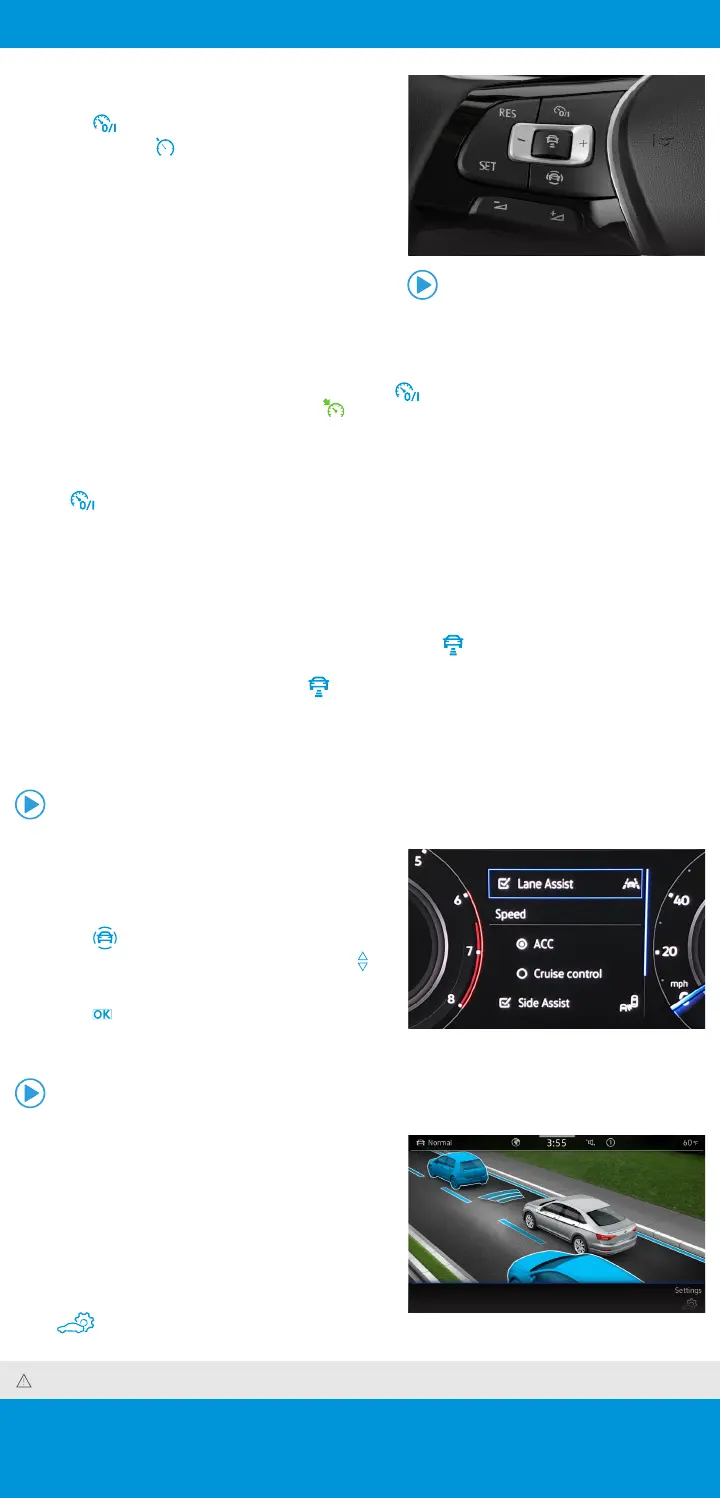
Locate the Cruise Control buttons on the left side of the
multi-function steering wheel.
• Press the button to activate Cruise Control.
• A speedometer icon will appear in the instrument cluster
display.
Set Cruising Speed
1. When you get to your cruising speed, press the SET button on
the multi-function steering wheel.
2. A green CRUISE indicator light will appear in the instrument
cluster display.
3. To increase/decrease the speed by 1 mph increments, press
the ++ or -- buttons.
Optional feature shown.
Adaptive Cruise Control Distance Level Setting*
Adaptive Cruise Control (ACC) helps maintain your selected speed while adjusting that speed to maintain a set
distance to the vehicle driving ahead. When you approach a slower moving vehicle in front of you, your vehicle may
brake if the situation requires. When the vehicle is no longer present, ACC will accelerate back to the stored speed.
You can set the speed-dependent distance interval from the vehicle ahead to one of five levels.
• When the ACC button is pressed to activate ACC distance setting, the indicator light illuminates in the
instrument cluster display.
• To change the ACC distance interval, press the button to cycle through the distance intervals. When the
shortest interval is reached, the distance returns to the greatest interval when the button is pressed again.
• When the ACC system brings the vehicle to a stop for more than 3 seconds, briefly press the accelerator pedal to
resume ACC.
*This feature is not a substitute for attentive driving. See the Owner’s Manual for further details and important limitations. Adaptive Cruise Control is only available on select trim lines.
Watch the Cruise Control video.
Cancel and Resume
1. To cancel the cruise speed, press the brake pedal or press the button once on the multi-function
steering wheel. The green CRUISE indicator light will go off.
2. To resume your last set speed, press the RES button on the multi-function steering wheel.
Turning Cruise Control System Off
• Press twice.
Watch the Deactivate ACC video.
Dramatization.









 To Next Page