Bluetooth
®
/ Voice Recognition
Warnings: See Bluetooth & Voice Recognition in your Owner’s Manual for more detailed information and for important safety warnings.
Pairing a Compatible Phone
1. Be sure to check your phone’s compatibility at
www.knowyourvw.com/bluetooth.
2. With ignition on and vehicle in Park, turn the Infotainment system
on. Your vehicle’s Bluetooth system will be in “discovery” mode.
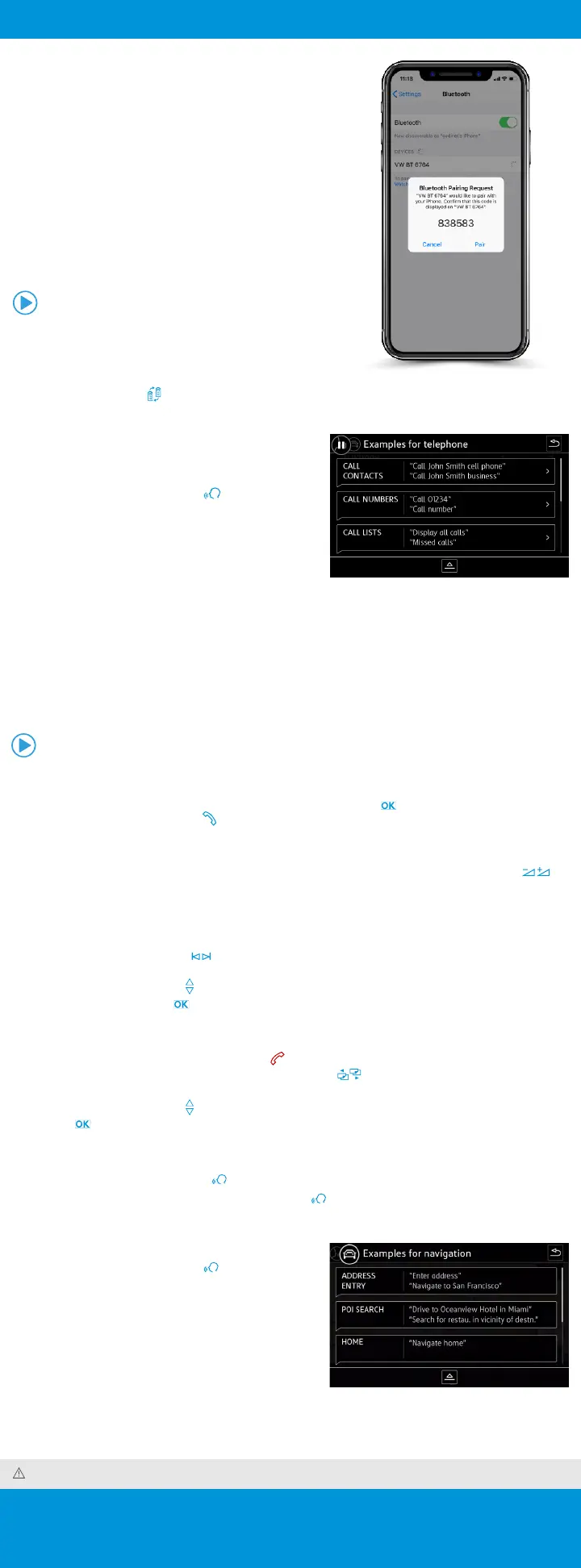
3. From the Bluetooth menu on your phone, search for new devices
and select VW BT XXXX (last four digits of VIN).
4. A connection request will appear on the Infotainment display.
5. Press Connect on the Infotainment display.
6. The Infotainment display will then show a PIN.
7. Make sure the same PIN is displayed on your phone and press Yes
on the Infotainment touchscreen, then press Pair on your phone.
Note: If your phone displays a prompt asking to connect to your vehicle, make sure to enable future automatic
connections. This will help to automatically reconnect the compatible paired device to the system. Once the
PIN is shown, pairing must be completed within 30 seconds; otherwise, the process will need to be repeated.
Primary and Secondary Phone Functionality
Two active phones can be connected simultaneously. Follow steps
1-7 above. Only contacts from the primary phone will be shown
within the Infotainment system. Switching between phones requires
pressing the Swapping icon .
Note: This feature is not available when the phone is connected to Apple CarPlay
®
or Android Auto
™
.
Call by Name via Native Bluetooth
Technology
Applies to vehicles with Voice Recognition.
1. Short press the Voice Control button on the multi-
function steering wheel.
2. After the chime say, “Call,” followed by the name of the
person you want to call. For example, “Call Mike Brown.”
3. The system will confirm, “Do you want to call Mike Brown?”
You then reply, “Yes.” If the contact has multiple numbers,
select or say the desired line number on the screen when
prompted. Once selected, the system will then say, “Contact
is being dialed.”
Note: If connected to App-Connect Apple CarPlay, press and hold the Voice Recognition button to activate Apple Siri > Then say, “Call Mike Brown.”
Voice Recognition Tips
• The contact must be said exactly as it is stored in the directory.
• If multiple numbers are stored per contact you may use the shortcut, “Call John Smith work,” or the system may
ask you to choose work, mobile, home, etc.
Answer an Incoming Call
The Bluetooth system will interrupt your car stereo with a ringtone. Press the button on the multi-function
steering wheel or the green Phone icon on the Infotainment touchscreen to answer the call.
Volume Settings
To adjust the volume of the Bluetooth system while on a call, press the Volume Up or Volume Down button
on the left side of the multi-function steering wheel.
Switch to Privacy Mode
To switch a Bluetooth call to your mobile phone, which would prevent passengers from overhearing the conversation:
1. Use the Horizontal Arrow buttons on the multi-function steering wheel to access the telephone menu in the
instrument cluster display.
2. Press the Vertical Arrow buttons until “Private” appears in the display.
3. To select, press the OK button on the multi-function steering wheel.
End a Call
While in the Phone function, press the red Phone icon on the Infotainment touchscreen. Or you may wish to:
1. Once a call has been answered, use the Horizontal Menu buttons on the multi-function steering wheel to
access the telephone menu in the instrument cluster display.
2. Press the Vertical Arrow buttons until “End” appears in the display.
3. Press the button on the multi-function steering wheel.
Cancel Active Voice Recognition or an Active Route
• Double press the Voice Control button on the multi-function steering wheel to end Voice Recognition.
• To end an active route, short press the Voice Control button and say, “Cancel destination,” after you hear a
beep.
Destination Entry via Voice Recognition
1. Short press the Voice Control button on the
multi-function steering wheel. A beep will sound.
2. Say, “New destination.”
3. After the beep, speak the address; for example, “Two
zero two four Main Street Los Angeles.” Speak in
single digits.
4. The system will repeat the address for confirmation
and ask if you would like to start route guidance. After
the beep say, “Yes,” and guidance will begin.
Watch the Phone Pairing video.
Watch the Making a Call Using Voice Recognition video.











 To Next Page