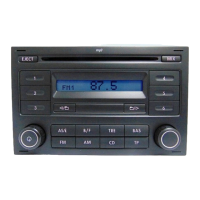
1- ON/OFF knob
If when the radio is turned ON, the display
shows the word “SAFE”, the Security Code
must be entered.
See page 27 for instructions.
- Volume control
- Autostore
3- Balance (BAL)
- Fader (FAD)
4- Presets buttons
- Code enter buttons
5- CD ejection
6- Automatic tuning down
- CD track selection down
- Folder down (MP3)
Briefly press this knob to turn the unit ON and
OFF.
Briefly press this button to activate or deactivate
the traffic announcements (RDS)
Press this button while in AM or FM modes,
and the Radio will find and store the best
reception level radio stations (6 on MW2 and
6 on FM2).
Press this button and turn the knob 11, to adjust
the balance between right and left speakers.
Press this button twice and turn the knob 11, to
adjust the balance between front and rear
speakers.
Buttons 1 to 6 allow the storage of 24 radio
stations (12 in FM and 12 in AM)
Buttons 1 to 4 allow entering the Security
Code.
Press this button to search for the next lower
radio station.
Press this button to select the previous track
in CD mode.
Press this button to select the previous folder
in CD mode.
2- Traffic announcements
(Only vehicles with 4 speakers)
26
BRIEF INSTRUCTIONS
7- Automatic tuning up
- CD track selection up
- Folder up (MP3)
- Code confirmation
8- Random (MIX)
9- Treble control (TRE)
10- Bass control (BAS)
11- Frequency Scan
- CD scan
- Code confirmation
- GALA function
12- Text info
13- CD player
14-AM bands
15- FM bands
Press this button to search for the next
higher radio station.
Press this button to select the next track in
CD mode.
Press this button to select the nex folder in CD
mode
Press and hold this button to confirm the
Security Code and enable operation.
Press this button in order to reproduce all the
tracks in random mode.
Press this button and turn the knob 11, to
adjust the Treble level.
Press this button and turn the knob 11, to
adjust the Bass level.
Press this button and the Radio will perform
a brief sampling of all radio stations available
on the current band.
Press this button and the device will perform
a brief sampling of the first 10 seconds of all
tracks.
Press and hold this button to confirm the
Security Code and enable operation.
Press this button and the display will show all
the data included on file AD3 TAG.
Press this button to select the CD player mode.
Press this button to select between AM1
and AM2, in Radio mode, or to switch to
AM while in CD or FM mode.
Press this button to select between FM1 and
FM2, in Radio mode, or to switch to FM
while in CD or AM mode.
Brief instructions
................................................27
.............................30
.......................................................30
...............................................28
....................................27
............................................28
...................................................28
...........................................29
....................................................32
...........................29
...........................31
......................................33
...................................29
.................................31
............................................33
..........................................31/33
......................................27
..............................................28
......................................27
...................................28
...................................28
.........................................29
......................................................32/33
........................................................33
.....................................................31
.....................................................29
....................................................29
Page Page


 To Next Page
 Loading...