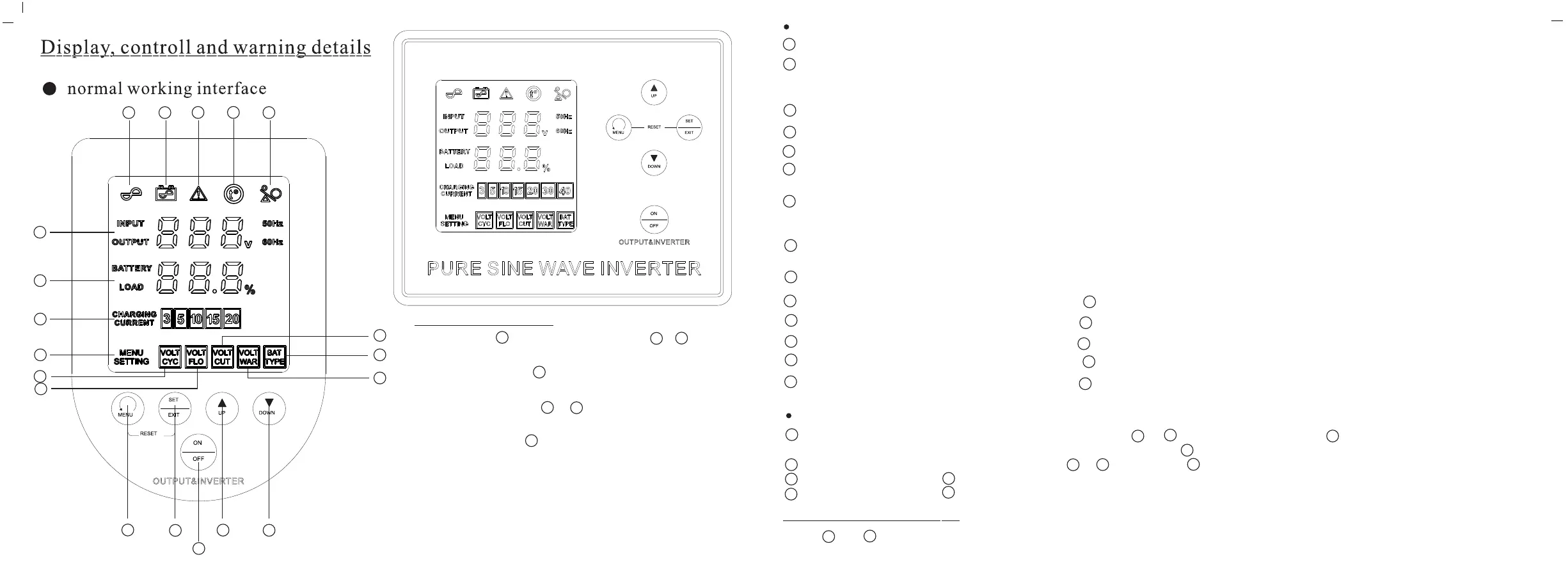
ICON INSTRUCTIONS:
AC MODE ICON: when device working in AC mode, this ICON will be lighting up.
1
INVERTER MODE and Charging indication ICON: when device working in AC mode and battery is not full charging,
this ICON will be flashing and battery is full charged, this ICON is lighting off; When device works in battery mode,
his ICON is constant lighting on.
2
Faulty ICON: when device is faulty, this ICON is constant lighting on.
3
Overheating ICON: when device is overheating, this ICON is constant lighting on.
4
Overheating ICON: when device is overheating, this ICON is constant lighting on.
5
AC input & output display: When”INPUT”icon lighting on, the data shows is input voltage;
when “OUTPUT” lighting on, it shows output voltage.
6
Battery capacity & loading Capacity display: When”BATTERY” lighting on, it shows battery remaining capacity percent
& battery voltage,it will alternate display the battery remaining capacity percent & battery voltage every 5 seconds.
When”LOAD”icon lighting on, it shows currently loading capacity percent.
7
Charging Current:The data shows the currently standard charging current.
When”CHARGING CURRENT”icon flashing, users can set the standard charging current.
8
MENU ICON:It will be lighting on.
9
VOLT CYC ICON:when the icon flashing,data shows cycle charging voltage value.
10
7
VOLT FLO ICON:when the icon flashing,data shows floating charging voltage value.
7
11
VOLT CUT ICON:when the icon flashing,data shows low voltage protection value.
12
7
VOLT WAR ICON:when the icon flashing,data shows low voltage warning value.
13
7
BAT TYPE ICON:when the icon flashing,data shows device matched battery type; If it shows “LEA” means,
device match Lead-acid battery;If it shows “PO4” means, device match LiFe-PO4 battery;
14
7
BUTTONS INSTRUCTIONS:
is menu button: press button,display screen will show - - data one by one. Press about 3s,
display screen showing data can return to original data. press many times, it also can back to original data.
menu button: when display screen showing - - data, press users can set the new data value.
menu button:press this button, it means”+” to up the data value
menu button:press this button, it means”_” to down the data value
S1
14
6
S1
S1
S2
14
8
S2
S3
S3
S4
S4
1
2
3
4
5
6
7
8
9
10
11
12
14
13
S1
S2
S3
S4
S5
Data setting steps:
Step 1: press ,make screen showing -- data,
then choose the data which you need re-set.
S1
8
14
Step2:short press ,can do setting operation,
the related data will be flashing.
S2
Step3: short press or , + or - the data value to the
suitable data
S3
S4
Step4: short press again, do”EXIT”operation,
then finish the data value setting
S2
Notes: This device can set charging current, cycle charging
voltage,floating charging voltage, battery low voltage
protection data, battery low voltage warning data,
battery type( lead-acid & LiFe-PO4).
The defined charge voltage, charge current and battery type
is suitable for 100Ah 12V liFe-PO4
Factory data reset:
Press and 3s at the same time, it enter in” RESET”, and when display show”SUC”,
means it resets successfully to factory data.
S1
S2
5
4


 To Next Page
 Loading...