EasyManua.ls Logo

Volt Polska sinusPRO W - User Manual

Volt Polska sinusPRO W
4 pages
Print Icon
To Next Page IconTo Next Page
Loading...
Manual
PRODUCT MANUAL
PURE SINE WAVE INVERTER/UPS
WARRANTY CARD
FILL IN IF NEEDEED
(*) Cross incorrect
I agree to pay the cost of inverter repair due to:
* expiration of the warranty period / * warranty void
Before proceeding with the repair, service will inform by phone about the exact costs of the repair.
Please attach a copy of the purchase document (receipt or invoice) to the complaint.
The full regulations of service repairs can be found on our website www.voltpolska.pl
VOLT POLSKA Sp. z o.o.
ul. Swiemirowska 3
81-877 Sopot
www.voltpolska.pl
Proper disposal of the product
(waste electrical and electronic equipment)
The marking placed on the product or in the texts related to it indicates that it should not be disposed of with other household waste at the
end of its useful life. To avoid harmful effects to the environment and human health from uncontrolled disposal, please separate this product
from other types of waste and recycle responsibly to promote the reuse of material resources as a continuing practice. For
information on where and how to recycle this product in an environmentally safe manner, residential users should
contact the retailer where they purchased the product, or their local government authority. Business users should
contact their supplier and check the terms and conditions of their purchase contract. The product should not be
disposed of with other commercial waste.
DATE OF PURCHASE
SHIPPING ADDRESS
SIGNATURE / STAMP
DAMAGE DESCRIPTION
SERVICE COMMENTS
serwis@voltpolska.pl pomoc@voltpolska.pl |
wersja 1.2022.12.23
sinusPRO W
Question and Answer IconNeed help?

Do you have a question about the Volt Polska sinusPRO W and is the answer not in the manual?

Summary

WARRANTY INFORMATION

Warranty Card Fields

Fields for customer to fill out regarding purchase date, address, and signature.

PRODUCT DISPOSAL

Environmental Disposal Guidelines

Instructions for proper disposal of electronic waste to protect the environment.

PREFACE AND PRODUCT FEATURES

Product Overview

Introduction to the inverter and its key features like UPS, AVR, and charger functions.

SAFETY PRECAUTIONS

Critical Safety Warnings

Important guidelines to prevent hazards like overloading, fire, and electrical shock.

DISPLAY AND CONTROL DETAILS

Normal Working Interface

Visual indicators for device status and parameters during normal operation.

Detailed Display Information

Explains specific symbols, voltage, and load indicators for detailed status.

OPERATIONAL DESCRIPTION OF COMPONENTS

Device Controls and Connections

Describes the function and operation of switches, sockets, input/output terminals, and charging.

BUZZER AND WORKING STATUS

Buzzer Alert Indications

Explains the audible alerts for different working conditions and abnormal states.

INSTALLATION GUIDELINES

Safe Installation Practices

Provides essential instructions for correctly and safely installing the device.

TECHNICAL SPECIFICATIONS

Device Performance Parameters

Lists key technical data including model, power, input/output specs, and protections.

Overview

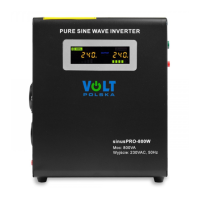
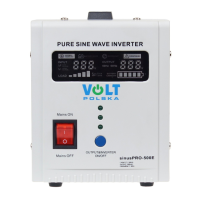
VOLT Polska SinusPRO W Pure Sine Wave Inverter/UPS

The VOLT Polska SinusPRO W series is a versatile pure sine wave inverter/UPS system designed to provide reliable power for various applications. This device integrates inverter, UPS, AVR (Automatic Voltage Regulation), and charger functions into a single unit, making it a comprehensive solution for power backup and conditioning.

Function Description

The SinusPRO W operates as a multi-functional power device:

  • Inverter: Converts DC power from batteries into pure sine wave AC power, suitable for a wide range of sensitive electronic appliances.
  • UPS (Uninterruptible Power Supply): Provides seamless power transfer to battery mode during mains power outages, ensuring continuous operation of connected devices. The short switchover time (≤ 4ms) guarantees uninterrupted usage.
  • AVR (Automatic Voltage Regulation): Stabilizes the output voltage when operating on mains power, protecting connected equipment from voltage fluctuations.
  • Charger: Features a built-in battery charger to replenish connected batteries when mains power is available. The charging current varies depending on the model, with options for 10A or 20A.

The device is controlled by a 32-bit high-speed CPU, enabling swift response times and accurate detection of operating parameters. Its toroidal transformer design contributes to high efficiency and low static loss, making it more energy-saving compared to older square transformer designs.

Important Technical Specifications

The SinusPRO W series offers several models with varying power capacities and battery voltages:

Power Ratings:

  • Max Power (VA): 500VA, 800VA, 1000VA, 2000VA, 2500VA, 5000VA
  • Max Power (W): 300W, 500W, 700W, 1400W, 1800W, 3500W

Input Specifications:

  • Voltage: 170VDC-270VDC
  • Frequency: 45-65 Hz

Output Specifications:

  • Voltage (Battery Mode): 230 VAC ± 1%
  • Voltage (Mains Mode with AVR): 230 VAC ± 8%
  • Frequency: 50 Hz ± 0.5 Hz
  • Voltage Waveform: Pure Sine Wave
  • Distortions: < 3%
  • Time of Switching (Battery Mode/Mains Mode): ≤ 4ms

Battery Specifications:

  • Battery Voltage: 12VDC, 24VDC, 48VDC (depending on model)
  • Charging Current: 10A (for 12VDC/48VDC models), 20A (for 24VDC models)

Physical Dimensions and Weight:

  • Dimensions (mm): Ranging from 253x241x102 to 540x330x130
  • Weight (kg): Ranging from 4.2 to 22

Protection Features: The device incorporates comprehensive protection mechanisms against:

  • Overload
  • High temperature
  • Over and under voltage
  • Battery discharge
  • Short circuit
  • Overcharging

Usage Features

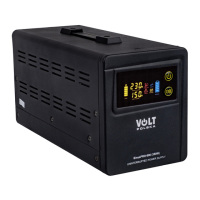
User Interface: The SinusPRO W features an LED colorful humanistic and friendly operation interface. This display clearly shows the device's working status, including:

  • Input and output voltage
  • Loading status (represented by a bar)
  • Battery status (represented by a bar, flashing during charging)
  • Input voltage indication
  • Output voltage indication and frequency indication

Control and Operation:

  • Output Switch: A push-button switch that, when held for more than 2 seconds, turns the inverter or output on/off.
  • AC Input Cord/Terminal: Used to connect the device to a wall socket or city power for battery charging or supplying output through AVR.
  • Mains Switch: When connected to city power and city power is normal, turning this switch on activates mains mode and battery charging. Turning it off switches the device to battery mode.
  • Output Socket/Terminal: For connecting appliances. Note that the maximum power for a single socket is 2000W; for appliances exceeding 2000W, connection to the terminal is recommended.
  • Battery Input Pole: Red cable for the positive pole, black cable for the negative pole. It is crucial to match the battery voltage with the device marking and ensure correct polarity.
  • AC Charger Switch: A button (on/off switch in the power supply) to control the built-in battery charger.

Buzzer Working Status: The device provides audible alerts for various conditions:

  • One beep: City power abnormal, switchover to battery mode.
  • Beeping every second: Battery working low voltage or output overload.
  • Beeping hurriedly: Protection activated or output abnormal.

Safety Precautions:

  • Avoid overloading the device beyond its maximum power capacity.
  • High voltage is present inside the device even when switches are off; only authorized professionals should open or service the unit.
  • In case of fire, use a dry powder type fire extinguisher; avoid liquid type extinguishers.
  • If the device operates unusually, immediately switch off both battery and city power sources and report to the distributor.
  • Important: Do not input voltage from poor-quality generators that do not produce sinusoidal voltage, as the device will not work correctly.
  • Important: It is recommended to use dedicated AGM/GEL lead-acid batteries suitable for buffer/cyclic work and deep discharge. Connecting car batteries not adapted for such work may damage the converter/battery. LiFePO4 batteries are not compatible with Sinus PRO E, W, S series due to different charging/discharging characteristics; for LiFePO4 batteries, the Sinus PRO ULTRA series by VOLT Polska is recommended.

Maintenance Features

Installation Guidelines:

  • Upon unpacking, inspect for any damage and contact the distributor immediately if found.
  • Do not install the device upside-down.
  • Avoid direct sunlight, heat sources, and keep away from children, water, moisture, oil, grease, and flammable substances.
  • Ensure at least 10cm clearance for fan outlets and device ventilation from walls or other heat-producing equipment to ensure proper airflow.
  • Verify that the city power voltage and frequency match the device's rated specifications.
  • The device must be properly grounded for safety.
  • Connect battery cables correctly: red to positive (+), black to negative (-). Incorrect connection will prevent the device from working.

Proper Disposal: The product bears a marking indicating that it should not be disposed of with other household waste at the end of its useful life. To prevent environmental harm and human health risks from uncontrolled waste disposal, it should be separated from other waste types and recycled responsibly. Residential users should contact their retailer or local government authority for information on safe recycling. Business users should consult their supplier and contract terms for disposal. The product should not be disposed of with other commercial waste.

For further assistance or inquiries, VOLT Polska can be reached at serwis@voltpolska.pl or pomoc@voltpolska.pl.

Volt Polska sinusPRO W Specifications

General IconGeneral
BrandVolt Polska
ModelsinusPRO W
CategoryInverter
LanguageEnglish

Related product manuals