Need help?
Do you have a question about the Volt Polska sinusPRO E and is the answer not in the manual?
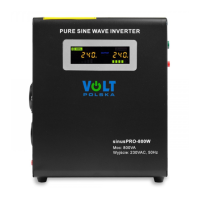
Details the key features and capabilities of the sinusPRO E series inverters, including their components and performance.
Provides step-by-step instructions for safely connecting and starting the inverter for the first time.
Explains the meaning of various icons and indicators shown on the inverter's LCD screen for status monitoring.
Presents detailed technical parameters for different models in the sinusPRO E series, including power, voltage, and dimensions.
Outlines the process for warranty claims, required documentation, and contact information for service.
This document outlines the features, operation, and maintenance of the sinusPRO E series of pure sine wave electronic inverters with UPS functionality, manufactured by VOLT POLSKA. It serves as a comprehensive guide for users to understand and effectively utilize their device.
The sinusPRO E series inverter is a versatile device that integrates several key functionalities into one unit: a DC/AC converter, an uninterruptible power supply (UPS), and an automatic battery charger. This combination allows it to provide a stable and reliable power source for various applications, particularly in situations where mains power is unreliable or unavailable.
At its core, the device acts as a pure sine wave inverter, meaning it converts direct current (DC) from a battery into alternating current (AC) that perfectly mimics the waveform of utility power. This pure sinusoidal output is crucial for sensitive electronic equipment, ensuring compatibility and preventing damage that can occur with modified sine wave inverters. It supports practically any type of load, from standard household appliances to more complex inductive loads like refrigerators and freezers, provided the device's nominal power is not exceeded.
The integrated uninterruptible power supply (UPS) feature ensures continuous operation of connected devices during power outages. When mains power is present, the device charges the connected battery and supplies power to the output devices through a built-in voltage regulator. In the event of a power failure, it seamlessly switches to battery mode, drawing power from the connected battery and converting it to AC to keep the loads running without interruption. This fast switching time, typically less than 4 milliseconds, is critical for maintaining the operation of sensitive electronics.
An automatic battery charger is also built into the unit, designed to efficiently and safely charge the connected battery when mains power is available. The device supports high battery charging currents, and on some models, the charge current can be adjusted or the charger can be switched off entirely, offering flexibility in battery management.
The sinusPRO E series also incorporates an Automatic Voltage Regulator (AVR) stabilizer. In network mode, the AVR actively monitors and adjusts the AC input voltage to maintain it at the correct level. If the input voltage deviates from the optimal range, the AVR will increase or decrease it to ensure a stable output voltage, protecting connected devices from voltage fluctuations.
The sinusPRO E series is designed for intuitive and simple operation, making it accessible even for users without extensive technical knowledge.
To begin using the inverter, users must first ensure all components are present and undamaged. The initial setup involves connecting the battery with the correct polarity (red wire to positive, black wire to negative) to prevent damage. Once the battery is connected, the device is started by holding down the ON/OFF button for approximately 5 seconds until an audible beep confirms activation. The mains plug is then connected to a wall socket. To initiate battery charging, the mains charger switch should be set to the "I" position, and for models with a priority switch, "AC PRIORITY" should be selected. Finally, devices intended for use with the power supply should be connected, ensuring they are turned off before connection and then powered on one by one. For models with a built-in priority switch and a regulator connected, the "SOLAR PRIORITY" option can be selected.
Proper shutdown procedure is equally important. All connected devices should be turned off one by one. The battery charging process is stopped by setting the charger switch to the "0" position. The inverter output is then disconnected by holding down the ON/OFF button for 3 seconds. Finally, the mains plug and the battery should be disconnected from the inverter.
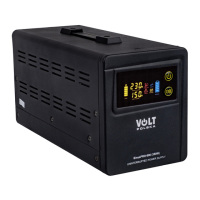
The device features a color LED display that provides real-time information about its operating status, enhancing user awareness and control. Key indicators include:
The sinusPRO E series is designed for reliability, but proper maintenance and awareness of potential issues are crucial for its longevity and safe operation.
The device comes with a warranty. In case of a repair need, users are required to fill out a warranty card, providing the date of purchase, shipping address, signature/stamp, and a description of the damage. Service comments will also be recorded. Users must indicate if they agree to pay for repairs due to warranty expiration or voidance. Before any repair work begins, the service department will inform the user about the exact costs. A copy of the purchase document (receipt or invoice) must be attached to the complaint. The full regulations regarding service repairs are available on the manufacturer's website, www.voltpolska.pl.
The device incorporates intelligent control of the cooling fan, which adjusts its operation based on the actual temperature of the device and the inverter's operating status. This ensures efficient cooling only when needed, reducing noise and energy consumption.
On some models, an AC priority (network) / SOLAR (battery) switch is available. This feature allows users to prioritize either mains power or solar/battery power as the primary energy source, offering flexibility in managing power consumption and optimizing energy usage, especially in solar power systems.
By adhering to these guidelines, users can ensure the safe, efficient, and long-lasting operation of their sinusPRO E series inverter.
 General
| Output Frequency | 50 Hz |
|---|---|
| Waveform | Pure Sine Wave |
| Continuous Power | 1000W |
| Efficiency | >85% |
| Output power | 1000W |
| Cooling | Fan |
| Output Voltage | 230V AC |
| Protection | Overload, Short Circuit, Over Temperature |
| Operating Temperature | 0°C to 40°C |
| Input Voltage | 12V / 24V / 48V DC |
| Instantaneous Power | 1500W |
| Peak power | 1500W |

 To Next Page