sales@voltpolska.pl (58) 341-05-06 | przemek@voltpolska.pl (58) 341-38-80 | bartek@voltpolska.pl (22) 100-42-99
sales@voltpolska.pl (58) 341-05-06 | przemek@voltpolska.pl (58) 341-38-80 | bartek@voltpolska.pl (22) 100-42-99
5
4
OPERATION OF THE DEVICE
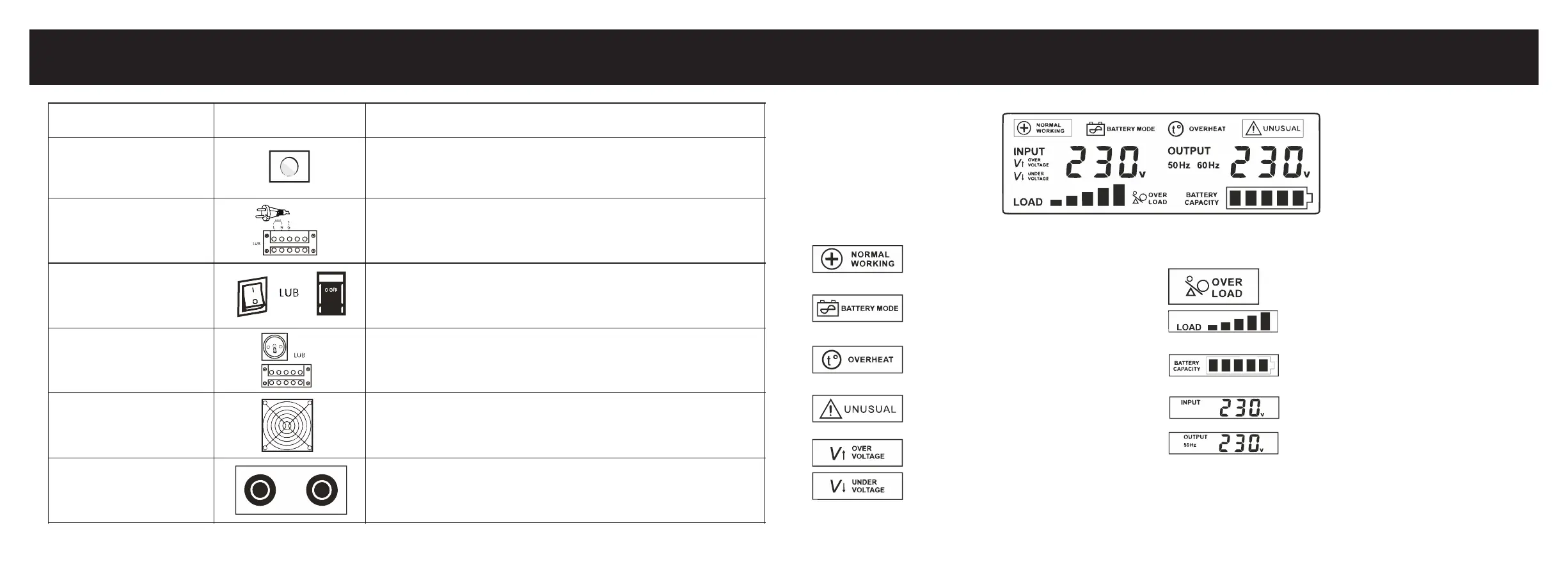
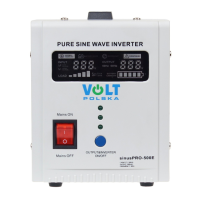
Pressing and holding the switch for more than 3 seconds will change the state of the
inverter to ON or OFF.
Connecting the plug to an electrical outlet allows the battery to be charged and to
power the output devices through the built-in voltage regulator.
If the device is connected to the mains supply and the switch is in the "I" position, the
battery will be charged and the output devices will be supplied from the mains.
Switching to the "0" position will start the inverter and supply the output devices from
the battery.
Connect output devices to the terminal or terminal strip.
The maximum power of a single socket is 2000 W. If the power of the output devices
is higher, please connect them to the terminal block.
The cooling fan starts when the UPS inverter is running or when the battery is being
charged - when the temperature of the transistors exceeds 45 C
The red terminal should be connected to the positive pole of the battery (+), and
black to negative (-). Changing the cables will prevent proper operation of the device.
- Normal operation mode, devices powered
directly from the 230 V BYPASS network
- No mains voltage, output devices powered
from a connected battery
- Overheating of the inverter, emergency
output devices are disconnected
- Incorrect battery voltage, short-circuit or
overheating of MOSFET transformers
- Mains voltage is too high
- Mains voltage is too low
- Inverter overload, too high power output
devices
- Inverter load level
- battery charge level, this indicator will
flash during charging
- Input voltage value
- Output voltage value and frequency
LCD DISPLAY ELEMENTS


 To Next Page