12
Step 5: If there is no more fault alarm, the system to support 3-phase equipment is completely installed.
Step 6: Please switch on all breakers of Line wires in load side. This system will start to provide power to
the load.
Note 1: To avoid overload occurring, before turning on breakers in load side, it’s better to have whole
system in operation first.
Note 2: Transfer time for this operation exists. Power interruption may happen to critical devices, which
cannot bear transfer time.
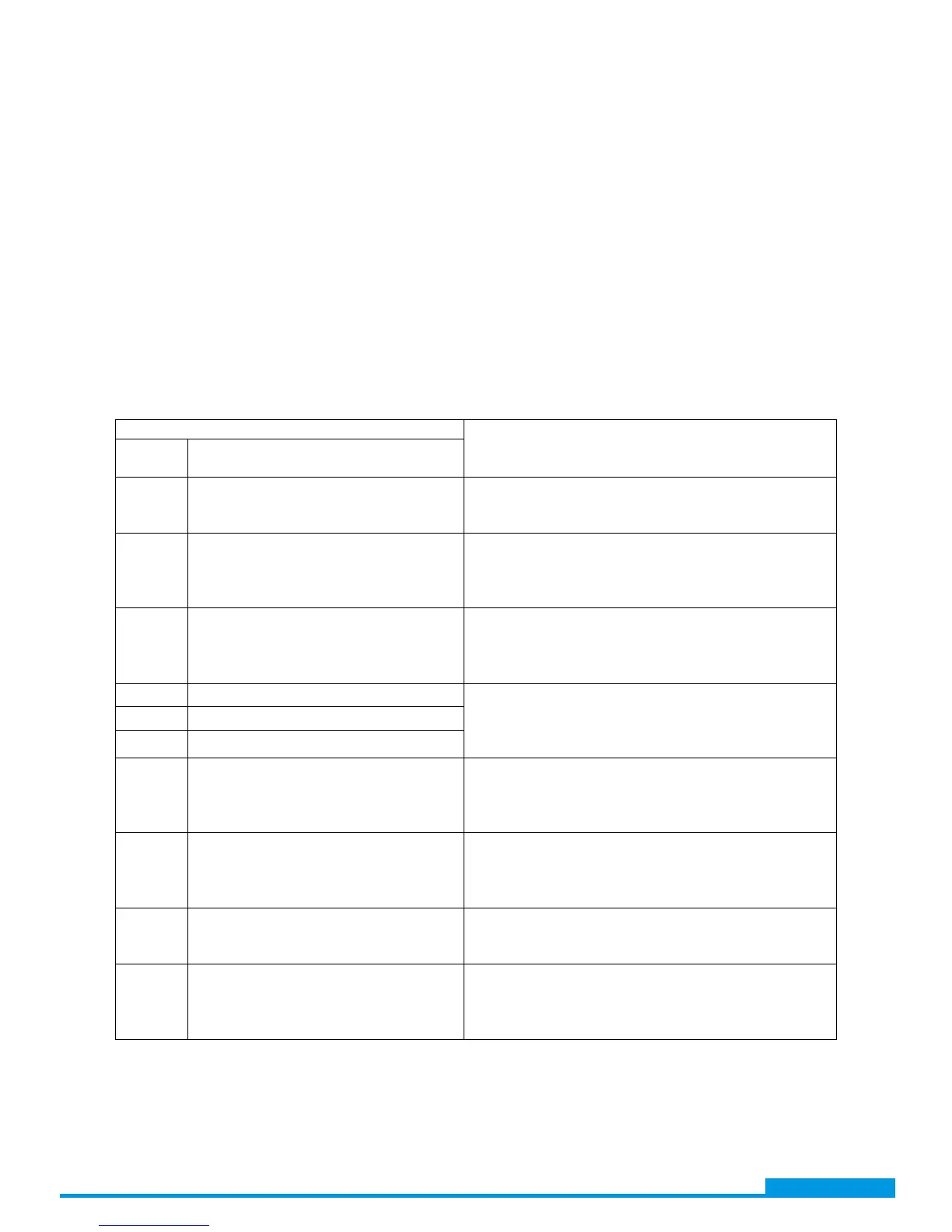
12. Trouble shooting
Situation
Solution
Fault
Code
Fault Event Description
60
Current feedback into the inverter is
detected.
1. Restart the inverter.
2. If the problem remains, please contact your
installer.
71
The firmware version of each inverter
is not the same.
1. Update all inverter firmware to the same
version.
2. If the problem remains, please contact your
installer.
72
The output current of each inverter is
different.
1. Check if sharing cables are connected well and
restart the inverter.
2. If the problem remains, please contact your
installer.
80 CAN data loss
1. Check if communication cables are connected
well and restart the inverter.
2. If the problem remains, please contact your
installer.
81 Host data loss
82 Synchronization data loss
83
The battery voltage of each inverter is
not the same.
1. Make sure all inverters share same groups of
batteries together.
2. If the problem remains, please contact your
installer.
84
AC input voltage and frequency are
detected different
1. Check the utility wiring conncetion and restart
the inverter.
2. If the problem remains, please contact your
installer.
85 AC output current unbalance
1. Restart the inverter.
2. If the problem remains, please contact your
installer.
86 AC output mode setting is different.
1. Switch off the inverter and check LCD setting
#28.
2. If the problem remains, please contact your
installer.
www.voltacon.com
info@voltacon.com


 To Next Page