Multiple Window Display
51275e
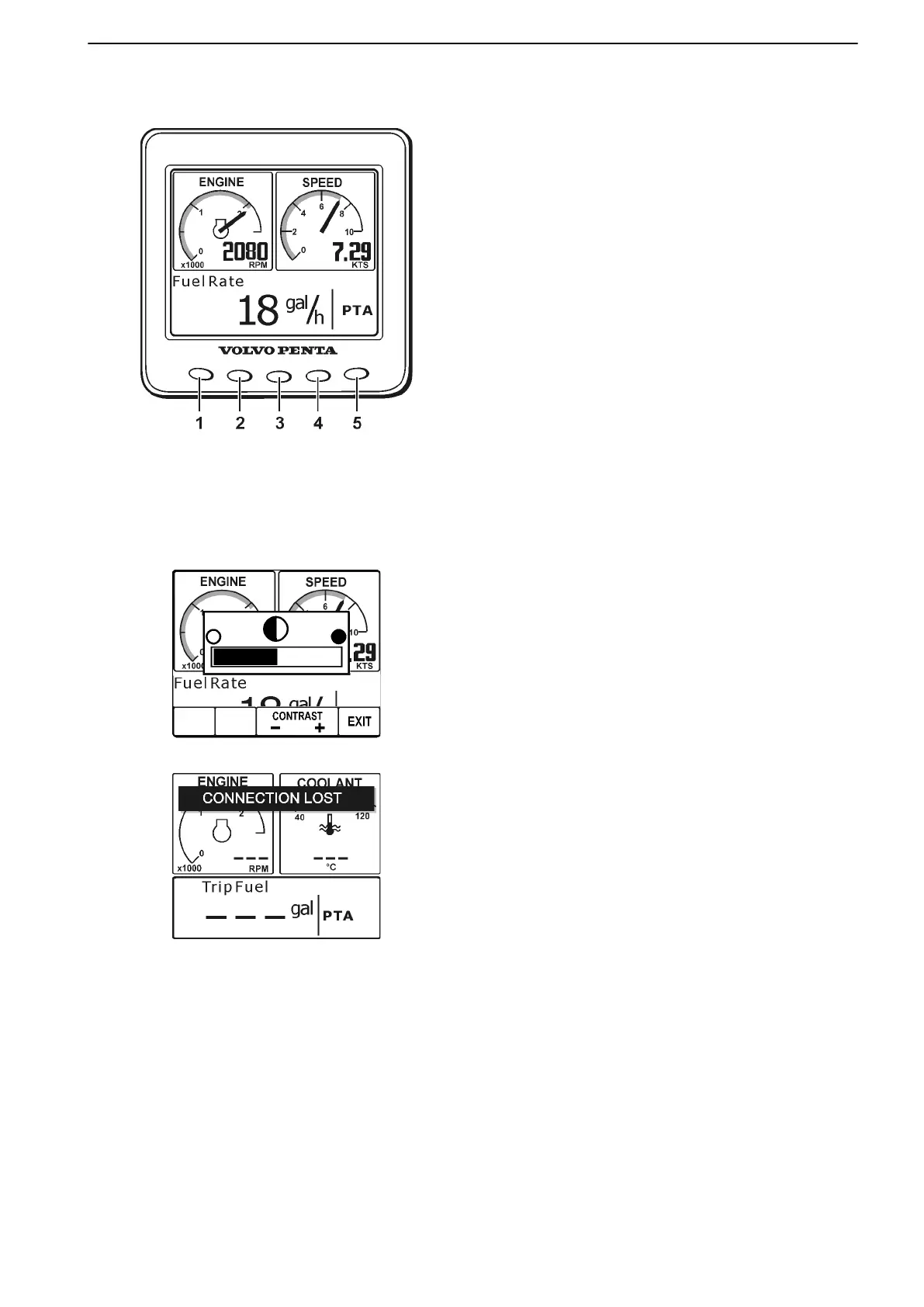
The EVC System Display instrument offers the possi-
bility to view multiple windows with operating informa-
tion simultaneously. The display has four different
pages to choose from: ENGINE, MULTI, TRIP and
GRAPH.
The five buttons (1–5) on the front of the display are
used to operate the four pages. The function of the
buttons vary depending on what is currently displayed.
For guidance, icons indicating their function are shown
in the display.
The icons are only visible for a short period of time,
then disappear if no button is pushed.
Some information requires optional equipment. If the
boat does not have this equipment installed, the infor-
mation will not be available.
For information on both EVC settings and settings
specific to the EVC System Display instrument, please
refer to Settings – EVC System Display.
Display Contrast
51276b
Press button 5 (farthest right). Then press the appro-
priate buttons (“-” or “+”) to adjust the contrast level
according to preferences. Confirm by pressing
button 5 (“EXIT”) again.
Connection Fault
If the display does not register transfer of operating
information from the EVC system, a pop-up with the
text “CONNECTION LOST” will flash. When the con-
nection has been re-established, the pop-up will dis-
appear.
Instruments and Controls
47701898 12-2010 23



 To Next Page