04 Driver support
Cruise control*
04
150
* Option/accessory, for more information, see Introduction.
General information on CC
The cruise control (CC – Cruise Control) helps
the driver maintain an even speed, resulting in
a more relaxed driving on motorways and long,
straight roads in regular traffic flows.
WARNING
The driver must always be observant with
regard to the traffic conditions and intervene
when the cruise control is not maintaining a
suitable speed and/or suitable distance.
The driver always bears ultimate responsi-
bility for ensuring that the vehicle is driven
safely.
Operation
G021411
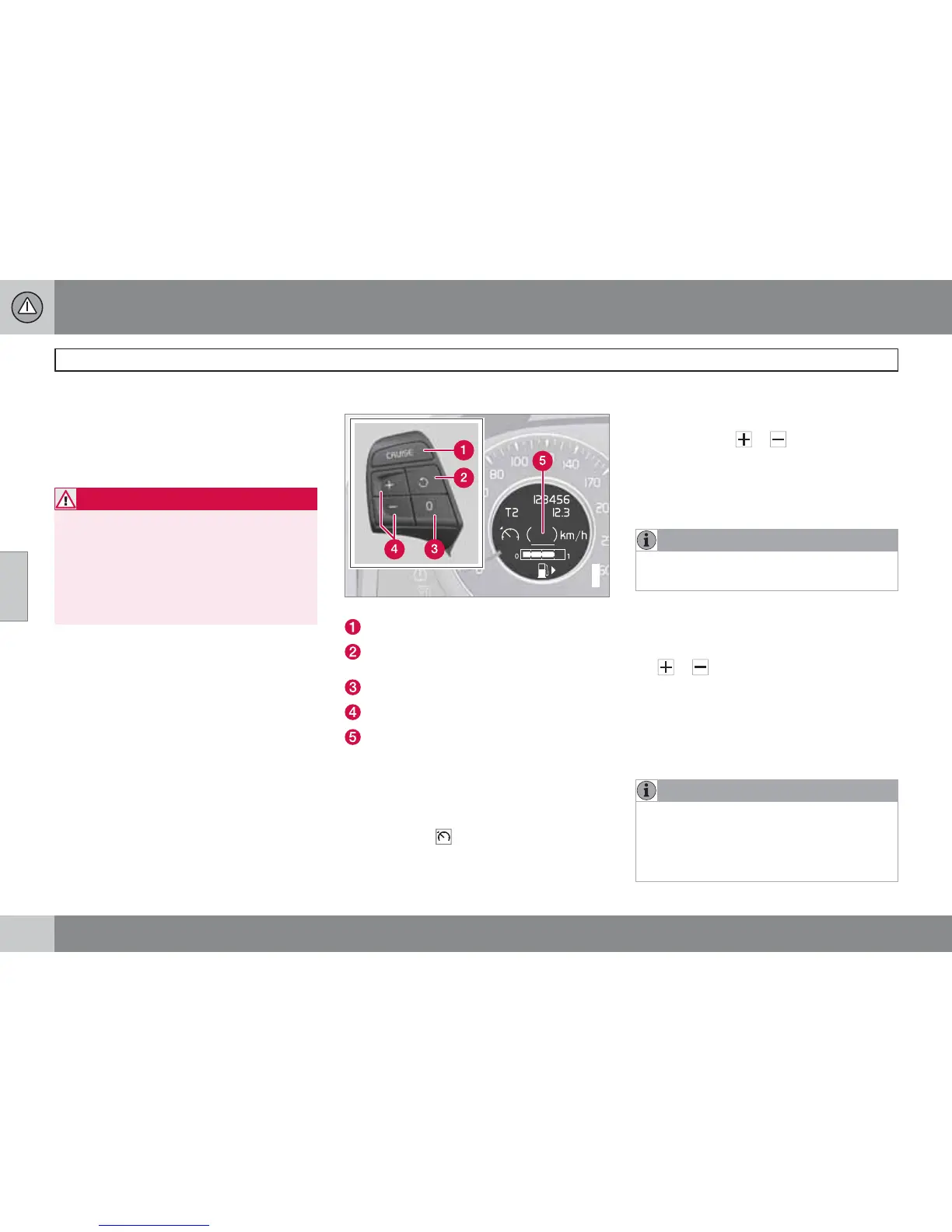
Steering wheel keypad and display.
Cruise control - On/Off.
Standby mode ceases and the stored
speed is resumed.
Standby mode
Activate and adjust the speed.
Selected speed (in brackets = Standby
mode).
Activating and setting the speed
To enable cruise control:
•
Press the steering wheel button (1).
>
The symbol
illuminates in the display (5)
and the brackets around
(---) km/h show
that cruise control is set in standby mode.
To activate cruise control:
•
At the required speed - press the steering
wheel button
or .
> Current speed is stored in the memory - the
display text
(---) km/h changes to show
the selected speed, e.g.
100 km/h, without
brackets.
NOTE
Cruise control cannot be engaged at
speeds below 30 km/h.
Changing the speed
To change the stored speed:
•
Press briefly on the steering wheel button,
or - most recent presses are stored
in memory.
A temporary increase in speed with the accel-
erator pedal, e.g. during overtaking, does not
affect the cruise control setting - the car returns
to the set speed when the accelerator pedal is
released.
NOTE
If any of the Cruise Control buttons are held
down for more than approx. 1 minute, it is
blocked and disabled. To be able to reacti-
vate Cruise Control, the car must be stop-
ped and the engine restarted.




 To Next Page