05 Comfort and driving pleasure
Menu source MY CAR
05
200
General information on MY CAR
Many of the car's functions are handled
in this menu source, such as setting the
clock, door mirrors and locks.
Navigation in the menus is carried out using
buttons on the centre console or with the steer-
ing wheel's right-hand keypad.
Certain functions are standard, others are
optional - the range also varies depending on
the market.
Operation
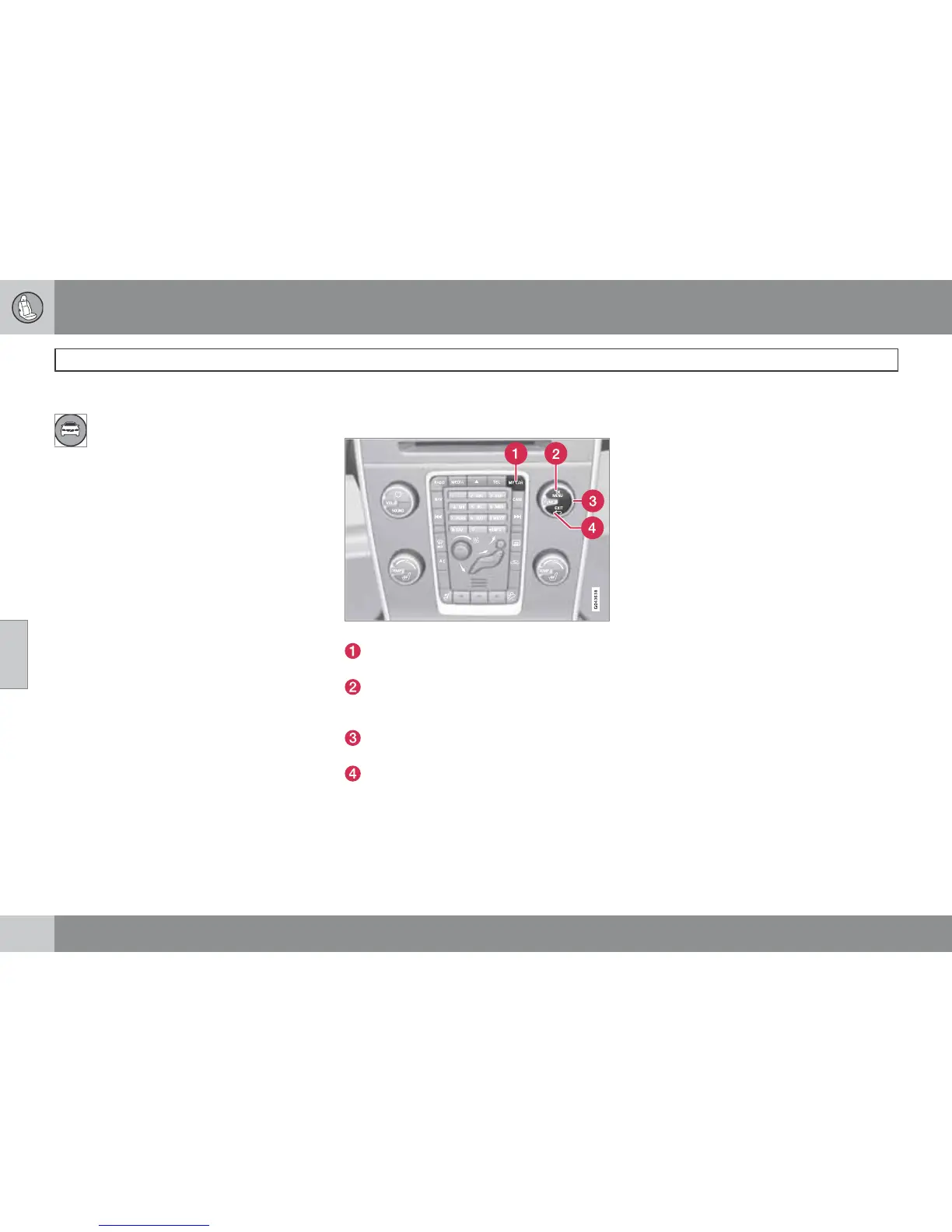
Centre console controls
Centre console controls for menu navigation.
Press MY CAR to open the menus under
MY CAR.
Press OK MENU to select/tick in the high-
lighted menu option or to store the
selected function in the memory.
Turn the TUNE knob to scroll up/down
among the menu options.
EXIT
EXIT functions
Depending on the function the cursor is on
when EXIT is pressed, and on the menu level,
one of the following occurs:
•
phone call is rejected
•
current function is interrupted
•
input characters are deleted
•
most recent selections are undone
•
leads up in the menu system
Short and long presses can also produce vary-
ing results.
A long press leads to the highest menu level
(Main source view), from where all of the car's
functions/menu sources can be accessed -
see also page 234.




 To Next Page