04 Driver support
Adaptive cruise control*
04
154
* Option/accessory, for more information, see Introduction.
Operation
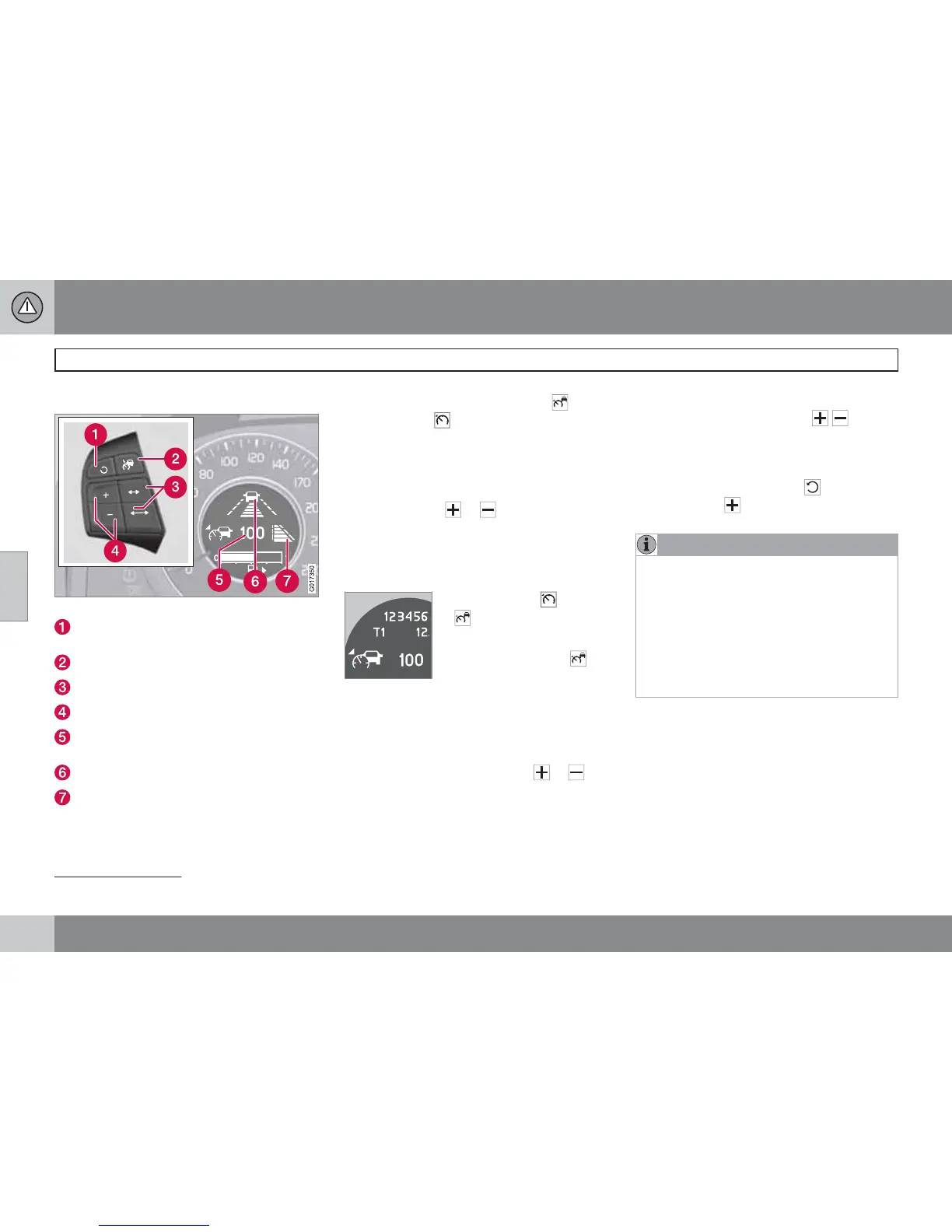
Steering wheel keypad and display.
Standby mode ceases and the stored
speed is resumed.
Cruise control - On/Off or Standby mode.
Time interval - Increase/decrease.
Activate and adjust the speed.
Selected speed (in brackets = Standby
mode).
Time interval
4
- On (during adjustment).
Time interval - On (after adjustment).
Activating and setting the speed
To set the Cruise control:
•
Press the steering wheel button -
the symbol
illuminates in the display.
The display's symbol
(---) shows that the
cruise control is set in standby mode.
To activate the Cruise control:
•
At the desired speed - press the steering
wheel button
or .
> The current speed is stored in the memory
- the display's symbol
(---) changes to
show the selected speed, e.g.
100, without
brackets.
When the symbol
changes
to
the radar sensor has
detected a vehicle.
Only when the symbol
(with car) is illuminated, is the
distance to the vehicle in
front regulated by the cruise control.
Changing the speed
To change the stored speed:
•
Adjust with short presses on or -
every press gives +/- 5 km/h. The last
presses made are stored in the memory.
If speed is increased using the accelerator
pedal prior to pressing the
/ button,
then it is the car's current speed when the
button is pressed that is stored in the
cruise control.
•
In active mode the button has the same
function as
but results in a lower
increase in speed: + 1 km/h.
NOTE
If any of the Cruise Control buttons are held
down for more than approx. 1 minute, it is
blocked and disabled. To be able to reacti-
vate Cruise Control, the car must be stop-
ped and the engine restarted.
In certain situations, cruise control cannot
be activated. Then the display shows
Cruise control Unavailable, see
page 160.
4
The display shows either "dash" symbol [6] or [7] - they are never shown simultaneously.



 To Next Page