STEERING WHEEL
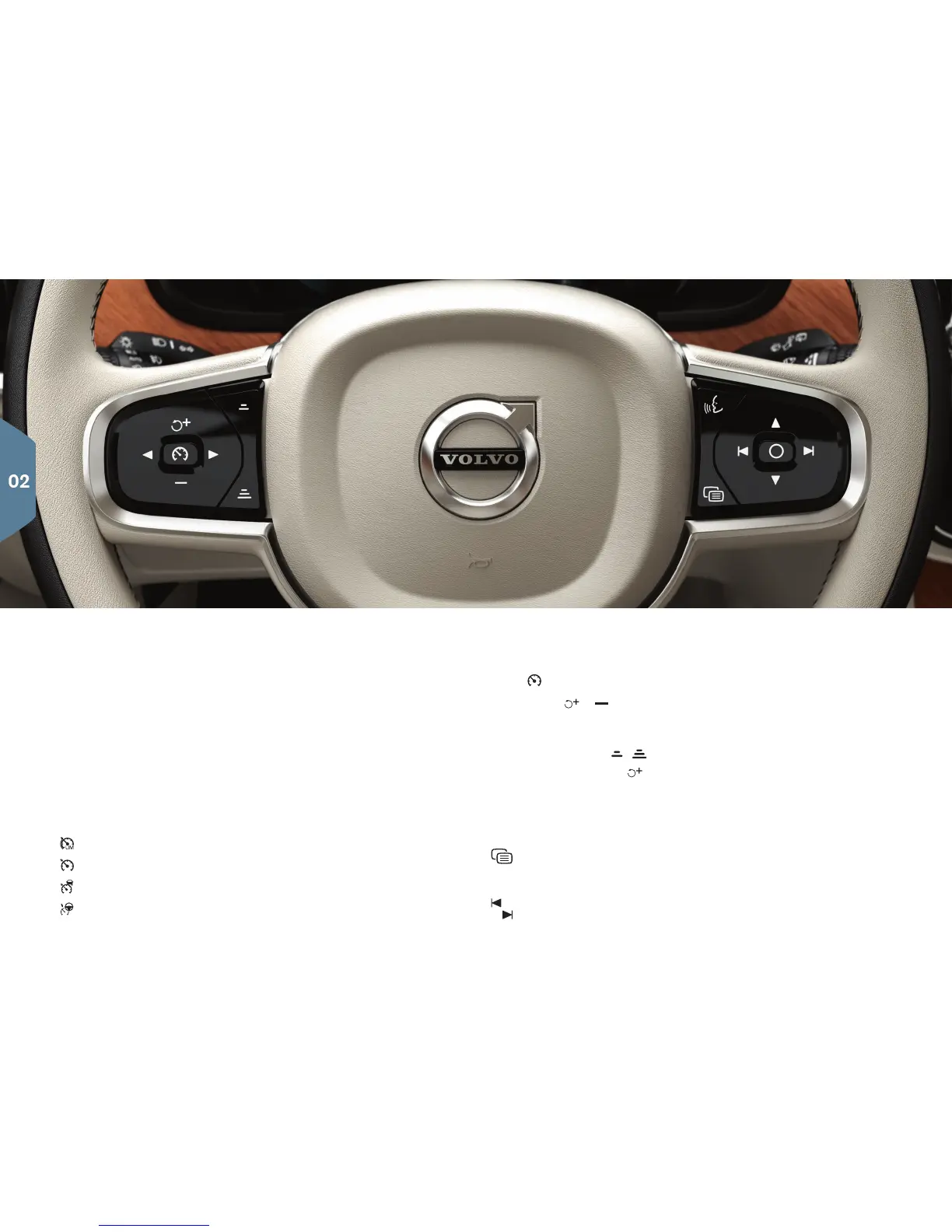
The steering wheel has controls for the horn, certain optional driver
support systems, menus/ messages and paddles for manually shifting
gears*. The steering wheel can be adjusted to various positions.
Left-side steering wheel keypad
Driver support functions are selected in the instrument panel using the
left-side keypad. When a symbol is WHITE, the function is active. A
GRAY symbol indicates that the function is in standby mode or has
been cancelled.
Screen symbols:
Speed limiter*
Cruise control
Adaptive cruise control*
Pilot Assist*
Press
to start or cancel a function.
Press briefly / to increase or reduce a stored speed in +/– 5
mph (+/– 5 km/h) increments. Press and hold to change the speed
+/– 1 mph (+/– 1 km/h) at a time. When using Adaptive Cruise Control
or Pilot Assist, press
/ to reduce/increase the time interval to the
vehicle ahead. Pressing
also resumes the speed set for the
selected function.
Right-side steering wheel keypad
The right-side keypad controls the instrument panel.
Open/close the app menu. From here, you can control the trip
computer, media player, a connected cell phone and the naviga-
tion system.
Press the left/right arrows to scroll among the available apps.


 To Next Page