04 Driver support
Adaptive cruise control*
04
156
* Option/accessory, for more information, see Introduction.
Operation
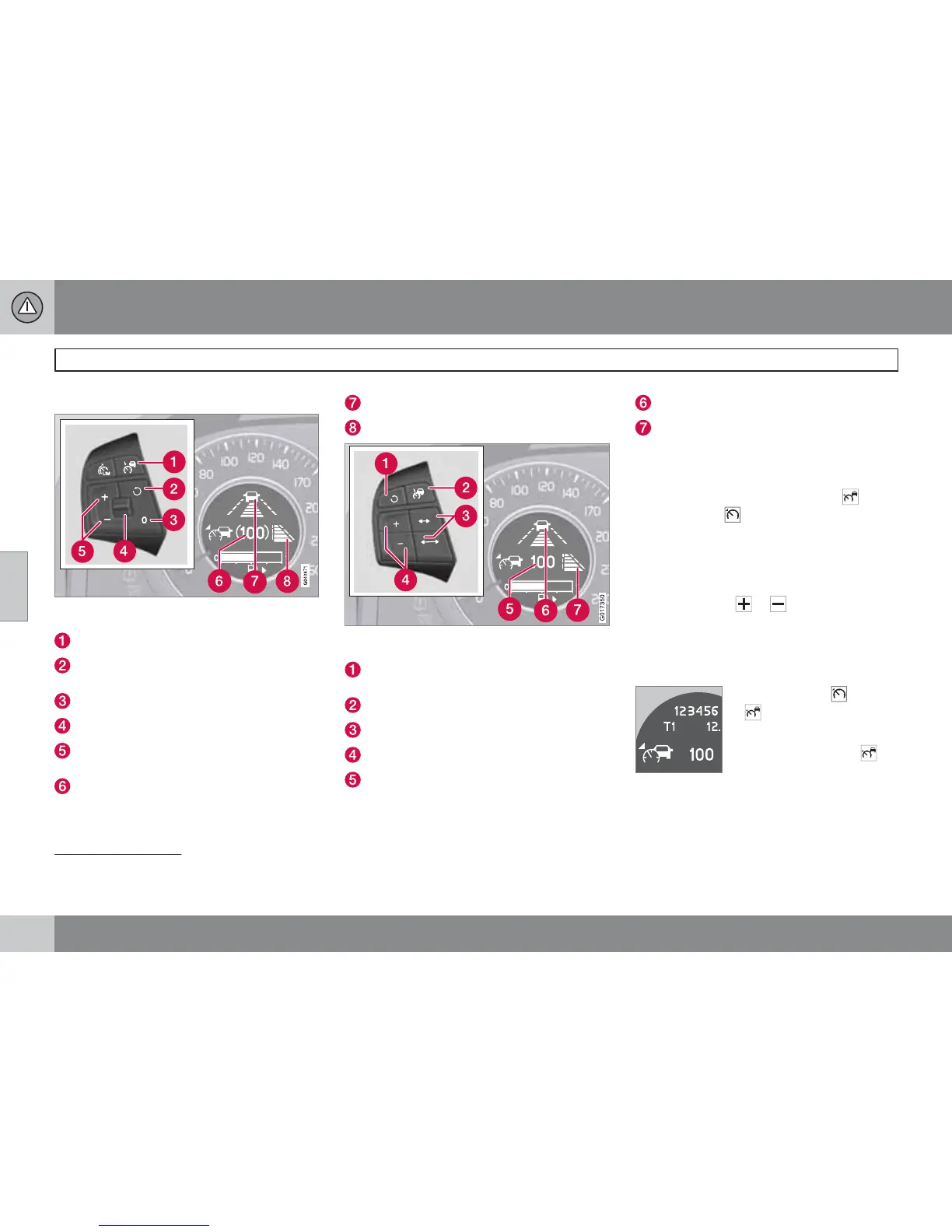
Steering wheel keypad and display in cars with
Speed limiter
3
.
Cruise control - On/Off.
Standby mode ceases and stored speed
resumes - each extra press gives +1 km/h.
Standby mode
Time interval - Increase/decrease.
Activate and adjust the speed (each press
gives +/-5 km/h).
Selected speed (in brackets = Standby
mode).
Time interval
4
- On (during adjustment).
Time interval
4
- On (after adjustment).
Steering wheel keypad and display in cars with-
out Speed limiter
3
.
Standby mode ceases and the stored
speed is resumed.
Cruise control - On/Off or Standby mode.
Time interval - Increase/decrease.
Activate and adjust the speed.
Selected speed (in brackets = Standby
mode).
Time interval
5
- On (during adjustment).
Time interval
5
- On (after adjustment).
Activating and setting the speed
To set the Cruise control:
•
Press the steering wheel button -
the symbol
illuminates in the display.
The display's symbol
(---) shows that the
cruise control is set in standby mode.
To activate the Cruise control:
•
At the desired speed - press the steering
wheel button
or .
> The current speed is stored in the memory
- the display's symbol
(---) changes to
show the selected speed, e.g.
100, without
brackets.
When the symbol
changes
to
the radar sensor has
detected a vehicle.
Only when the symbol
(with car) is illuminated, is the
distance to the vehicle in
front regulated by the cruise control.
3
A Volvo dealer has updated information about what applies in each respective market.
4
The display shows either "dash" symbol [7] or [8] - they are never shown simultaneously.
5
The display shows either "dash" symbol [6] or [7] - they are never shown simultaneously.









 To Next Page