EasyManua.ls Logo

Vonyx AP1500PA - User Manual

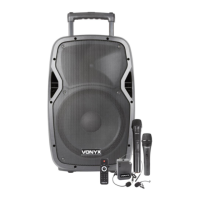
Vonyx AP1500PA
24 pages
Print Icon
To Next Page IconTo Next Page
Loading...
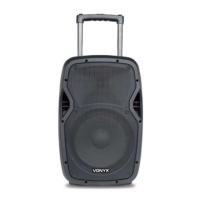
AP1200PA / AP1500PA Mobile Amplifier Series
Ref. nr.: 170.334; 170.335; 170.337; 170.338
INSTRUCTION MANUAL
GEBRUIKSAANWIJZING
GEBRAUCHSANLEITUNG
MANUAL DE INSTRUCCIONES
MANUEL D'INSTRUCTIONS
INSTRUKCJA OBSŁUGI
V2.0

Questions and Answers

  • A
    Angela AdamsAug 2, 2025
    Why does my Vonyx Microphone system have constant noise, buzzing, and/or humming?
    • G
      gcarrollAug 2, 2025
      If your Vonyx Microphone system has constant noise, buzzing, or humming, it could be due to a faulty electronic component in the amplifier, mixer, signal processing unit, source device, or line-level wiring. You should check and correct the system grounding as needed. Also, perform a chain check to identify any noisy sources or electronic components and verify the wiring for proper shielding.
  • D
    Diana CobbAug 6, 2025
    Why does my Vonyx Microphone system have poor low- frequency output?
    • S
      Sara FosterAug 6, 2025
      If your Vonyx Microphone system has poor low-frequency output, it might be due to improper polarity. When two speakers near each other are connected out-of-polarity, they can cancel each other out, especially at low frequencies. Ensure your speaker cables are identically wired and connected, and check that your balanced line signal cables are correctly wired.
  • J
    josephsolisAug 11, 2025
    What to do if my Vonyx Microphone system is intermittent?
    • O
      omar52Aug 11, 2025
      If you are experiencing intermittent issues with your Vonyx Microphone system, the problem is likely with an output cable or connector. Check the soldering on your connectors to ensure they are properly connected. While a faulty speaker could cause intermittent output, it is less likely.
  • M
    Megan RothAug 15, 2025
    How to troubleshoot no output on Vonyx Microphone system?
    • C
      Charles HenryAug 15, 2025
      If there is no output from your Vonyx Microphone system, try these steps: Reseat all connectors to ensure they are properly connected. Substitute with known good cables to rule out cable issues. Check solder joints for any breaks or poor connections. Inspect the cable for any signs of damage. Also, inspect the wire or connector for any stray strands that may be causing a short.
  • T
    Tiffany BryantAug 19, 2025
    What to do if my Vonyx Amplifier has constant noise, buzzing, or humming?
    • A
      Alicia AndersonAug 20, 2025
      If your Vonyx Amplifier is producing constant noise, buzzing, or humming, it might be due to a faulty electronic component. You should check and correct the system grounding as necessary, perform a chain check to identify noisy sources or electronic components, and inspect the wiring for proper shielding.
  • M
    Michael WrightAug 25, 2025
    Why does my Vonyx Amplifier have poor low-frequency output?
    • J
      Jesse JohnsonAug 25, 2025
      Poor low-frequency output from your Vonyx Amplifier could be due to improper polarity. Ensure that all your speaker cables are wired and connected identically. Also, verify that all balanced line signal cables are correctly wired.
  • M
    Margaret RobertsAug 28, 2025
    What to do if Vonyx AP1500PA sound is intermittent?
    • T
      Thomas MooreAug 28, 2025
      If the sound from your Vonyx Amplifier is intermittent, it could be due to poor connections. Check the soldering on your connectors to ensure they are secure.

Summary

Product Series Identification

Safety and Precautions

General Safety Warnings

Critical safety information regarding electrical hazards, product placement, and maintenance.

Usage and Environmental Guidelines

Instructions for proper product usage, environmental considerations, and disposal.

Unpacking and Power

Unpacking Instructions

Guide for carefully unpacking the product and checking contents for damage.

Power Supply Connection

Information on connecting the correct power supply and ensuring proper grounding.

Controls and Connections (Part 1)

Microphone Inputs and Levels

Details XLR and 1/4" microphone inputs and their respective level controls.

Equalizer and Input Selection

Explains the 5-band equalizer for master signal and input selection for media player/line.

Master Volume and Line I;O

Covers the master volume control and RCA jacks for audio input/output.

Wireless Microphone Levels

Details controls for adjusting signal levels of wireless microphone channels.

Features and Operation (Part 2)

Media Player and Bluetooth Operation

Instructions for using the media player, connecting Bluetooth devices, and navigating tracks.

UHF Wireless Microphones Setup

Steps for setting up and using the included UHF wireless microphones.

Battery and Fuse Management

Battery Charging and Indicator

Guidance on charging the internal 12V battery and understanding the charge indicator.

Fuse Replacement Procedure

Procedure for safely replacing a defective fuse with a new one of the same type.

Technical Specifications

Product Technical Specifications

Comprehensive specifications for AP1200PA and AP1500PA models including power, frequency, and dimensions.

Compliance Statement

Declaration of Conformity

Official statement confirming compliance with EU directives and regulatory standards.

Vonyx AP1500PA Specifications

General IconGeneral
Battery voltage12 V
AC input voltage220-240 V
Battery capacity7 Ah
Power source typeAC
AC input frequency50 Hz
Quantity per pack1 pc(s)
Microphone includedYes
Frequency range50 - 19000 Hz
RMS rated power800 W
6.35 mm (1⁄4-inch) input1
Speaker type-
Product colorBlack
Housing materialAcrylonitrile butadiene styrene (ABS)
Weight and Dimensions IconWeight and Dimensions
Depth350 mm
Width435 mm
Height700 mm
Weight15800 g
Woofer diameter (imperial)15 \
Tweeter diameter (imperial)1.4 \

Related product manuals