D. Custom Mode:
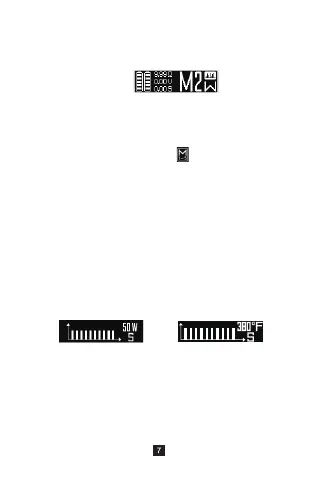
a). Custom mode under Power mode or TC
mode:
- Press “+” and “-”Simultaneously,Enter
function menu , select and Switch
M1 to M5;
- Press fire button 4 times, Switch :Power
customization (W) → FIT mode →TC
customization (SS, Ni, Ti);
b). Under Custom Mode, there are 2 ways to
adjust the value:
- Manually switch custom curve per second
(Shortly press fire button 4 times to enter
the curve interface, press UP/DOWN to
adjust, then long press fire button to exit.),
see the chart below:
- Connect to a computer app for custom
settings
e). Coil cooling value range : 0.05~1.50Ω
Power curve—current
watt shown on top right
TC curve—current
temperature shown on top right


 To Next Page