5
Connect the Adapter to the Spotting Scope
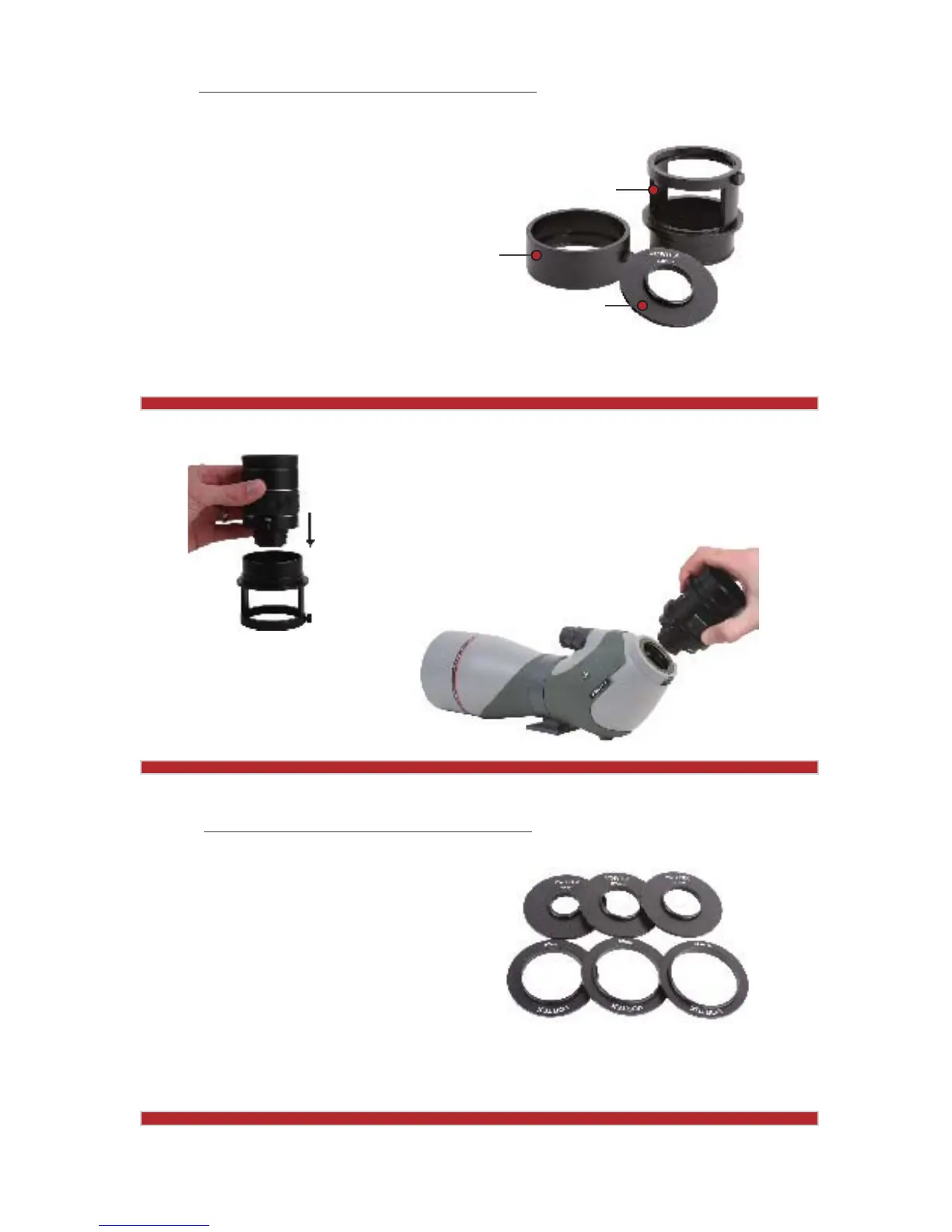
The Razor HD digital adapter connects DSLR and digital point-and-shoot cameras to a
Razor HD spotting scope.
To use the Razor HD digital
adapter, you will first need
to connect the eyepiece
sleeve to the Razor HD
spotting scope. The eyepiece
sleeve will allow easy
access to the magnification
adjustment ring and the
twist-up eyecup.
Camera Adapter Ring
Eyepiece Sleeve
Camera Adapter
www.vortexoptics.com
6
1. Remove the eyepiece from the Razor HD spotting scope and
slip the eyepiece through the top end of the eyepiece sleeve.
2. Thread the Razor HD eyepiece back onto the spotting scope,
turning the eyepiece clockwise until it clicks in place.
3. Tighten the eyepiece sleeve thumbscrew and twist the
eyecup up or down as needed for the most
comfortable viewing with or without eyeglasses.
Assembly Steps:
www.vortexoptics.com
7
The second step involves mounting your
digital camera on the Razor HD digital
adapter. Choose the camera adapter ring that
fits the thread size of your digital camera.
Choose the Proper Camera Adapter Ring
Attach the Adapter to the Digital Camera
Note: Some digital cameras may require an
additional lens accessory.
www.vortexoptics.com
Note: Please refer to specific instructions
for mounting DSLR cameras.



 To Next Page