EN
FR
IT
NL
SV
ES
PL
DE
EN
INSTRUCTION MANUAL VOSS.PET AB 2
7.2 FILLING THE DEVICE
As soon as LED 2 (5) ashes blue/yellow every 10
seconds, the device must be relled.
1. Switch o the device.
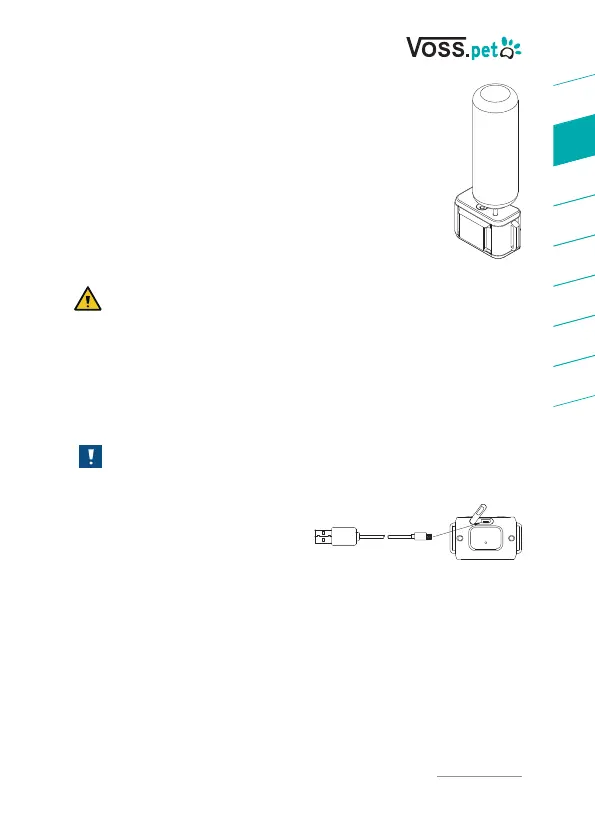
2. Insert the spray nozzle from above into the
rell port (1) on the device (Fig. 1).
3. To ll the device to the full, press and hold the
spray nozzle to the rell port (1) for approx.
15 seconds.
CAUTION
If spray leaks during the process, realign the spray
nozzle with the rell port.
7.3 CHARGING THE DEVICE
As soon as LED 1 (4) ashes red every 5 seconds, the device
must be charged.
NOTICE
Use the supplied USB cable for charging.
1. Open the ap on the USB
connector (9) and connect
the supplied USB cable to
the device (Fig. 2).
2. Connect the cable to the PC or a charging adapter.
During the charging process, the LED 1 (4) lights up red.
As soon as the charging process is completed, the LED 1 (4) will
light up green.
Fig. 1
Fig. 2
2324548 | 10 | 2020 | V 1



 To Next Page