Co
nfigure the Devices
A
fter the control software is downloaded and installed on
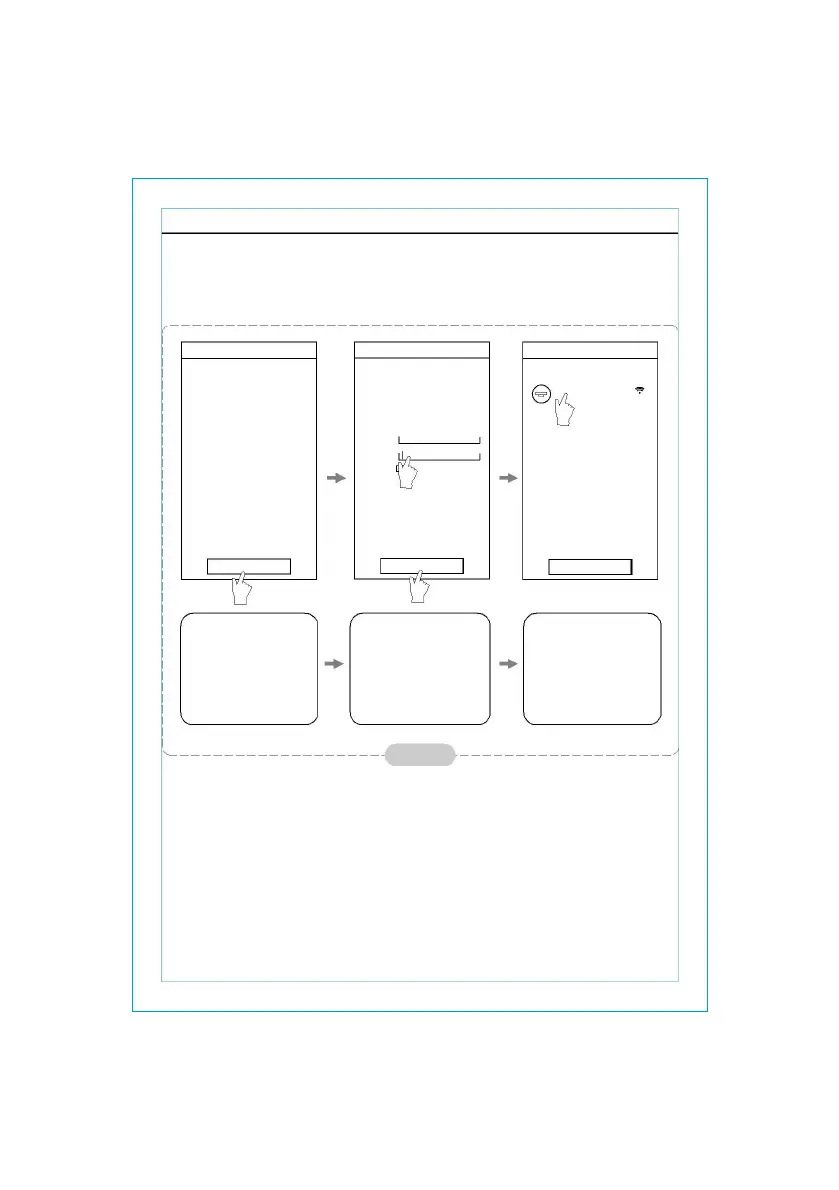
the mobile terminal, configure the AC devices according to
the following figure.
< D
evice List
Ad
d device
1
Ac
tivate the control
software and click
“Add device”within
30 minutes after the
WIFI module is reset.
< A
dd device
Ad
d a new device to the WIFI net work
W
IFI name: xxxxx
p
assward:
sh
ow password
2
<
<Config failed check items>>
St
art the configuration
3
th
e WI-FI name will
automatically appear in
“Wi-Fi name”. Enter the
password of the Wi-Fi
and click “Start the
configuration”.
D
evice List
Ai
r-conditioner
4
Ad
d device
O
nce the configuration
is complete, the
“Device List” interface
will be automatically
returned to and the
configured the AC can
be seen.
f
igure 6
Not
e: 1.In the case of first time configuration or after the connected wireless router
o
r access point is changed, make sure the mobile terminal is already
c
onnected to the wireless router or access point to be paired with the
WI-FI
module.
2. If
the configuration is failed, press “Config faild check items” to check the notes
about the failure before reconfigure the AC.
A
fter the configuration is successful, click the corresponding
AC name to enter the control interface for further operation.
- 5 -



 To Next Page