Appendix
65
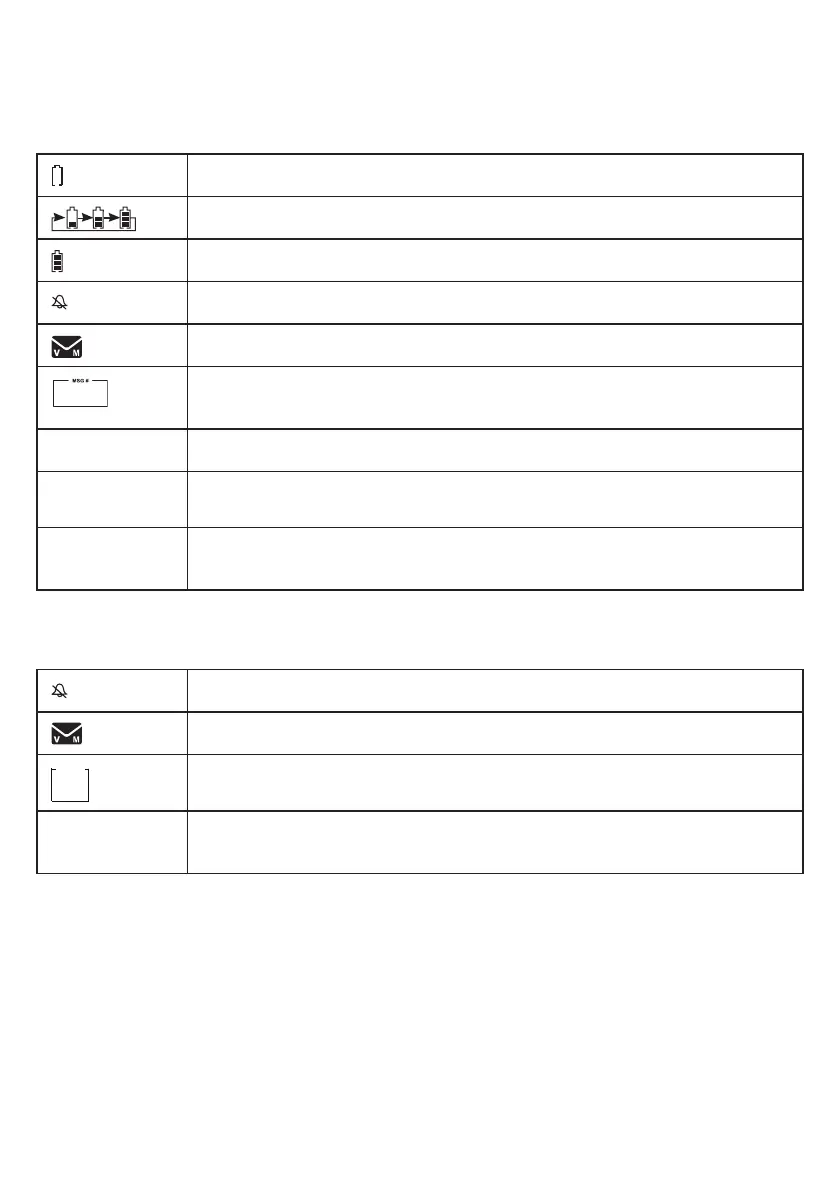
Handset icons
The battery icon ashes when the battery is low and needs charging.
The battery icon animates when the battery is charging.
The battery icon becomes solid when the battery is fully charged.
The handset ringer is turned off.
There are new voicemail received from the telephone service provider.
The message number currently playing and total number of messages recorded.
ANS ON The answering system is turned on.
ECO
The ECO mode activates automatically to reduce power consumption whenever the
handset is synchronized with the telephone base.
NEW
The caller ID log entry you are reviewing is new.
The message you are listening is new.
1/13
Telephone base icons
The telephone base ringer is turned off.
There are new voicemail received from the telephone service provider.
The message number currently playing, or the total number of messages recorded..
NEW
The caller ID log entry you are reviewing is new.
The message you are listening is new.
Handset and telephone base indicators
MSG #
1


 To Next Page