
 Need help?
Do you have a question about the VTech Fix & Learn Car Carrier and is the answer not in the manual?
Instructions for removing old batteries and installing new AA batteries in the unit.
Information on how to dispose of batteries and the product responsibly, including environmental symbols.
Controls the unit's power and selects between Explore or Challenge modes.
Press to learn about road safety and the color red.
Press to learn about the color yellow and car facts.
Press to learn about the color green and car carrier servicing.
Used to launch the car into a race.
Learn about car services, facts, road safety, and colors; mix accessories to build a unique car.
Follow directions to find and customize car pieces, playing a memory game to finish tasks.
Instructions for cleaning the unit, avoiding sunlight and heat, and removing batteries for storage.
Information on warranty policies and consumer guarantees for UK, Australian, and NZ customers.
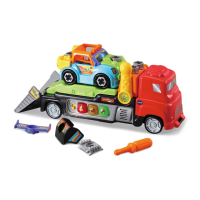
The VTech® Fix & Learn Car Carrier is an interactive toy designed to engage children in imaginative play and foster early learning skills. This toy allows children to create and customize their own car, load it onto a car carrier, and launch it into a race, providing a multi-faceted play experience. With over twenty tools and accessories included, children can explore various ways to personalize their car, encouraging creativity and fine motor skill development.
The car carrier itself is equipped with several interactive features that enhance the play experience. An Off/Mode Selector allows users to turn the unit On and switch between different play modes: Explore mode and Challenge mode. When the unit is in the OFF position, sliding the selector turns it off. This selector is crucial for navigating the toy's various functionalities.
One of the key interactive elements is the Road Safety Button. Pressing this button teaches children about road safety concepts and introduces them to the color red, integrating educational content directly into playtime. Similarly, the Car Facts Button provides interesting facts about cars and the car carrier, while also teaching about the color yellow. This helps expand a child's general knowledge and color recognition.
The Car Carrier Service Button is another interactive feature that educates children about car carrier services and the color green. This button helps children understand the role of a car carrier and the different services it provides, adding a layer of realism to their play.
A prominent feature of the car carrier is the Pull Handle. This handle is used to launch the customized car into a race, adding an exciting action element to the play. The act of pulling the handle helps develop gross motor skills and coordination.
The toy also includes a Custom Car feature, where children can place their small car on the car carrier to hear funny conversations between the vehicles. They can then add different accessories to create and fix their unique car, fostering imaginative storytelling and problem-solving skills. The car carrier also functions as a push-along toy; pushing it along triggers melodies and fun sing-along songs, encouraging movement and auditory engagement.
For convenience, the car carrier has a Storage compartment located in its cab, where all the accessories can be neatly stored. This promotes tidiness and ensures that all parts of the toy are kept together. A Volume Control Switch is situated on the bottom of the car carrier, allowing users to adjust the sound level to their preference, which is a useful feature for different play environments.
The VTech® Fix & Learn Car Carrier is designed with an Automatic Shut-Off feature to preserve battery life. After several minutes of inactivity, the unit will automatically turn off. It can be reactivated by pressing any button, placing the car back on the car carrier, or sliding the Off/Mode Selector to a different mode.
The toy offers two main activity modes: Explore Mode and Challenge Mode. In Explore Mode, children can learn about car carrier services, car facts, road safety, and colors. This mode encourages children to mix and match accessories to build their unique car, promoting creativity and imaginative play.
In Challenge Mode, the car carrier provides directions for building and customizing a cool car. Children can play a memory game by pressing the color buttons in the correct order to complete tasks, which helps develop memory skills and the ability to follow instructions.
The product also includes several songs that enhance the play experience. Song 1, "In rain or snow, we'll get you where you need to go! Let's get outside and go for a ride," encourages outdoor play and adventure. Song 2, "Racing fast is such a blast. Ready, set, race! Let's get first place!" promotes excitement and a sense of competition. Song 3, "I am big and strong and ready to have some fun! You'll never get stuck!" instills confidence and resilience.
Maintenance of the VTech® Fix & Learn Car Carrier is straightforward. To keep the unit clean, it should be wiped with a slightly damp cloth. It is important to keep the unit out of direct sunlight and away from any direct heat sources to prevent damage. If the unit will not be in use for an extended period, the batteries should be removed to prevent leakage and preserve battery life. Additionally, the unit should not be dropped on hard surfaces or exposed to moisture or water to ensure its longevity.
Battery installation and removal are simple processes. First, ensure the unit is turned off. The battery cover is located on the bottom of the unit and can be opened with a screwdriver. Old batteries should be removed by pulling up on one end. Two new AA size (LR6/AM-3) batteries should be installed according to the diagram inside the battery box, ensuring correct polarity. Finally, the battery cover should be replaced and the screw tightened to secure it.
The toy is designed to exit try-me mode when the car is placed on the car carrier and an accessory part is inserted into the front of the car, followed by turning the screw. A short opening tune indicates entry into normal mode. If the Off/Mode Selector is in the OFF position, sliding it will turn the unit on.
The VTech® Fix & Learn Car Carrier is a comprehensive play set that combines imaginative play with educational content, making it a valuable toy for young children.
 General
| Product Type | Toy |
|---|---|
| Brand | VTech |
| Batteries Included | Yes |
| Batteries Required | Yes |
| Battery Cell Composition | Alkaline |
| Number of Pieces | 1 |
| Color | Multicolor |
| Manufacturer | VTech |
| Warranty Description | 90-day limited warranty |
| Batteries | 2 AA batteries required |
| Features | Interactive learning toy |
| Included Components | Car carrier |


 To Next Page