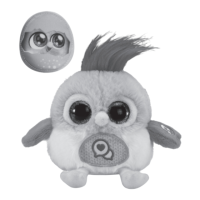
The VTech LoLibirds are interactive toy birds designed to engage children through various play modes and sensory experiences. These toys are part of VTech's broader educational product line, which caters to different developmental stages from birth to 10 years, focusing on stimulating interest, encouraging language development, and supporting curriculum-related learning.
Function Description:
The LoLibirds are designed to be a child's best friend, offering companionship and interactive play. They can be carried on a child's shoulder using a magnetic shoulder pad, allowing for adventures on the go. The toys feature voice recording and playback capabilities, allowing them to repeat what a child says in a funny voice or sing back. They also respond to movement, making fun sounds and singing when moved up, down, or upside down. The LoLibirds offer two main play modes: Shoulder Mode and Cuddle Mode, each providing different interactive experiences.
Important Technical Specifications:
- Power Source: Requires 2 new AAA (AM-4/LR03) batteries. Alkaline batteries or fully charged Ni-MH rechargeable batteries are recommended for best performance.
- Recording Duration: LoLibirds can record up to 10 seconds of audio.
- Volume Control: The toy bird has a reduced volume to adhere to safety regulations for close-to-the-ear toys.
- Automatic Shut Off: To preserve battery life, the unit automatically powers down after several seconds of inactivity. It can be turned ON again by pressing any button.
- Packaging: Includes the LoLibirds toy, a magnetic shoulder pad, and a Quick Start Guide. Packaging materials such as tape, plastic sheets, packaging locks, removable tags, cable ties, cords, and packaging screws are not part of the toy and should be discarded for safety.
Usage Features:
- Off/Shoulder Mode/Cuddle Mode Switch: This switch controls the toy's power and play mode.
- To turn ON, slide the switch to the Shoulder Mode or Cuddle Mode position.
- To turn OFF, slide the switch to the OFF position.
- Shoulder Mode Play:
- Slide the mode switch to Shoulder Mode.
- Place the magnetic shoulder pad under your t-shirt on your shoulder.
- Place the LoLibirds over your t-shirt, above the magnetic shoulder pad, to keep it perched on your shoulder.
- Press the Record Button or Music Button to interact.
- Cuddle Mode Play:
- Slide the mode switch to Cuddle Mode.
- Connect the magnetic shoulder pad to the bottom of the LoLibirds for safekeeping.
- Children can cuddle with the LoLibirds or place them on a flat surface to play.
- Turning the LoLibirds upside down or shaking them elicits fun reactions.
- Press the Record Button or Music Button to interact.
- Record and Playback:
- Silly Voice: Press the Record Button once. Wait for the LoLibirds' eyes to turn blue and the recording music to complete. Then, talk, sing, or make funny sounds. The LoLibirds will play back the recording in a silly voice.
- Bird Tweets: Press the Record Button twice quickly. Wait for the LoLibirds' eyes to turn blue and the recording music to complete. Then, talk, sing, or make funny sounds. The LoLibirds will translate the recording into bird tweets.
- To stop recording before 10 seconds, press the Record Button again.
- Fun Sounds and Music: Press the Music Button on the LoLibirds' wing to hear delightful birdy music and fun bird sound effects.
Maintenance Features:
- Cleaning: Keep the unit clean by wiping it with a slightly damp cloth.
- Storage: Keep the unit out of direct sunlight and away from any direct heat sources.
- Battery Removal: Remove batteries if the unit will not be in use for an extended period of time.
- Handling: Do not drop the unit on hard surfaces and do not expose it to moisture or water.
- Battery Installation:
- Ensure the unit is turned OFF.
- Locate the battery cover on the back of the unit.
- Use a screwdriver to loosen the screw and open the battery cover.
- Remove any used batteries by pulling up on one end.
- Install 2 new AAA (AM-4/LR03) batteries, observing correct polarity (+ and -).
- Replace the battery cover and tighten the screw.
- Battery Information (Important Safety Guidelines):
- Insert batteries with correct polarity.
- Do not mix old and new batteries.
- Do not mix alkaline, standard (carbon-zinc), or rechargeable batteries.
- Use only batteries of the same or equivalent type as recommended.
- Do not short-circuit the supply terminals.
- Remove batteries during long periods of non-use.
- Remove exhausted batteries from the toy.
- Dispose of batteries safely; do not dispose of batteries in fire.
- Rechargeable Batteries (Specific Guidelines):
- Remove rechargeable batteries (if removable) from the toy before charging.
- Rechargeable batteries are only to be charged under adult supervision.
- Do not charge non-rechargeable batteries.
Troubleshooting:
If the unit stops working or malfunctions:
- Turn the unit Off.
- Interrupt the power supply by removing the batteries.
- Let the unit stand for a few minutes.
- Replace the batteries.
- Turn the unit On.
- If the unit still does not work, install a new set of batteries.
If problems persist, contact VTech Consumer Services.
Environmental Phenomena:
The unit may malfunction due to radio-frequency interference. It should return to normal operation when the interference stops. If not, turn the power Off and On, or remove and reinstall the batteries. In case of electrostatic discharge, the unit may malfunction and lose memory, requiring a reset by removing and reinstalling the batteries.
Disposal of Batteries and Product:
The crossed-out wheelie bin symbols indicate that products and batteries should not be disposed of with domestic waste. They contain substances harmful to the environment and human health. Chemical symbols (Hg, Cd, Pb) indicate the presence of mercury, cadmium, or lead above specified values. The solid bar indicates the product was placed on the market after August 13th, 2005. Dispose of products and batteries responsibly. In the UK, dispose of the toy at a small electricals collection point for recycling.

 Need help?


 To Next Page
 General