
 Need help?
Do you have a question about the VTech My Busy Workbench and is the answer not in the manual?
Step-by-step guide for inserting and removing batteries from the electronic panel.
Crucial guidelines for safe and proper battery usage, including polarity and mixing.
Controls power and audio volume levels for the unit.
Selects different play modes and activities on the workbench.
Details on using the interactive power tools with the workbench.
Engage with songs and music-related activities.
Explore learning through tools, numbers, colours, and measuring.
Test knowledge with questions about tools, colours, and numbers.
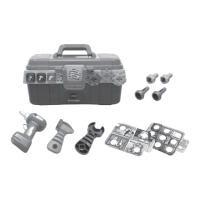
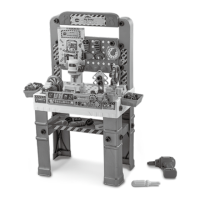
The VTech My Busy Workbench is an interactive toy designed for children to engage in role-play fun and develop various skills. It comes with a workbench, a working toy drill, hammer, spanner, sander, saw, and screws, providing a comprehensive set of tools for imaginative play. The workbench is part of VTech's Pre-School range, focusing on developing imagination and encouraging language development in children aged 3-6 years, though its features also cater to younger and older children through different VTech product lines.
The My Busy Workbench offers multiple modes of play and learning activities, making it a versatile educational toy. It features an electronic panel with five tool buttons, an Off/Low/High volume switch, and gears. Additionally, it includes a ruler with a slider and a mode switch to select different activities. The workbench integrates three power tools: a circular saw, a drill press, and a sander, which can be placed in a dedicated "Power Tool Zone" to activate specific sounds and learning content.
The primary function of the workbench is to introduce children to tools, colours, numbers, and basic measuring concepts through interactive play. It aims to foster creativity, problem-solving skills, and fine motor development.
The workbench offers three main activity modes: Music Mode, Free Play Mode, and Quiz Mode, each designed to engage children in different ways.
Upon first use, the workbench needs to exit Try-Me mode. This is done by turning the unit On and then placing any Power Tool on the Power Tool Zone. A sound will indicate that the unit has entered Normal Play mode.
This switch controls the unit's power and volume. Sliding it to Low or High turns the unit On and adjusts the volume. To turn the unit Off, the switch should be slid to the Off position.
The mode switch allows children to select one of the three different activities:
Music Mode: In this mode, children can listen to fun songs. Pressing the tool buttons, inserting the circular saw, drill press, or sander tools into the Power Tool Zone, or moving the ruler slider will trigger sing-along songs about tools and number facts. Turning the gears will also play fun music. This mode is designed to make learning enjoyable through auditory engagement.
Free Play Mode: This mode encourages open-ended exploration. Pressing the buttons, inserting the power tools into the Power Tool Zone, or moving the ruler slider allows children to learn about tools, numbers, colours, and measuring. Turning the gears in this mode provides information about gear facts and plays gear sounds, promoting discovery and independent learning.
Quiz Mode: In Quiz Mode, the workbench asks a series of questions about tools, colours, numbers, or recognisable tools (circular saw, drill press, and sander). Children can answer by pressing the buttons or moving the ruler slider. Turning the gears will repeat the question, helping reinforce learning and problem-solving skills.
Pressing the five tool buttons teaches children about colours and tool facts. They can also listen to sing-along songs or answer activity questions. The light on the electronic panel will flash or light up in sync with the songs and melodies, adding a visual element to the learning experience.
The ruler features a slider that, when moved, teaches children about numbers and ruler facts. It also triggers sing-along songs and activity questions related to measuring.
Turning the gears introduces children to gear facts and plays gear sound effects. Like other interactive elements, it can also trigger sing-along songs or repeat questions in Quiz Mode.
The three power tools—Drill Press, Circular Saw, and Sander—are central to the interactive play:
Drill Press: To use the drill press, it is placed in the Power Tool Zone. A rectangular building piece is then placed on its base. Pressing down the drill press handle simulates making straight holes, encouraging imaginative construction play.
Circular Saw: The circular saw is placed in the Power Tool Zone. Children can connect two rectangular building pieces and place them on the circular saw base. Pressing down the grey handle of the circular saw simulates "cutting" the building piece into two parts, demonstrating cause and effect.
Sander: The sander is also placed in the Power Tool Zone. A rectangular building piece is placed on the peg of the sander. Pushing the bar forward pretends to make the block smooth, introducing the concept of finishing and refining.
To conserve battery life, the My Busy Workbench automatically shuts off after approximately 1 minute of inactivity. It can be turned on again by sliding the Off/Low/High Volume Switch.
Proper care and maintenance ensure the longevity and optimal performance of the My Busy Workbench.
The unit should be kept clean by wiping it with a slightly damp cloth. This helps remove dust and grime accumulated during play.
It is important to keep the unit out of direct sunlight and away from direct heat sources to prevent damage to the electronic components and plastic materials. The unit should also not be dropped on hard surfaces or exposed to moisture or water.
Batteries should be removed if the unit will not be in use for an extended period to prevent leakage and potential damage. If the unit stops working or malfunctions, installing a new set of batteries is recommended.
The product and its batteries should not be disposed of in domestic waste due to substances that can harm the environment and human health. Chemical symbols (Hg, Cd, Pb) indicate the presence of specific heavy metals. The solid bar signifies that the product was placed on the market after August 13th, 2005. Users are encouraged to dispose of the product and batteries responsibly, for example, by taking them to a small electricals collection point for recycling, especially in the UK.
The VTech My Busy Workbench is designed to be a durable and engaging learning tool, providing hours of educational and imaginative play for children while emphasizing the importance of responsible product use and disposal.
 General
| Material | Plastic |
|---|---|
| Manufacturer | VTech |
| Language | English |
| Features | Interactive workbench with tools and activities |
| Number of Puzzle Pieces | 0 |
| Educational Objective | Motor Skills |




 To Next Page
