EasyManua.ls Logo

VTech Safari Sounds - User Manual

VTech Safari Sounds
16 pages
Print Icon
To Next Page IconTo Next Page
Loading...
91-003913-000
UK
Parents Guide
Safari Sounds Guitar
Question and Answer IconNeed help?

Do you have a question about the VTech Safari Sounds and is the answer not in the manual?

Summary

Package Contents and Setup

Battery Installation

Step-by-step guide for installing batteries into the unit.

Battery Information and Disposal

Battery Notice

Recommendations and warnings regarding battery usage and types.

Product Features and Modes

Off;Mode Switch Operation

How to use the Off/Mode switch to power on, change modes, and turn off.

Animal and Tiger Buttons

Using the Tiger, Elephant, Bear, Parrot, and Frog buttons in different modes.

Guitar Fun Mode

How to play and create music in Guitar Fun mode.

Animal Band Mode

How to play along with melodies and sing-along songs in Animal Band mode.

Support and Maintenance

Troubleshooting Guide

Steps to resolve common issues or malfunctions with the unit.

Consumer Services

Information on contacting VTech Consumer Services for support and suggestions.

Product Warranty and Guarantees

Summary

Package Contents and Setup

Battery Installation

Step-by-step guide for installing batteries into the unit.

Battery Information and Disposal

Battery Notice

Recommendations and warnings regarding battery usage and types.

Product Features and Modes

Off;Mode Switch Operation

How to use the Off/Mode switch to power on, change modes, and turn off.

Animal and Tiger Buttons

Using the Tiger, Elephant, Bear, Parrot, and Frog buttons in different modes.

Guitar Fun Mode

How to play and create music in Guitar Fun mode.

Animal Band Mode

How to play along with melodies and sing-along songs in Animal Band mode.

Support and Maintenance

Troubleshooting Guide

Steps to resolve common issues or malfunctions with the unit.

Consumer Services

Information on contacting VTech Consumer Services for support and suggestions.

Product Warranty and Guarantees

Overview

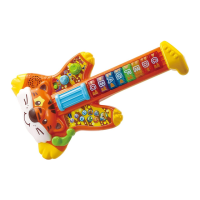
The VTech Safari Sounds Guitar is an engaging musical toy designed to entertain and educate children across various developmental stages, from birth to 10 years and beyond. This interactive guitar, themed like a friendly tiger, offers a rich array of features that encourage imaginative play, language development, and musical exploration.

Function Description

The Safari Sounds Guitar provides a versatile musical experience, allowing children to switch between acoustic, clean electric, and distorted electric guitar sounds. It features three distinct music genres: Rock, Blues, and Country, each with its own set of melodies and sing-along songs. The toy also incorporates animal sounds and songs, focusing on a tiger, bear, elephant, frog, and parrot, enhancing its appeal and educational value.

The guitar operates in two main modes: "Guitar Fun" and "Animal Band." In "Guitar Fun" mode, children can create their own music using the 8 Light Up Fret Buttons, which respond with guitar or animal sounds. The Strings Bar can be moved to play sound effects and melodies, while the Whammy Bar adds special guitar sound effects. Animal buttons (Tiger, Elephant, Bear, Parrot, Frog) allow for the integration of animal sounds into the music.

In "Animal Band" mode, the focus shifts to sing-along songs featuring the various animals. Pressing an animal button initiates a sing-along song about that animal. The Music Button can then be pressed to hear the melody played in the selected animal's sound. Similar to "Guitar Fun" mode, the Strings Bar and Whammy Bar can be used to add sound effects and keep the music playing.

The device is designed to adapt to a child's evolving needs, offering stimulating textures, sounds, and colors for infants, interactive play for preschoolers to develop imagination and language, and curriculum-related learning for older children. It supports early learning by introducing the alphabet and counting, fostering creativity through music and drawing, and providing challenging activities that keep pace with a growing mind.

Usage Features

  • Off/Mode Switch: This slide switch allows users to power the unit on by selecting either "Guitar Fun" or "Animal Band" mode, or to turn the unit off by sliding it to the OFF position.
  • Low/High Volume Buttons: Two dedicated buttons control the volume. The Low Volume Button decreases the sound, while the High Volume Button increases it. Users may need to adjust the volume after powering the unit off and on again.
  • 8 Light Up Fret Buttons: These buttons are central to creating music. In "Guitar Fun" mode, they produce acoustic, clean electric, distorted electric guitar, or animal sounds, depending on the selected sound switch setting. The lights flash in sync with the music and sing-along songs.
  • Guitar Sound Switch: This switch allows users to select the desired guitar sound: acoustic, clean electric, or distorted electric.
  • Music Genre Switch: This switch enables the selection of music genres: Rock, Blues, or Country.
  • Strings Bar: Moving this bar triggers sound effects and melodies, adding an interactive element to the musical play.
  • Whammy Bar: This bar can be moved to produce special guitar sound effects, enhancing the musical experience.
  • Music Button: Pressing this button plays melodies, particularly useful in "Animal Band" mode to hear the melody in the selected animal's sound.
  • Stop Button: This button allows users to stop any current responses or ongoing music.
  • Animal Buttons (Tiger, Bear, Elephant, Parrot, Frog): These dedicated buttons activate animal-specific sounds and songs. In "Guitar Fun" mode, they introduce animal sounds into the music. In "Animal Band" mode, they initiate sing-along songs about the respective animals and allow for jamming with animal roars or sounds over melodies.

Maintenance Features

  • Battery Removal and Installation: The device requires 2 new AA (LR6/AM-3) alkaline batteries for optimal performance. The battery cover is located at the back of the unit and secured with a screw. Instructions are provided for safe removal and installation of batteries, emphasizing correct polarity.
  • Automatic Shut-Off: To conserve battery life, the Safari Sounds Guitar automatically powers down after several minutes of inactivity. The unit can be reactivated by moving the Off/Mode Switch to any mode.
  • Battery Notice: The manual provides important guidelines for battery usage, including recommendations for alkaline batteries, avoiding mixing different battery types, proper insertion, and removal of exhausted or rechargeable batteries. Adult supervision is required for charging rechargeable batteries.
  • Cleaning: The product should be kept clean by wiping it with a slightly damp cloth.
  • Storage: It is recommended to keep the product out of direct sunlight and away from direct heat sources. Batteries should be removed if the product will not be in use for an extended period.
  • Durability: Users are advised not to drop the product on hard surfaces or expose it to excessive moisture or water.
  • Troubleshooting: In case of malfunctions, a step-by-step troubleshooting guide is provided, including turning the unit off, removing and replacing batteries, and contacting Consumer Services if issues persist.
  • Disposal: The manual includes information on responsible disposal of batteries and the product itself, adhering to environmental guidelines and encouraging recycling.

VTech Safari Sounds Specifications

General IconGeneral
Power SourceBattery
MaterialPlastic
FeaturesAnimal sounds, music, phrases
Batteries2 AA batteries (included)
ColorMulticolor

Related product manuals