4
4
4
GETTING STARTED
Battery Removal and Installation
1. Make sure the unit is turned Off.
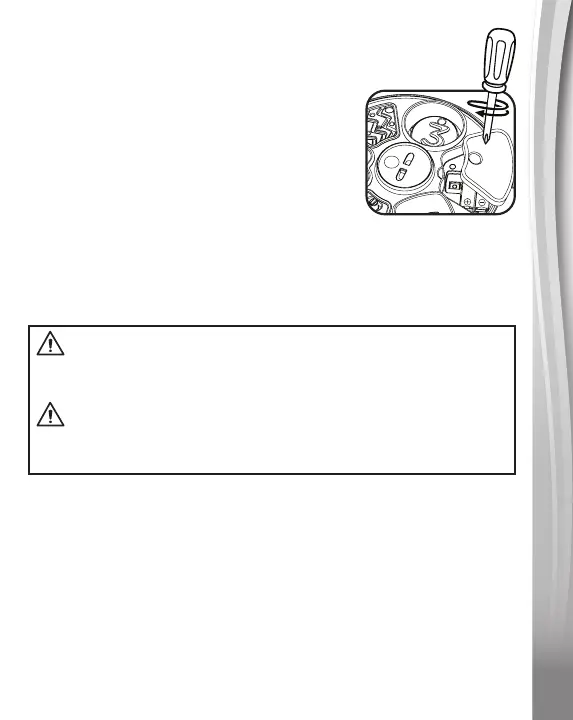
2. Find the battery cover located on the
bottom of the unit, use a screwdriver
to loosen the screw and then open the
battery cover.
3. Removeoldbatteriesbypullinguponone
end of each battery.
4. Install 2 new AAA (AM-4/LR03) batteries followingthe diagram
inside the battery box. (For best performance, alkaline batteries
orfullychargedNi-MHrechargeablebatteriesarerecommended.)
5. Replace the battery cover and tighten the screw to secure.
IMPORTANT: BATTERY INFORMATION
• Insertbatterieswiththecorrectpolarity(+and-).
• Do not mix old and new batteries.
• Donotmixalkaline,standard(carbon-zinc)orrechargeable
batteries.
• Only batteries of the same or equivalent type as recommended
are to be used.
• Do not short-circuit the supply terminals.
• Remove batteries during long periods of non-use.
WARNING:
Adult assembly required for battery installation.
Keep batteries out of reach of children.
ATTENTION :
Les piles ou accumulateurs doivent être installés par un adulte.
Tenir les piles ou accumulateurs hors de portée des enfants.








 To Next Page