10
11
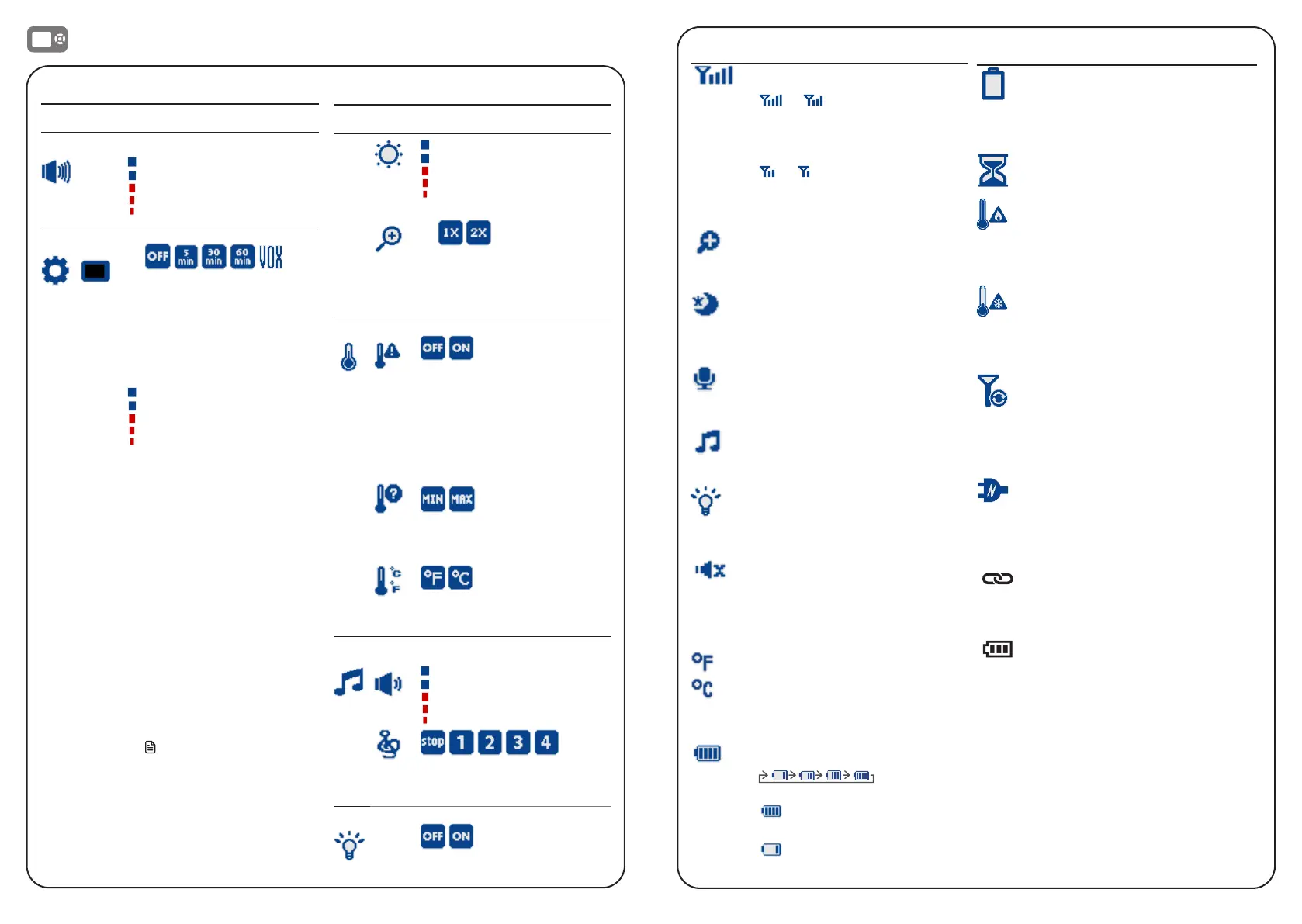
Parent unit icons
Status icons
Connection status
• or displays when strong
signal strength is detected
between the baby unit and the
parent unit.
• or displays when
moderate or low signal strength
is detected between the baby
unit and the parent unit.
Zoom
• Displays when the current image
on the parent unit has zoomed in.
Night vision
• Displays when the baby unit
being viewed has activated the
night vision feature.
Talkback
• Displays when talking back to
the baby unit from parent unit.
Lullaby
• Displays when a lullaby is
playing.
Night light
• Displays when the baby unit’s
night light is turned on.
Mute alert
• Displays when the parent unit
speaker volume is set to zero.
• Displays when the parent unit is
talking to the baby unit.
or
Real-time temperature
• Displays the real-time
temperature detected by the
baby unit in Fahrenheit (
o
F) or
Celsius (
o
C) (e.g. 57
o
F or 14
o
C).
Battery status
•
animates
when the battery is charging.
• displays solid when the
battery is fully charged.
• displays when the battery is
low and needs charging.
Main menu icons
Main
menu
Sub-menu
Volume
Parent unit speaker
volume
• Adjust the Parent unit
speaker volume.
Settings
Screen off timer
• The parent unit screen
will turn off after the
selected time to save
energy. You can still hear
your baby while the
screen is turned off.
VOX (Voice Activated
Alert) Sensitivity
• When VOX is selected,
the parent unit screen will
automatically turn on when
detected sounds exceed
a set level. You can adjust
the baby unit microphone
sensitivity level so that the
higher the sensitivity level,
the more sensitive the
baby unit is in detecting
sounds for transmitting to
the parent unit. For details,
see the Sound sensitivity
and sound activation
section.
• The parent unit will then
turn off again after 50
seconds if the sound
detected is lower than the
set level.
Note
• When the parent unit screen
is off, if alerts are received,
for example, no signal
received between the parent
unit and baby unit, or a low
battery, the parent unit
screen will turn on.
Main
menu
Sub-menu
Brightness
• Adjust the parent unit
LCD screen brightness
level.
Zoom
• Zoom in and out of the
video displayed from the
baby unit.
Temperature
• Turn on/off temperature
alert tone.
• Set the parent unit to
beep whenever the room
temperature detected by
the baby unit falls outside of
the set temperature range.
• Set the minimum/maximum
temperature.
• Set temperature display in
Fahrenheit (
o
F) or Celsius (
o
C).
Lullaby
Lullaby volume
• Adjust the baby unit
speaker volume when
playing the lullaby.
• Select one of the four
melodies to play, or stop a
lullaby.
Night Light
• Turn on/off the night light.
Warning icons and messages
Battery low at
Parent Unit
The battery is empty and
needs to be recharged.
Operation is in progress.
Temperature
too high
The temperature detected
by the baby unit is higher
than the maximum
temperature alert setting.
Temperature
too low
The temperature detected
by the baby unit is
lower than the minimum
temperature alert setting.
No Link to
Camera
The parent unit is searching
for baby unit or the link
between the baby unit and
the parent unit has been
lost, for example, due to
out of range.
The parent unit is
connected to AC power.
• On when the parent unit is
linked to the baby unit.
• Flashes when the link to the
baby unit is lost.
• On when the parent unit is
connected to AC power, or
the battery is charging.
• Flashes when the parent
unit battery is low and
needs charging.
• Off when the parent unit
is disconnected from AC
power.
Parent Unit Indication Lights


 To Next Page