12
13
Sound sensitivity and sound activation
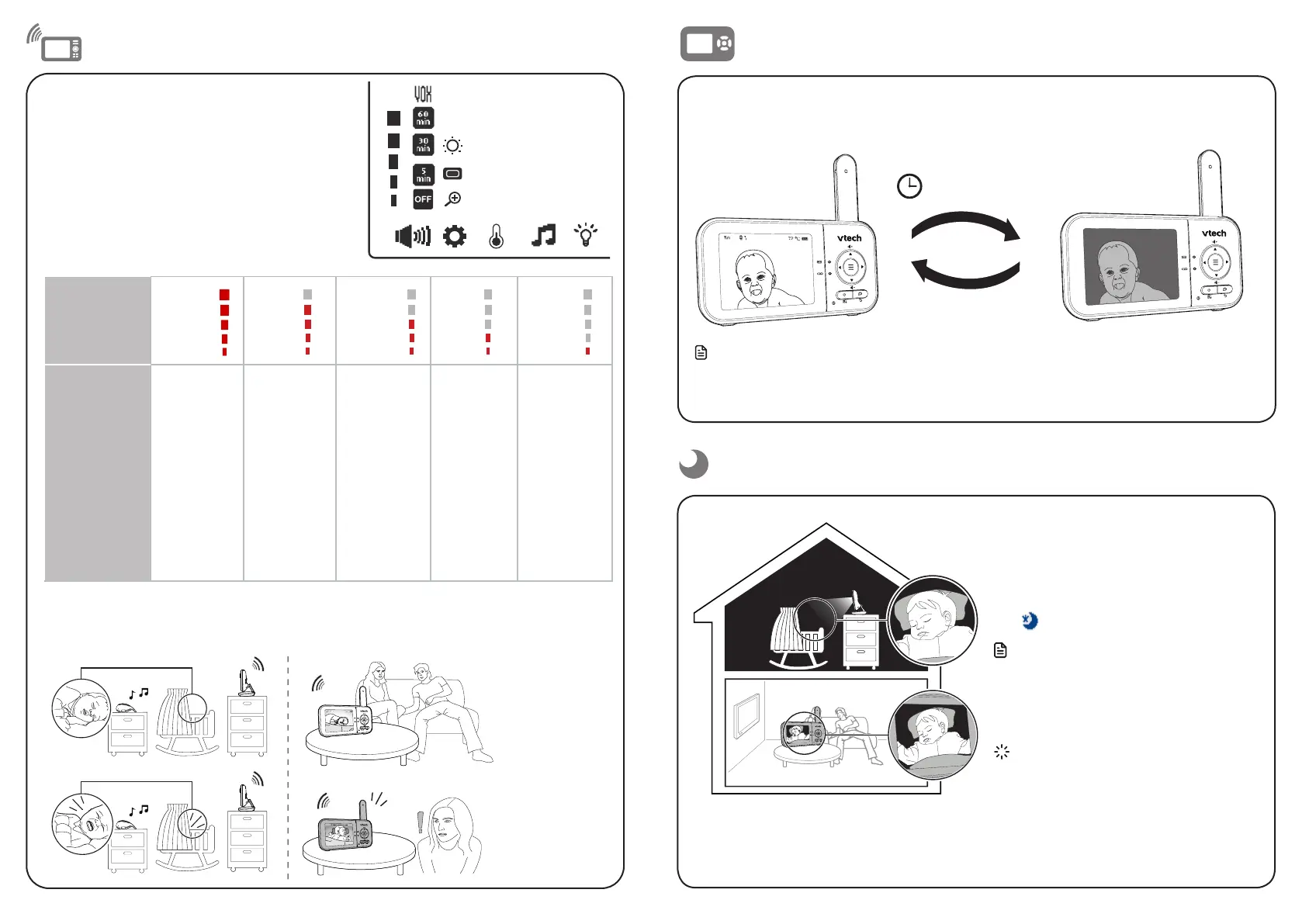
When VOX is selected, the parent unit screen stays off to save power when the baby unit detects
sounds that are lower than the set sensitivity level. Once the baby unit detects sounds that are
louder than the set sensitivity level, the parent unit screen turns on automatically. It will then turn
off again after 50 seconds if the sounds detected are lower than the set sensitivity level.
Adjust the sound sensitivity of the
baby unit
The parent unit screen will turn on only when the
detected sounds exceed a set level.
Use the parent unit to adjust the microphone
sensitivity of your baby unit. The higher the
sensitivity level, the more sensitive the baby unit is
in detecting sounds that transmit to the parent unit.
The VOX sensitivity level is preset to the highest
level.
VOX
Sensitivity
level
Highest High Medium Low Lowest
Description
The parent
unit screen
turns on
for quiet
sounds,
(including
background
noises) from
your baby’s
room.
The parent
unit screen
turns on
for soft
babbling
and louder
sounds
from your
baby. It
remains off
when your
baby sleeps
soundly.
The parent
unit screen
turns on
for loud
babbling
and louder
sounds from
your baby. It
remains off
when your
baby makes
soft sounds.
The parent
unit screen
turns on
for crying
and louder
sounds
from your
baby. It
remains
off when
your baby
makes soft
sounds.
The parent
unit screen
turns on
for loud
crying or
screeching
sounds from
your baby. It
remains off
when your
baby makes
soft sounds.
Night vision
Dim mode
The baby unit has infrared LEDs that allow
you to see your baby clearly at night or in
a dark room. When the baby unit detects
low light levels, the infrared LEDs are
switched on automatically. The images
from the baby unit are in black and white,
and
appears on the screen.
Notes
• It is normal to see a short white glare on
your parent unit screen when the baby unit
adapts to the dark environment.
• When the infrared LEDs are on, the images
are in black and white. This is normal.
Tip
• Depending on the surroundings and other
interfering factors, for example, lighting,
objects, colours and backgrounds, the image
quality may vary. Adjust the baby unit angle
or place the baby unit at a higher location to
prevent glare and a blurred display.
Dim mode helps you save parent unit power. Your parent unit display will automatically dim
after 10 minutes of inactivity, when no keys are pressed or alerts are received from the baby
unit.
10 min inactivity
Press any button
Note
• When the screen is dimmed, any keypress or alert message will trigger the screen to return to the
preset brightness level. After 10 minutes of inactivity, it will resume back to dim mode.


 To Next Page