14
15
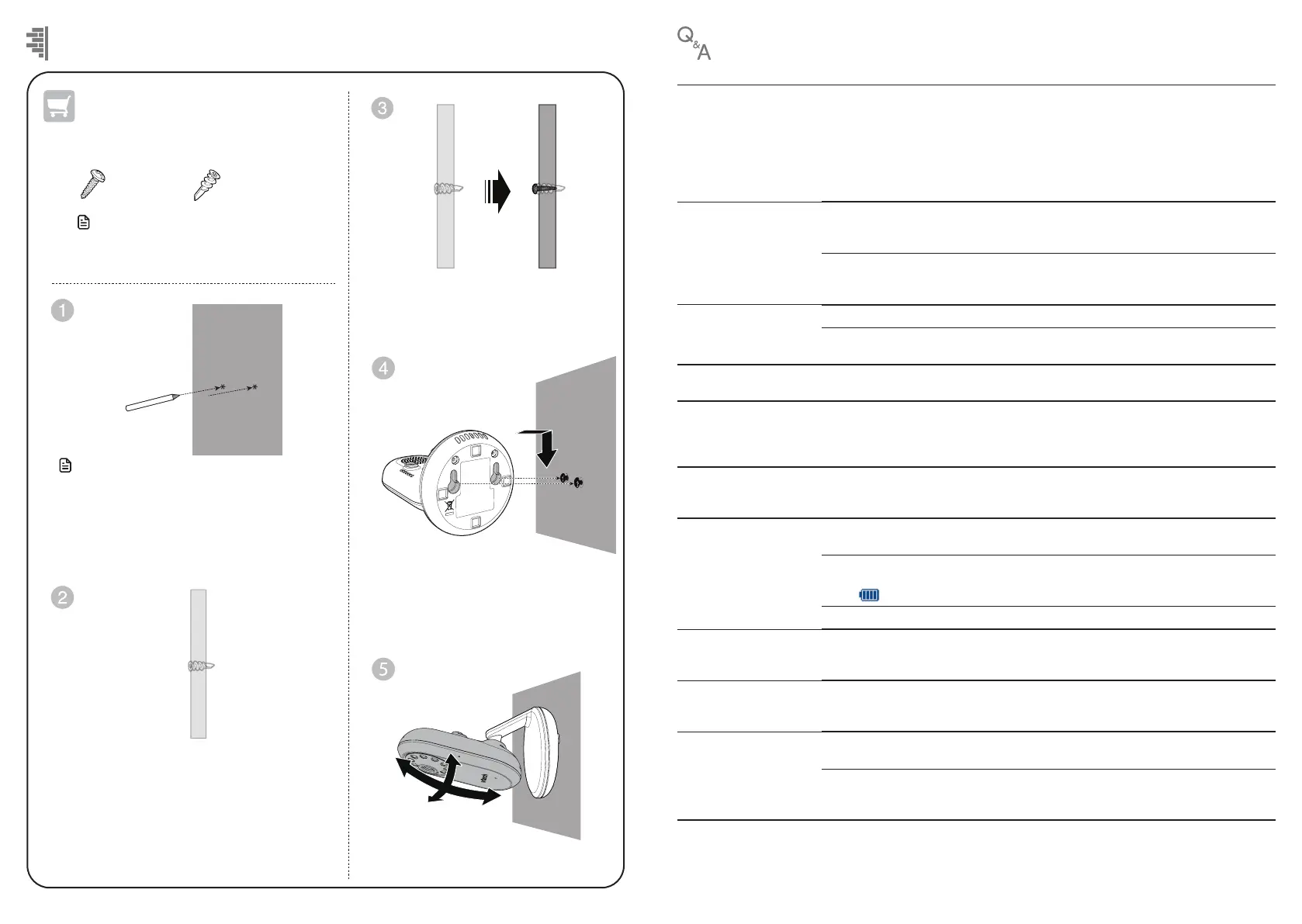
Mount the baby unit on dry wall (optional)
Use a pencil to mark two holes in parallel.
Make sure they are the same distance apart
as the wall mount holes on the baby unit.
Note
• Check for reception strength and camera
angle before drilling the holes.
Not Included
You will need to purchase the following
items separately to mount your baby unit:
2 screws
2 anchors
Adjust the camera angle.
Drill two holes in the wall (5.5mm drill bit ). If
you drill the holes into a stud, go to step 3.
-OR-
If you drill the holes into an object other than
a stud, insert the wall anchors into the holes.
Tap gently on the ends with a hammer until
the wall anchors are flush with the wall.
Insert the screws into the holes
and tighten the screws until only
6.5mm of the screws are exposed.
Align the wall mount holes on the
baby unit with the screws on the
wall. Slide the baby unit down
until it locks into place.
Note
• The types of screws and anchors you need
depend on the composition of the wall.
Below are the questions most frequently asked about the baby monitor.
Why does the
baby monitor
not respond
normally?
Try the following (in the order listed) for common cure:
1. Disconnect the power to the baby unit and the parent unit.
2. Wait a few seconds before connecting power back to the baby unit and the parent
unit.
3. Turn on the baby unit and the parent unit.
4. Wait for the parent unit to synchronise with the baby unit. Allow up to one
minute for this to take place.
Why doesn’t the
baby unit and parent
unit power-on light
illuminate when the units
are switched on?
Perhaps the parent unit is not connected to the power. Insert the adapter plug into
the parent unit and insert the adapter in a wall socket. Then, press and hold
POWER to switch on the parent unit to establish connection with the baby unit.
Perhaps the baby unit is not connected to the power. Insert the adapter plug into
the baby unit and insert the adapter in a wall socket. Then, establish a connection
with the parent unit.
Why doesn’t my parent
unit charge while
connected to AC power?
Make sure the power is not controlled by an electronically controlled wall switch.
The battery may de degraded through extended use or defective. See Warranty
for repair/replacement.
Why is my screen in
black and white?
The screen is in black and white during night-time or in a dark room when the night
vision feature is activated. This is normal.
Why do I get glare or
blurry display on my
screen when viewing my
baby at night?
During night-time or in a dark room, the surroundings and other interfering factors,
like lighting, objects, colours and backgrounds may affect the image quality on your
parent unit screen. Adjust the baby unit angle or place the baby unit at a higher
level to prevent glare and a blurry display.
Why does the baby
monitor produce a
feedback noise?
The parent unit and baby unit may be too close to each other.
• Move the parent unit away from the baby unit until the noise stops; OR
• Turn down the volume of your parent unit.
Why does the parent
unit beep?
The baby unit may be out of range. Move the parent unit closer to the baby unit
(but not less than 1 metre).
The parent unit may not have enough charge for the parent unit to perform
normally. Charge the battery in the parent unit until the battery icon segments are
solid
.
The temperature of your baby’s room may be too high or too low.
Why does the parent
unit react too quickly to
other sounds?
The baby unit also picks up other sounds than those of your baby. Adjust the VOX
sensitivity level to a lower level or lower the parent unit speaker volume.
Why don’t I hear a
sound/Why can’t I hear
my baby cry?
The parent unit speaker volume may be too low. See Adjust parent unit speaker
volume to increase the volume.
Why can’t I establish a
connection? Why is the
connection lost every now
and then? Why are there
sound interruptions?
The baby unit may be out of range. Move the parent unit closer to the baby unit
(but not less than 1 metre).
Other electronic products and wireless products may cause interference with your
baby monitor. Try installing your baby monitor as far away from these devices as
possible.
Frequently asked questions


 To Next Page