EasyManua.ls Logo

VTech VM344 - User Manual

VTech VM344
2 pages
Print Icon
To Next Page IconTo Next Page
Loading...
Go to www.vtechphones.com
to register your product for
enhanced warranty support
and latest VTech product news.
VM344
Quick start guide
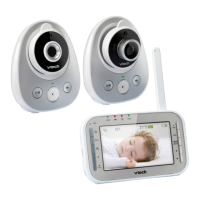
What’s in the box VM344 baby monitor system
63
ē
63
ē
Once you power on your baby monitor, your parent unit displays image from the baby unit, and the LINK LED
light turns on. The ON/OFF LED light of the baby unit also turns on.
4
Status check
Night vision
The baby unit has infrared LEDs that allow you to
see your baby at night or in a dark room. When the
baby unit detects low light levels, the infrared LEDs
turn on automatically.
NOTES
It is normal if you see a short white glare on your
parent unit screen as the baby unit is adapting to the
dark environment.
When the infrared LEDs are on, the image is in black
and white. This is normal due to external light sources.
TIP
Depending on the surroundings and other interfering
factors, like lightings, objects, colors and backgrounds,
the display resolution may vary. Adjust the baby unit’s
angle, or place the baby unit at a higher level to prevent
glare and blurry display.
Baby’s room Living room
2
Install the battery
THIS SIDE UP
1
2
2
1
More than 1 meter
(3 feet)
1
Connect and power on - Baby unit
2
1
Dim mode
With dim mode preset to on, your parent unit display will dim after 10 minutes of inactivity to conserve energy.
Press any button on your parent unit to restore screen brightness.
10 min inactivity
Sound activation
Automatically turns on the parent unit screen when the
baby unit detects a sound after the screen is turned off.
When no sound is detected within 50 seconds, the screen is
automatically turned off to save power.
CAUTION
To prevent high-pitched screeching noise from your baby monitor:
Make sure your baby units and parent unit are more than 1 meter (3 feet) apart.
Turn down the volume of your parent unit before caring for your baby.
-
-
3
1
2
3
Connect and power on - Parent unit
More than 1 meter
(3 feet)
More than 1 meter
(3 feet)
63
ē
6U
]KXOTMUT
2s
1
2
6U
]KXOTMUT

Other manuals for VTech VM344

Question and Answer IconNeed help?

Do you have a question about the VTech VM344 and is the answer not in the manual?

Summary

VM344 Baby Monitor System Setup and Features

Whats in the Box

Lists all items included in the VM344 baby monitor package.

Connecting and Powering On

Step-by-step guide to connect and power both the baby and parent units.

System Status and Operation Modes

Details status checks, dim mode, sound activation, and night vision features.

Parent Unit Overview and Basic Operations

Parent Unit Components Overview

Identifies and explains the various parts and indicators of the parent unit.

Basic Parent Unit Operations

Guides on adjusting volume, talking, screen control, and menu navigation.

Baby Unit Overview and Basic Operations

Baby Unit Components Overview

Identifies and explains the parts of the baby unit.

Basic Baby Unit Operations

Instructions on adjusting speaker volume and powering off the baby unit.

Advanced Features and Installation

Changing Views with Multiple Units

How to switch between views from multiple baby units.

Optional Baby Monitor Wall Mounting

Provides instructions and guidance for mounting the baby monitor on a wall.

Overview

This document describes the VTech VM344 baby monitor system, a device designed to help parents monitor their baby from a separate location. The system consists of two main components: a baby unit (camera) and a parent unit (monitor).

Function Description

The VTech VM344 baby monitor system provides real-time audio and video monitoring of a baby. The baby unit, placed in the baby's room, captures video and audio, which is then transmitted wirelessly to the parent unit. The parent unit allows parents to see and hear their baby, offering peace of mind and the ability to respond quickly to their child's needs.

Key functions include:

  • Video Monitoring: The baby unit features a camera that transmits live video to the parent unit.
  • Audio Monitoring: Both the baby unit and parent unit have microphones and speakers, enabling two-way communication. Parents can hear their baby, and they can also talk to their baby through the parent unit.
  • Night Vision: The baby unit is equipped with infrared LEDs, allowing for clear video monitoring in low-light conditions or complete darkness. When the baby unit detects low light, these LEDs automatically activate, displaying the image in black and white on the parent unit.
  • Temperature Sensor: The baby unit includes a temperature sensor, which likely displays the room temperature on the parent unit, although this is not explicitly detailed in the provided excerpts.
  • Sound Activation (VOX Mode): This feature automatically turns on the parent unit screen when the baby unit detects a sound. If no sound is detected for 50 seconds, the screen automatically turns off to conserve power.
  • Dim Mode: The parent unit display can automatically dim after 10 minutes of inactivity to conserve energy. Pressing any button on the parent unit restores screen brightness.
  • Multi-Camera Support (VM314): The system can be expanded to include multiple baby units (VM314, purchased separately), allowing parents to monitor different areas or multiple children. The parent unit can switch between different camera views or display them all at once in a split-screen view.

Usage Features

The VTech VM344 is designed for user-friendly operation, with various features to enhance the monitoring experience.

Parent Unit Features:

  • Power On/Off: The parent unit is powered on by connecting it to an adapter and pressing the power button. It can be powered off by pressing and holding the power button for 2 seconds.
  • Speaker Volume Adjustment: Dedicated +/VOL/- buttons allow for easy adjustment of the parent unit's speaker volume.
  • Screen On/Off: The LCD ON/OFF button can be used to manually switch the screen off while still allowing audio monitoring.
  • Menu Navigation: A MENU/SELECT button provides access to the system's settings. Users can navigate through menu items using the up/down arrow keys and select options with the SELECT button. A BACK button allows returning to the previous screen or idle mode.
  • Talk Back Feature: Pressing and holding the TALK button on the parent unit enables two-way communication, allowing parents to speak to their baby through the baby unit's speaker.
  • Pan, Tilt, and Zoom: The parent unit has controls (likely arrow keys and a zoom button) to remotely adjust the camera angle (pan and tilt) and zoom in or out on the baby unit's video feed.
  • Multi-Camera Viewing (with additional baby units):
    • VIEW Button: Pressing the VIEW button switches between the images from different baby units.
    • PATROL Mode: Pressing the PATROL button automatically cycles through the images from all connected baby units every 10 seconds.
    • SPLIT View: The SPLIT button allows viewing images from all baby units simultaneously on a split screen.
  • Status Indicators: The parent unit has light indicators for various statuses, such as power, link status, and possibly battery level.
  • Alert Tones: The parent unit provides alert tones for low battery, no link, and other potential issues, ensuring parents are informed.

Baby Unit Features:

  • Power On/Off: The baby unit is powered on by connecting it to an adapter and sliding the ON/OFF switch. It is powered off by sliding the ON/OFF switch to the right.
  • Speaker Volume Adjustment: The baby unit also has +/VOL/- buttons to adjust its speaker volume, which is useful for the talk-back feature.
  • ON/OFF Light: An ON/OFF light indicates the power status of the baby unit.
  • Mounting Options: The baby unit can be placed on a flat surface using its integrated stand or mounted on a wall. Wall mounting involves drilling holes, inserting anchors (if not drilling into a stud), and securing the wall mount bracket. The baby unit then attaches to the bracket using a screw. It is recommended to check reception strength and camera angle before permanent installation.

General Usage Guidelines:

  • Placement: To prevent high-pitched screeching noise (feedback), ensure the baby unit and parent unit are more than 1 meter (3 feet) apart.
  • Volume Control: It's advisable to turn down the volume of the parent unit before approaching the baby unit to avoid feedback.
  • Night Vision Adaptation: When the baby unit transitions to a dark environment, a short white glare may appear on the parent unit screen as the system adapts. This is normal.
  • Display Resolution: The display resolution may vary depending on environmental factors like lighting, objects, colors, and backgrounds. Adjusting the baby unit's angle or placing it at a higher level can help prevent glare and blurry displays.

Maintenance Features

While the document does not explicitly detail maintenance features like cleaning instructions or battery replacement procedures, some aspects can be inferred:

  • Battery Installation: The parent unit requires battery installation, as indicated by the "Install the battery" section. This suggests that the parent unit is portable and can operate on battery power, requiring occasional charging or replacement of rechargeable batteries. The instructions show how to open the battery compartment and insert the battery, ensuring correct orientation ("THIS SIDE UP").
  • Power Adapters: Both units are powered by adapters, implying that they need to be connected to a power source for continuous operation or to charge the parent unit's battery.
  • Firmware/Software (Implied): Although not explicitly mentioned, modern baby monitors often have internal software that might require updates or troubleshooting. The menu system suggests configurable settings that might be reset or adjusted if issues arise.

The VTech VM344 system is designed for straightforward setup and daily use, focusing on reliable monitoring and user convenience.

VTech VM344 Specifications

General IconGeneral
CameraYes
Night VisionYes
Two-way CommunicationYes
Range1000 feet
Temperature SensorYes
Sound ActivationYes
ZoomYes
Belt ClipYes
Parent Unit PowerRechargeable battery
Baby Unit PowerAC adapter
Low Battery IndicatorYes
Out of Range IndicatorYes
Night LightYes
TypeVideo

Related product manuals