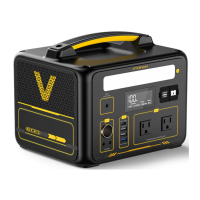
DC Input
DC Output
AC Output
Pure Sine Wave 110V/60Hz ,
continuous 1800W,peak3600W
12V-30V
(200W MAX)
1548Wh
USB Output
5V/2.4A*3
Quick Charge 3.0*1
S P E C I F I C A T I O N S
Capacity
DC Input(12-30V)
Support AC Adapter Charging.
Support Solar Panel Charging (DC12-30V, Solar Panel Not Included ).
Support Car Charger Charging.
Power Switch:Press the power switch to turn on the corresponding output
function and press the power switch one more time to turn it off, please turn off the
corresponding functions (LED/USB/DC/AC ) to save power after using.
32
5
W
eight
Dimensions
Lifecycles
Warranty
Recharging
Temperature
LED Flashlight
Type-C
Output
N.W: 38.5 lbs
2*PD100W (5V3A/9V3A
/12V3A/15V3A/20V3A/
20V5A)
LiFePO4
Pure Sine Wave
3000 Cycles
Battery
Management
Sysem
Operating
Temperature
Certifications
1800W Portable
Power Station
4
Thank you for purchasing Jump 1800 portable power station.
To make sure your personal safety, property security and user
experience, please read this manual carefully before operating,
and retain it for the future reference.
Preface
Charge it first!
1
Before reading through the manual, you can begin to charge up
your Jump 1800 by connecting it to the AC Adapter provided.
Please use the charger provided to charge the Jump 1800!
128g铜版纸,骑马钉装订
彩色印刷,尺寸:93*130mm
6
2 DC output+ 1* Car output: Total 120W
24 Months
FCC/CE/PSE/RoHS/
UL
12W LED
Temperature Protection
Over Charge Protection
Short Circuit Protection
Over-Current Protection
Over Discharge Protection
14.17x10.63x11.02 inch
WHAT’S IN THE BOX
USB Output Port: Smart phones,Tablets,Smart watches,Digital Cameras,e-readers,etc.
12V Cigarette Lighter Socket: Car air pump,Car vacuum cleaners,Car refrigerators,etc.
DC Output Port: Drones,Routers,etc.
AC Output Port: Laptops,Displays,Home appliances,etc.
Type-C Port: Support PD100W max output,power for laptops and smart phone,etc.
Support Charging Device
AC Adapter
Product Overview
LED Flashlight
Press the [LED] button and the LCD display will be on, press the button one more time to
turn on the LED light. There are 5 modes of LED light appear in order(Weak light, Medium
light,Strong light,Strobe,SoS)if you press slightly.
14°F~113°F
32°F~113°F
User Manual
1800W Portable Power Station
Model: Jump 1800
Recharging Method
Before using or storage, if the LCD display shows capacity less than 5% , please recharge
the Jump 1800 as soon as possible. Connecting your Jump 1800 to the AC Adapter until it’s
fully charged. There are three ways to recharge it::
Supports 12~30V solar panels with DC5521 connector
The charging time is determined by the solar light intensity.
Car Charger 9-10 Hours
How to Charge the Jump 1800
AC Adapter Charging
AC Adapter(180W)8-9 Hours
Use the AC Adapter we provided to charge this unit, the full charge time takes 8-9 hours.
When the LCD display shows the battery power of 100%, it indicates that this unit is fully
charged.
AC Outlet
AC Adapter
DC12-30V 200W max
Solar Panel Charging
Place Solar Panels in direct sunlight as much as possible.
2
1
Supports 12~30V solar panels with DC5521 connector, the charging time is determined
by the solar light intensity.
(Not Included)
12V Car Charger Charging
Use the Car Charger we provided to charge this unit. The full charge time takes 9-10
hours. When the LCD display shows the battery power of 100%, it indi cates that this
unit is fully charged.
Cigarette Lighter Plug
Car Charger
CP3500 cable
Power check button
Power
indicator
light
USB-A 5V2.4A Output
USB-A 5V2.4A Output
USB-A 5V2.4A Output
USB Quick Charge 3.0 Output
LCD
12V Jump starter port
AC 110V 1800W
Output
Backup battery port
USB-C Output
DC12V~30V
Input
DC12V10A
Output
Caution
1. During charging, the battery power will be displayed on the LCD screen. When the
battery power is 100%, this unit is fully charged. Please disconnect the charger after the
charging process is finished.
2. To avoid interference, please keep it away from TVs and radios while charging.
Car charger
USB to Type-C Cable*1
Type-C to Type-C Cable*1
Inpu t
DC12 V~30V
ttuuppttuuOO CC--BBSSUU
5V/2.4A
Quick Charge 3.012V/10A
5V/2.4A
12V/10A
PURE SINE WAVE 110V/60Hz 1800W
Input
DC12V~30 V
ttuuppttuuOO CC--BBSSUU
Quick Charge 3.0
PURE SINE WAVE 110V/60Hz 1800W
User Manual
User Manual
1800W Portable Power Station
Model: Jump 1800
7
How To Jump Start Your Vehicle
Jump 1800 is designed for jump starting 12V vehicle batteries,Start current: 500A
Peak current: 2000A.
Step 1:
Fully plug the blue connector of the clamp cable into the jump starter
socket, and make sure the Indicator on the clamp cable is off.
Connect Red Clamp to the negative(+) battery terminal and Black Clamp
GREEN LIGHT on: Telling the connection is correct and the circuit is working,
you can turn on the engine to jump startdirectly.
to the negative(-) battery terminal.
Intended Use: The Jump 1800 portable power station is intended as a power
supply for electronic devices with a maximum power consumption of 1800W. Our product
is not suitable to be used with equipment that relates to one's own personal safety and
relies heavily on electricity, such as large medical devices, equipment for nuclear facilities,
the manufacture of air and spacecraft, etc. We therefore assume no liability for accidents
involving personal safety, fires, or machine failures, caused by using our product with
the aforementioned devices.
Disclaimer
Warranty
Q1: What type of battery is in Jump 1800?
A: Jump 1800 contains a battery pack which consist of LiFePO4.
Q2: How do I know if my Jump 1800 is charging?
A: Check the LCD Display, if the battery percentage blinks, it indicates the Jump 1800 is
charging.
Q3: Can I charge the Jump 1800 while powering other d evcies at the same time?
A: The Jump 1800 could power other devices while recharging itself.
Q4: How do I know if my device will work with the Jump 1800?
A: You need to check the rated power and start power of your devices. This may
require some research on your end. An online search or examining the user guide for
your device should suffice. To be compatible with the Jump 1800 you should use devices
that require less than 1800W.
Q5: What is the maximum output power of 12V DC port or Cigarette Lighter Socket?
A: Cigarette Lighter Socket+2 x DC Ports total output is 120W, if only use the Cigarette
Lighter Socket or 1 of 2 DC Ports, the output power is also 120W. Total load power over
120W will trigger the overload protection.
Q6: How to turn off the LCD display of the Jump 1800?
A: Please turn off the AC/USB/DC/LED power switch when the Jump 1800 is not in use.
When the AC/USB/DC function icons don’t show on the LCD screen, it means all
the functions have been turned off, then the LCD display will shut off in 30 seconds.
FAQS
MADE I N CH INA
· DO NOT disassemble, repair or modify the unit or the battery.
· DO NOT expose the product to fire or excessive temperatures. It will explode if the
temperature is over 266°F. Keep out of direct sunlight.
· DO NOT charge, use or store the unit in a bathroom or in an area exposed to rain
or moisture.
· Only use the output socket to power external devices. Never connect the output to
mains po
wer under any condition.
· DO NOT touch the unit or the plug-in points if your hands are wet.
· DO NOT connect any metallic objects to the AC input or output.
· DO NOT rub your eyes if fluid from inside the unit should get in your eyes.
· DO NOT dispose the unit together with household waste.
· DO NOT use any inappropriate power cords.
1. The LCD display will lit and the function will turn on at the same time when you press any
corresponding power switch.
2. When the function icons appear on the LCD screen, it means that the output function is
turned on and can power for other devices, when the function icons disappear on the LCD
screen, it means that the output function is turned off.
3. If you do not use this unit for a long time, it should be recharged every 3 months and the
battery power should be kept at more than 80% and store it in a ventilated and dry place.
4. In order to save power, if this unit has no power consumption and all output functions are
turned off, it will be automatically turned off in 30 seconds.
5. When any output switch of the battery is turned on, the battery will maintain continuous
output for 6 hours. After 6 hours, the battery starts to detect the load current and lasts for 2
hours. There are three situations as follows:
1) If no load is detected within 2 hours, the battery will automatically shut down;
2) When the load is detected within 2 hours, the battery will continue to output;
3) If it is detected that the load is turned on and then turned off within 2 hours, the load
detection will be restarted for 2 hours after the load is turned off.
6. In order to maximize the battery capacity, it is recommended to use it in an environment
of 32°F~104°F.
7. In order to maintain the life of this unit (lithium battery), please do not run out of the
battery power. When the battery power is 5% or less, please recharge this unit immediately.
8.When the total operating power of the devices connected to the battery's AC socket
exceeds the battery's 1800W rated power, Jump 1800 will not automatically disconnect the
AC output, but will continue to output at a constant power of 1800W. But when the
operating power of your device exceeds 160%~180% of the rated power of the battery (when
the operating power exceeds 2880W~3240W), the battery may disconnect the AC output
function.
13 14 15 16
10
Safety Instructions
DANGER
Noncompliance may very likely lead to serious injury or death.
· Use and store the unit only in a clean and dry environment. DO NOT use and store
in dusty and wet environment.
· DO NOT use the unit if it is damaged or broken.Check the unit prior to every use.
· DO NOT use the unit if the power cord is damaged or broken.
· Keep the unit away from children. DO NOT let children use the power supply unit.
· Keep this product away from pets.
· DO NOT use or store the unit in an area or environment with high temperature.
· Should fluid from inside of the unit come in contact with your skin or clothing, wash
the affected ar
eas with tap water.
· In a storm, unplug the power cord from the socket.
· DO NOT charge the unit via power supply systems that operate outside of 100-240V.
· DO NOT place the unit on its side or upside down while in use or storage.
· DO NOT use accessories for other usage.
WARNING
Noncompliance may lead to serious injury or death.
· If peculiar odors, overheating or other abnormal circumstances are observed, stop
using the unit immediately and contact our customer service
· The unit complies with all legal requirements for transport of dangerous goods.
· Make sure that the unit is properly secured when transporting it in a motor vehicle.
· Only charge, use and store the unit within an ambient temperature of 0 to 45℃
(32-113℉).
· Switch the unit off immediately if it has accidentally fallen, was drop
ped or was
exposed to vibrations.
· Carefully read the instructions for the electric devices that you intend to connect to
your power supply unit.
· Please remove power plug when the product is not in use.
CAUTION
Noncompliance may lead to injuries and/or property damage.
11 12
USB Output
You can connect a standard USB cable to the 5V/2.4A USB output port to charge the smart
devices.
Quick Charge 3.0 USB Output
It supports 5V to 12V output up to 18W and can power Quick charge 3.0 compatible smart
devices. The actual output voltage and current depend on the smart devices.
Type-C Output
It supports 5V to 20V output up to 100W and can power type-C compatible smart devices.
The actual output voltage and current depend on the smart devices.
DC Output
●
12V Cigarette Lighter Socket Output
Connect the devices that need to be powered by the 12V DC output ports. Please check
if the device supports a 5.5mm DC plug with 12V DC input (the diameter of this unit's
DC port: 5.5*2.1mm). If not, you will not be able to use it.
●
2*12V DC Output (120W Max)
Protection Mode
AC Output (Rated Power 1800W, Peak 3600W)
Protection Mode
Operation Instructions
· DO NOT operate the unit above the specified input voltage.
· DO NOT use the unit if it is not functioning correctly.
· DO NOT drop the unit if it is recharging or in use.
Connect the devices that need to be powered by 12V Cigarette Lighter Socket, like Car
air pump,Car vacuum cleaners,Car refrigerators,etc.
Short-circuit/Over-load Protection: If the DC ports are short-circuited or overload
(load power>120W), this unit will turn off the DC output function for self-protection.
Resolve short-circuit or overload problems and press the [DC] button to reset from
protection mode.
The output voltage of the AC port is 110V and the output frequency is 60Hz. Power the
electronic devices with power consumption less than 1800W, such as laptops and displays,
home appliances,etc.
Short-circuit/Over-load Protection: If the AC port is short-circuited or overload (load
power>1800W), this unit will turn off the AC output for self-protection. Some appliances
like refrigerators and ice makers may require exceed 1800W surge power during startup
or operation and this unit may enter overload protection mode. Resolve short-circuit or
overload problems and press the [AC] button to reset from protection mode.
Warranty Period
Temperature Protection: When the operating temperature reaches 131°F, the fan starts
up. If the temperature of this unit is above 194°F, it will turn off the AC output for self-
protection. Please reuse this unit after the temperature drops to the normal.
The warranty period is 24 months. In each case, the warranty period is measured starting
on the date of purchase by the original purchaser. The sales receipt from the first consumer
purchase, or other reasonable documentary proof, is required in order to establish the
start date of the warranty period.
• Our company cannot be held liable for damages caused by fire, earthquake, use by a
third party, other accidents, intentional misconduct on the part of the customer, abuse
or other abnormal conditions.
• Do not repair any damage to the AC plug or power supply on your own.
• The warranty covers all terms and conditions of the warranty. Contents that are not
specified in the warranty terms and conditions are beyond our responsibility.
• Our company assumes no liability for damages caused by incorrect use or non-
compliance with this instruction manual.
華佳商事 株式会社
8
GREEN LIGHT is on to turn on the engine.
GREEN LIGHT blinking: Telling the vehicle battery is low, press the "BOOST"
button, wait till GREEN LIGHT becomes solid, then turn on the engine within 30s.
No Lights on, No buzzing: Telling the vehicle's battery may be damaged, after
confirming that the clamps connection is correct, press the "BOOST" button, wait
till GREEN LIGHT is on, and then turn on the engine within 30s.
If you need this accessory, you need to
buy it separately.
9
Step 4: Start the vehicle.
Step 5: When the vehicle is started, remove the clamp cable from the jump
starter first, then remove the clamps from your vehicle battery.
Occasionally, the jump starter will lock itself down for safety, due to(a) short-
circuit; (b) over-current; (c) over-temperature; (d) over/low-voltage; (e) reverse-
connection.Once it happens, turn off the jump starter and remove the battery
clamps from your car battery, restart the jump starter & connect the clamps
back on the battery, try it again.
If the vehicle does not start within 3 seconds, stop starting and wait at least 30
seconds before attempting to restart the vehicle . Don't jump start the vehicle
continuously more than four times as it may damage the unit.Check your
vehicle for other possible reasons of not starting.
CAUTION:
LCD Screen
The LCD display will be on when you press any power switch, it will display charge and
discharge. When you use this unit, it will display the Battery Power, Available Time
(Hours), Power Consumption (Watts),Output Methods.
Available time at the current power.
The current battery power, it is displayed as a percentage (%).
Press the [DC] button to turn on the DC output function.
Press the [USB] button to turn on the USB output function.
Press the [USB] button and use a type-c to type-c cable to charge other
devices, the type-c function icons will appear on the LCD screen.
Press the [AC] button to turn on the AC output function.
The current total output power.
Customer Service
12+12 Months Limited Warranty Service
Lifetime Technical Service
Feel Free to Contact Us
For FAQ and More Information
www.vtoman.com
contact@vtoman.com (recommend)
Facebook : @Vtoman2022
Youtube : @Vtoman
Twitter : @Vtoman

 Need help?
 General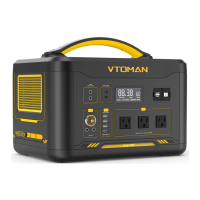

 To Next Page