EasyManua.ls Logo

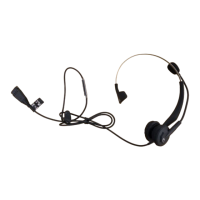
VXI BlueParrott B250-XT - User Manual

VXI BlueParrott B250-XT
23 pages
Print Icon
To Next Page IconTo Next Page
Loading...
Compatible with Bluetooth phones & Bluetooth enabled
computers (Windows® or Macintosh®)
For Sales Information Please Contact RoadTrucker Inc (www.RoadTrucker.com)
8312 Sidbury Rd.; Wilmington, NC 28411 - (800) 507-0482 / (910) 686-4281

Other manuals for VXI BlueParrott B250-XT

Question and Answer IconNeed help?

Do you have a question about the VXI BlueParrott B250-XT and is the answer not in the manual?

Summary

Safety Instructions and Glossary

Charge the Headset

Battery Power Indicators

Headset Controls

On, Standby, and Off Modes

Pair Headset with Phone

Microphone Positioning

Make and End a Call

Answer and End a Call

Pairing with a Computer

Operation While Using Charger;Adapter

12 Additional Functions (Page 15)

Last Number Redial

Redial the last number dialed from the cell phone by pressing volume down button.

Reset Paired Devices List

Specifications

Summary

Safety Instructions and Glossary

Charge the Headset

Battery Power Indicators

Headset Controls

On, Standby, and Off Modes

Pair Headset with Phone

Microphone Positioning

Make and End a Call

Answer and End a Call

Pairing with a Computer

Operation While Using Charger;Adapter

12 Additional Functions (Page 15)

Last Number Redial

Redial the last number dialed from the cell phone by pressing volume down button.

Reset Paired Devices List

Specifications

VXI BlueParrott B250-XT Specifications

General IconGeneral
Headset typeMonaural
Product typeHeadset
Product colorBlack
Wearing styleHead-band
Recommended usageOffice/Call center
Impedance- Ω
Magnet type-
Ear couplingSupraaural
Headphone frequency- Hz
Microphone typeBoom
Standby time150 h
Connectivity technologyWireless

Related product manuals