Page 6
Button combinations: Pairing, functions reprogramming and factory reset
Pairing buttons: Press and hold HEAD UP and FOOT UP buttons together on the remote and while still holding, press “PAIR” button on control box cable to
pair the remote with the base in which that control box is installed, a beep should be heard (see “Remote Pairing” section for more details).
Reprogram Zero-G Function: Press and hold ZG and FLAT buttons together for 5 seconds until hearing the beep to save Zero-G as current base position.
Reprogram Snore function: Press and hold SNORE and FLAT buttons together for 5 seconds until hearing the beep to save Snore as current base position.
Reprogram TV Function: Press and hold TV and FLAT buttons together for 5 seconds until hearing the beep to save TV as current base position.
Reprogram M1 Function: Press and hold M1 button for 5 seconds until hearing the beep to reprogram M1 (Memory 1) as current base position.
Reprogram M2 Function: Press and hold M2 button for 5 seconds until hearing the beep to reprogram M2 (Memory 2) as current base position.
Restore to Factory Settings: Press and hold HEAD UP and FLAT buttons together for 5 seconds until hearing the beep to repgroam to factory settings. After
hearing the beep, the functions Zero Gravity, Snore, and TV will be restored to factory congurations.
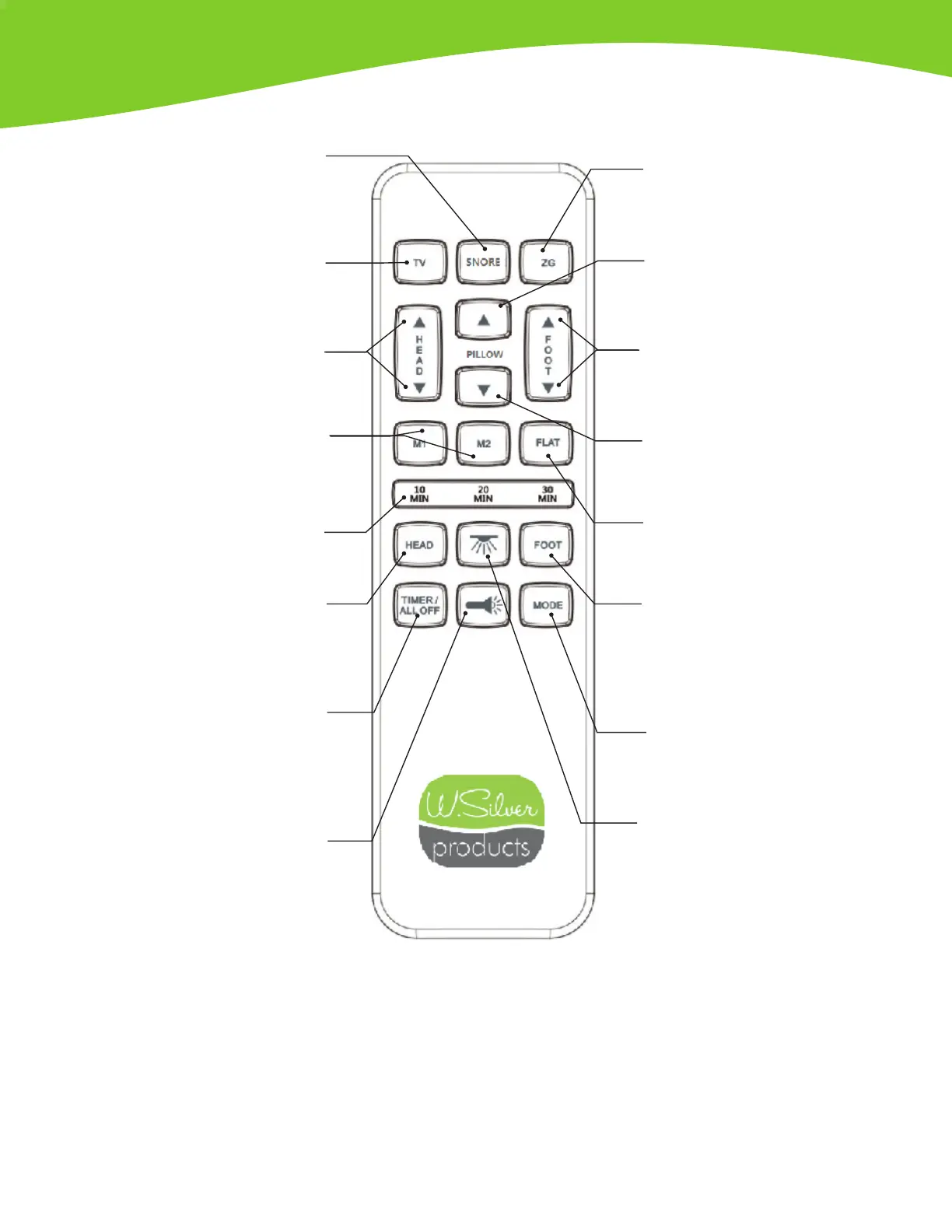
Zero Gravity Postition Button
Press and release to achieve Zero-G
position. Do not keep the button pressed.
Pillow Up
Press and hold to raise both the head &
foot sections
Pillow Down
Press and hold to lower both the
head & foot sections
Flat Button
Press and release to lower the base
to at position
Under Bed LED Light
Press to turn ON LED, press
again to turn OFF LED
Foot Massage ON
Press to turn on the foot massage motor(s):
• 1st press = level 1
• 2nd press =level 2
• 3rd press = level 3 (most intense)
Massage Modes
When massage is ON, press to switch
between pulse, wave and constant modes
Foot Up/Down
Press and hold to raise or lower
the foot section
Snore Position Button
Press and release to achieve Snore
position (this function may help in
preventing or reducing snoring)
TV Position Button
Press and release to achieve
TV position
M1 and M2 Buttons
Press and release M1 or M2 button
to recall memory positions. Press and
hold 5 seconds to save new positions
Head Massage ON
Press to turn on the head massage motor(s):
• 1 s t p r e s s = l e v e l 1
• 2nd press =level 2
• 3rd press = level 3 (most intense)
Massage Timer/All OFF
Press 1 time for 10 minute timer
Press 2 times for 20 minute timer
Press 3 times for 30 minute timer
If massage motors are ON, press to turn OFF
Remote Flash Light
Press and hold to turn ON the ashlight
located on the remote control, release
the button to turn ashlight OFF
Head Up/Down Button
Press and hold to raise or
lower the head section
Massage Timer Light
Lights up to indicate
massage timer selection
Remote Control Operations: G72


 To Next Page
 Loading...