7
Installation _____________________
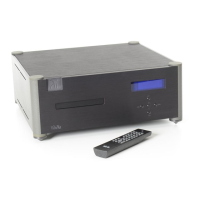
This section includes information on how to unpack and position your
Wadia 3
33
302 CD Player.
Unpacking
After carefully unpacking your Wadia 3
33
302 CD Player, inspect for any
shipping damage and call your dealer immediately if any is found. Do
not plug your Wadia 3
33
302 CD Player into any outlet if you find shipping
damage.
Please save all packing materials so the unit can be easily and safely
shipped if the need arises.
The Accessory Kit
Included in the carton, you will find an accessory kit that contains the
following:
• AC power cord
• Remote Control
• Two type-AA batteries
• Three cone feet and flat metal discs
• One 75 Ohm BNC-to-RCA adapter
Installing Batteries In Remote Control
The Wadia 3
33
302 CD Player remote control requires two batteries, which
you will find in the accessory kit. To install the batteries, unscrew the
battery cover on the back of the remote. Insert the batteries as
indicated on the battery holders, and replace the cover.



 To Next Page