9
Connections ____________________
This section provides instructions to connect the Wadia 3
33
302 CD Player
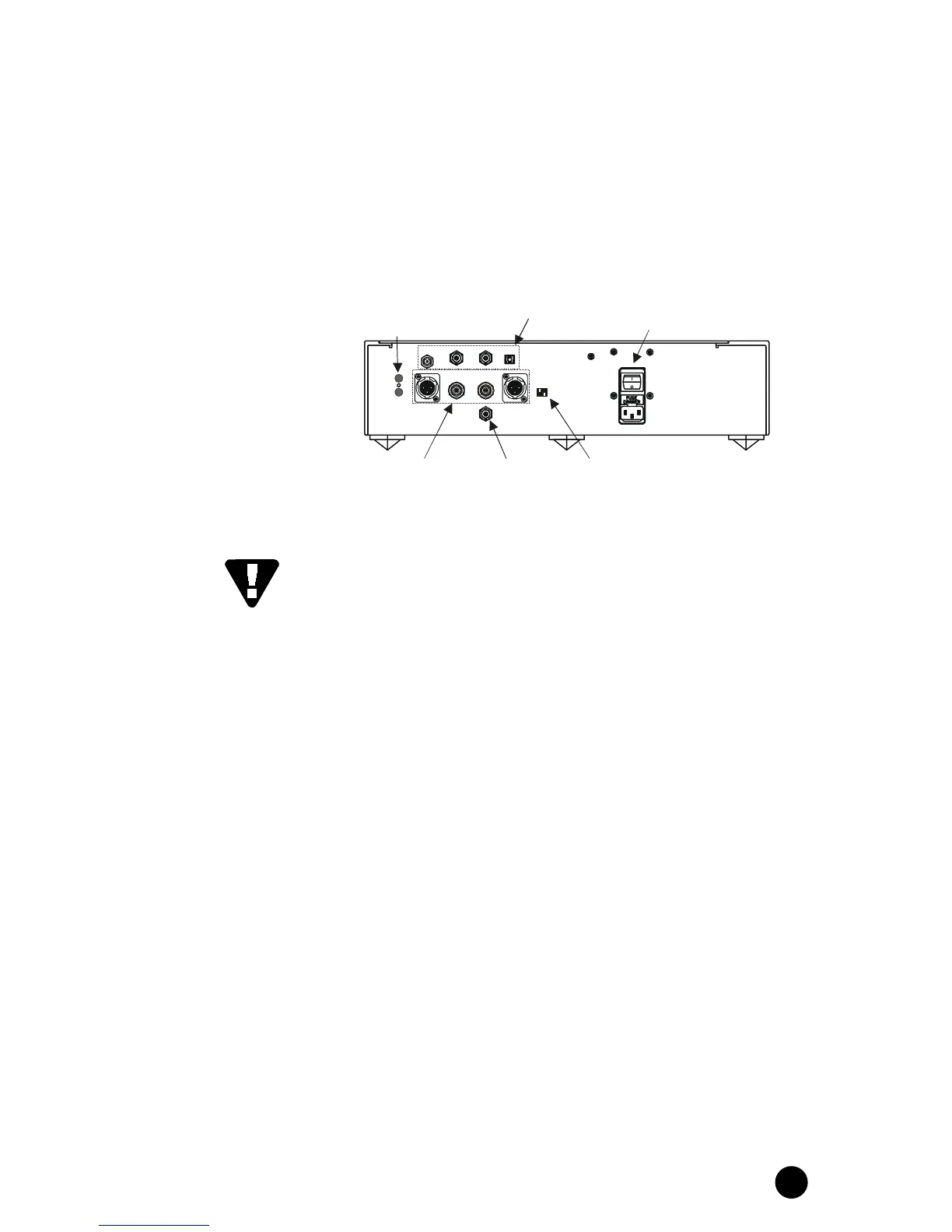
to the rest of your music system. Below is an illustration of the Wadia
3
33
302 CD Player rear panel, showing all inputs and outputs.
Avoid allowing static shocks to be applied to the inputs or outputs. To
prevent static shocks, touch any grounded surface, such as the chassis
of a component that is plugged into an AC socket, before connecting
or removing a cable. It is unlikely that a static shock will damage the
unit, but it may cause the Wadia 3
33
302 CD Player circuitry to lock-up (see
Trouble Shooting in Appendices).
Inputs and outputs can be safely connected to the Wadia 3
33
302 CD
Player:
• When the AC power is switched off OR
• When the unit is in Relay-Mute mode (See Mute in Operation)
DESIGNED & MANUFACTURED
IN THE U.S.A.
IR IN
IR OUT
IN 1
RL
ANALOG OUTP UT
DI GITAL OUTPU T
LEFT
IN 2 IN 3 IN 4
IR pass through
(page 14)
Digital inputs (Optional)
(page 14)
Analog outputs
(page 10)
Digital output
(page 14)
Maximum Output Level Adjustment
(page 13)
AC inlet and power switch
(page 9)
RI GHT



 To Next Page