Need help?
Do you have a question about the Waferlock C760 and is the answer not in the manual?
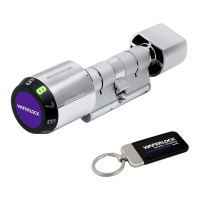
Remove the outer cylinder knob and insert a CR2 battery.
Tighten the screws anti-clockwise with the hexagon key.
Insert the electronic cylinder through the door aligning the cam flush with the cylinder body.
Tighten the M5 screw fully.
Insert the inner knob accurately based on measured thickness and tighten the screw.
The Programming Card must be linked to the lock before any other steps can take place.
Programming card is used to add/delete user cards/badges, not to unlock cylinders.
Download the App by searching 'WAFERKEY' in the App Store or on Google Play.
Open the App, use a Third Party Login or register a WAFERKEY account.
Turn on Bluetooth, stay near the lock, and follow the instruction in the App to pair.
The WAFERKEY App works on iPhone with iOS 13.6+ or Android 8.0+.
Add a new user by tapping the programming card, then the user card.
Set a new combination by tapping the programming card and rotating the knob.
Unlock the door by tapping the user card on the reader.
Unlock the door by touching the WAFERLOCK logo and rotating the knob.
Replace the battery if 3 beeps are heard 5 times and the red light flashes 3 times.
Delete all users by repeatedly tapping the programming card until a long beep occurs.

 To Next Page
 General