EasyManua.ls Logo

Wahoo ELEMNT - Setting Up Your Bike Computer; Download Companion App; Power On and Pair Device; Complete App Setup

Wahoo ELEMNT
Print Icon
To Next Page IconTo Next Page
To Previous Page IconTo Previous Page
Loading...
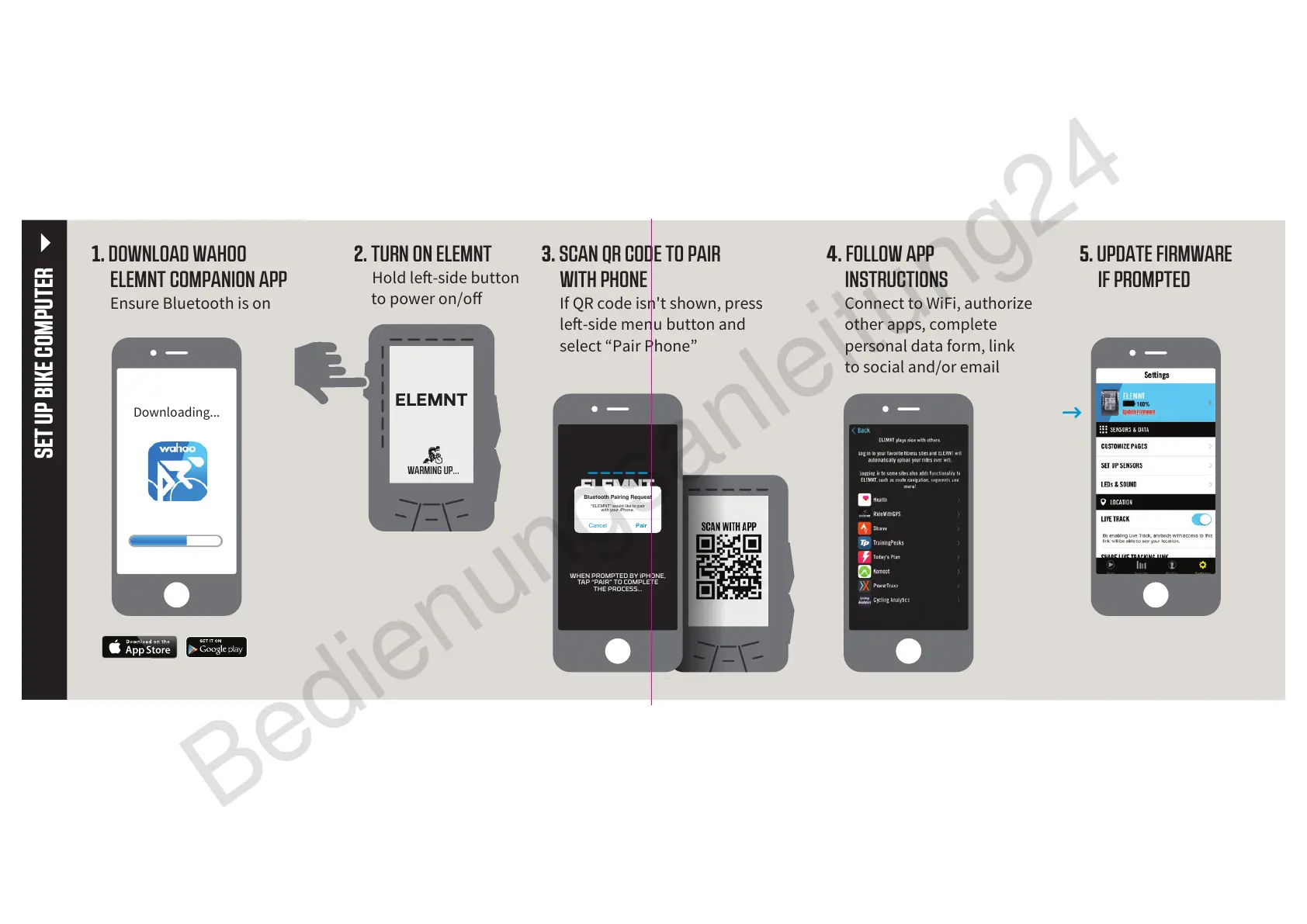
1. DOWNLOAD WAHOO
ELEMNT COMPANION APP
Ensure Bluetooth is on
3. SCAN QR CODE TO PAIR
WITH PHONE
If QR code isn't shown, press
le-side menu button and
select “Pair Phone”
4. FOLLOW APP
INSTRUCTIONS
Connect to WiFi, authorize
other apps, complete
personal data form, link
to social and/or email
2. TURN ON ELEMNT
Hold le-side button
to power on/o
SET UP BIKE COMPUTER
5. UPDATE FIRMWARE
IF PROMPTED
Downloading...
ELEMNT
WARMING UP...
WHEN PROMPTED BY iPHONE,
TAP “PAIR” TO COMPLETE
THE PROCESS...
Bluetooth Pairing Request
“ELEMNT” would like to pair
with your iPhone.
PairCancel
Bedienungsanleitung24

Related product manuals