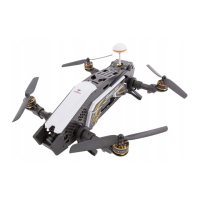
The Walkera Furious 215 is a high-performance racing drone designed for experienced pilots. Its robust construction, advanced flight features, and real-time video transmission system make it suitable for competitive racing and aerobatic maneuvers.
Function Description
The Furious 215 is a quadcopter equipped with four brushless motors and propellers, a camera for real-time video transmission, and an OSD (On-Screen Display) system. It supports various flight modes, including forward/backward, right/left rollover, and racing. The drone is controlled by a DEVO 7 remote controller, which offers primary, mid-level, and high-level flight modes, allowing for different levels of control and aerobatic capabilities. The 5.8G real-time video transmission system provides a live feed to the pilot, enhancing the immersive flight experience.
Important Technical Specifications
Aircraft:
- Main Rotor Dia.: 127mm
- Overall (L x W x H): 168 x 209 x 71.5mm
- Weight: 375g (excl. battery)
- Remote Controller: DEVO 7
- Receiver: DEVO-RX721
- Flight Controller: FCS-215
- 5.8G transmitter: TX5838(FCC)/TX5839(CE)
- Brushless Motor: WK-WS-28-017(2500KV)
- Brushless ESC: Furious 215 ESC
- Battery: 14.8V 1300mAh 60C 4S LiPo
- Flight Time: 8~9mins
- Working Temperature: -10 ℃ ~ +40 ℃
Camera:
- Lens: 2.5mm
- Image Sensor: 1/3" Sony SUPER HAD II CCD
- Horizontal Resolution: 600TVL
- Integrated MIC: Yes
- WDR: D-WDR
- DNR: 2DNR
- Day/Night: Color/Auto/B&W
- Power: DC 5-17V
DEVO 7 remote controller:
- Frequency: 2.4GHz DSSS
- Output power: ≤100mW
- Current consumption: ≤230mA(100mW)
- Power Supply: 5# Battery 8x1.5V or NiMH 8x1.2V 1600-2000mAh
- Output Pulse: 1000-2000mS(1500Ms Neutral)
TX5838(FCC) / TX5839(CE) transmitter:
- 5.8G wireless image transmission
- TX5838 B-band 8-channel selection
- TX5839 B-band 8-channel selection
- TX5838 output power: ≤200mW
- TX5839 output power: ≤25mW
Usage Features
Flight Preparation:
- Battery Charging: The GA009 charger is used for the 14.8V LiPo battery. A green LED indicates charging completion, while a red LED indicates active charging. A flashing yellow LED signals a fault.
- Remote Controller Setup: The DEVO 7 remote controller requires 8 AA batteries (or NiMH equivalents). Proper polarity must be observed during installation.
- Antenna Installation: The 5.8G transmitter antenna must be installed and tightened with a spanner.
- Propeller Installation: CW (Clockwise) and CCW (Counter-Clockwise) propellers must be installed on the correct brushless motors and secured with locknuts, tightened with a spanner.
- Battery Installation: The LiPo battery is attached to the aircraft using Velcro, and its center of gravity should be adjusted to be parallel with the head and tail. A sticking band further secures the battery.
Flight Control:
- Aircraft Code-Matching: The aircraft and remote controller must be code-matched. This involves powering on the remote controller with all switches in the "0" position and the throttle rocker at the lowest position. Then, power on the aircraft, ensuring positive and negative electrodes are correct. Blue status indicator lights and a buzzer sound indicate successful code-matching.
- Motor Unlock/Lock:
- Unlock: After binding, ensure all trims are neutral, the throttle rocker is at 0%, and all switches are UP. Push the throttle rocker down and move the rudder (YAW) rocker to the left for over 2 seconds. Red status indicator lights and a "B B" sound confirm motors are unlocked.
- Lock: Move the throttle rocker all the way down and the rudder (YAW) rocker all the way to the right. Blue status indicator lights and a "B B" sound confirm motors are disarmed. Motors are LOCKED by default after successful binding.
- Flight Modes: The DEVO 7 remote controller supports primary, mid-level, and high-level flight modes, offering different levels of stability and maneuverability.
- Aerobatic Flight: The Furious 215 is capable of forward/backward and left/right rollovers. To perform a rollover, the MIX switch must be in position "1" or "2" (mid-level or high-level flight mode). Sufficient altitude and practice are required.
- Racing Flight: Racing requires an open field, low wind, and a distance of up to 300 meters for video receiving range. Pilots should maintain a safe distance from crowds, animals, and power lines.
- End of Flight: Manual landing involves slowly pulling down the throttle rocker, then locking the motor. Disconnect power to the aircraft before switching off the remote controller.
OSD Information:
- The OSD displays critical flight information, including battery voltage and flight timer. It is visible when switch 1 is in the "ON" position.
Transmitter Channel Selection:
- The TX5838/TX5839 transmitter offers 8 channels. Channel selection is done via code switch positions on the transmitter. One-to-one correspondence is between the transmitter channel and the video receiver channel.
DEVO-RX721 Receiver Introduction:
- To remove a fixed ID code, press the "Cleaning key" on the receiver. This is useful when switching between aircraft or if the receiver's red indicator light flashes slowly, indicating a fixed ID memory.
FCS-F215 Flight Controller Introduction:
- The flight controller features ports for external PPM, external SBUS, BOOTO (brush button), receiver toggle switch (internal/external SBUS), connection port for flexible flat cable, USB upgrade port, and SWD port.
Maintenance Features
Firmware Upgrade:
- Online upgrades for the flight controller are available from the Walkera official website (www.walkera.com) via the USB data cable.
General Maintenance:
- The drone's body structure is made of carbon fiber composite, offering high tenacity and impact resistance, which simplifies maintenance.
- Modular designs improve expandability and ease of installation/maintenance.
- Regular checks of local laws before flying are advised to avoid illegal flights.
- Always use Walkera-approved batteries to prevent damage, as Walkera takes no responsibility for damage caused by non-Walkera batteries.
- Prior to use, pilots are encouraged to visit the Walkera official website for teaching videos and to carefully read the Quick Start Guide to prevent misoperation, property loss, and personal injuries.

 Need help?

 To Next Page
 General