EasyManua.ls Logo

Walkera QL 1800 - User Manual

Walkera QL 1800
24 pages
Print Icon
To Next Page IconTo Next Page
Loading...
Fuel-electric hybrid | 30X 4K Camera
QUICK START GUIDE
May 28th, 2020
V1.0
www.walkera.com
Question and Answer IconNeed help?

Do you have a question about the Walkera QL 1800 and is the answer not in the manual?

Summary

Summary of Flight Safety

Environment

Environmental requirements for safe flight, including location and weather.

Pre-Flight Inspection

Pre-flight checks to ensure aircraft readiness and safety.

Flight Operation Guidelines

Guidelines for operating the aircraft safely during flight.

Aircraft Overview

Remote Controller Guide

Remote Control Power and Operation

Instructions for powering the remote controller on, off, and controlling the screen.

Flight Control Stick Operations

Explanation of left and right stick functions for flight control.

Technical Specifications

Battery Status and Charging

Checking Battery Levels

Procedures for checking the battery status of the remote controller and aircraft.

Aircraft Charging Procedures

Step-by-step guide for charging the aircraft battery.

Remote Controller Charging

APP Interface Overview

Flight Preparations

Aircraft Starting and Connection

Steps for starting the aircraft, code-matching, and connecting the APP.

Remote Controller Setup

How to prepare and set up the remote controller before flight.

Aircraft Preparation for Flight

Unfolding Aircraft Components

Instructions for unfolding the aircraft's arms, blades, and GPS antennas.

Installing the Aircraft Battery

Guide on how to install the aircraft battery correctly.

Gimbal and Camera Installation

Fuel and Coolant Filling

Fuel Mixing and Filling

Detailed steps for mixing fuel and coolant correctly.

Ready for Flight Operations

Aircraft Starting and Code-matching

Steps for starting the aircraft and performing code-matching.

Connecting to the Mobile App

Instructions for connecting the mobile application to the aircraft.

Engine Start Procedure

GPS Indicator Lights

Control Stick Functionality Comparison

Motor Lock and Unlock

Flight Control Basics

Manual vs. Auto Takeoff

Instructions for manual and automatic takeoff procedures.

Landing Procedures

GPS Mode Flight Operations

Motion Mode Flight Operations

Waypoints Flight Planning

Return to Home (RTH) Function

RTH Altitude and Distance Scenarios

Low Voltage Protection Feature

Photo and Video Capture

Camera Zoom Control

Adjusting zoom levels for the camera.

Camera Focus Adjustment

Adjusting the camera's focus.

Gimbal Control

Gimbal Follow Me Mode

Using the gimbal to follow the aircraft's nose direction.

Gimbal Lock Mode

Keeping the gimbal pointing steady regardless of aircraft movement.

Ending the Flight

Storage and Transportation

Aircraft Maintenance

Engine Maintenance and Warranty

Engine Maintenance Details

Specific maintenance tasks for the aircraft's engine.

Spark Plug Cleaning Procedure

Air Filter Cleaning Procedure

Engine Warranty Information

Compass Calibration

Fuel Level Calibration

Stick Mode and Calibration

Stick Mode Switching

Changing the remote controller's stick mode configuration.

Stick and Thumbwheel Calibration

Calibrating the remote controller's sticks and thumbwheels.

LIDAR Systems

LIDAR Ranging Function

How the LIDAR system measures distances.

Obstacle Avoidance System

Activating and configuring the obstacle avoidance function.

Battery Safety Guidelines

Safe Battery Usage

Guidelines for safely using aircraft batteries.

Battery Storage Recommendations

Recommendations for storing aircraft batteries safely.
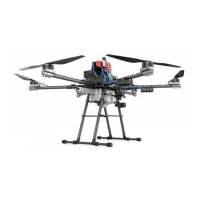
Walkera QL 1800 Specifications

General IconGeneral
BrandWalkera
ModelQL 1800
CategoryDrones
LanguageEnglish

Related product manuals