Mobile Phone with the Same Screen
The following steps can help us to display content of our mobile phone to projection
screen synchronously through wireless wifi, just enjoy with a larger picture.
Equipment requirements: support devices above IOS6 and Android 5.3 Min.
Android Devices User Instruction
1. Ensure the Phone and Projector are under the same WIFI (For Android Only).
2. Open“Eshare”of the projector.
3. Choose the device with the same name with Eshare to complete mirror.
Android
Support for Android 5.3 Min
iPhone
Support for IOS6 or Over IOS6
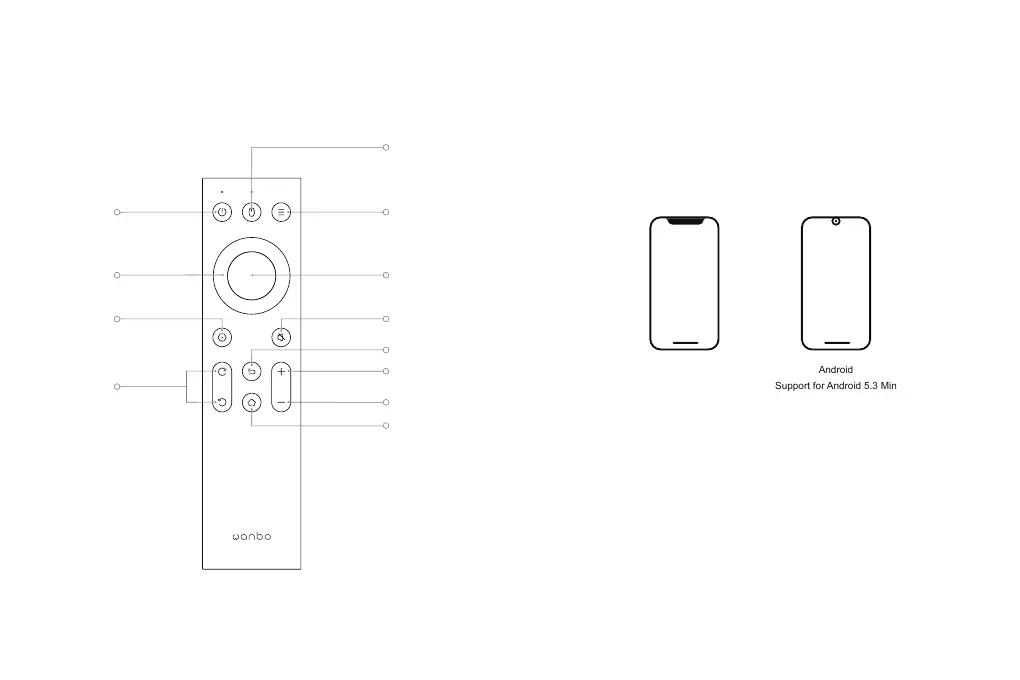
Remote Control
Multi-Function Keys
OK
Volume+
Volume -
OFF/ON
Arrow Keys
Setting Mute
Focus Key
Mouse Mode
(Android)
Return
Home
12



 To Next Page