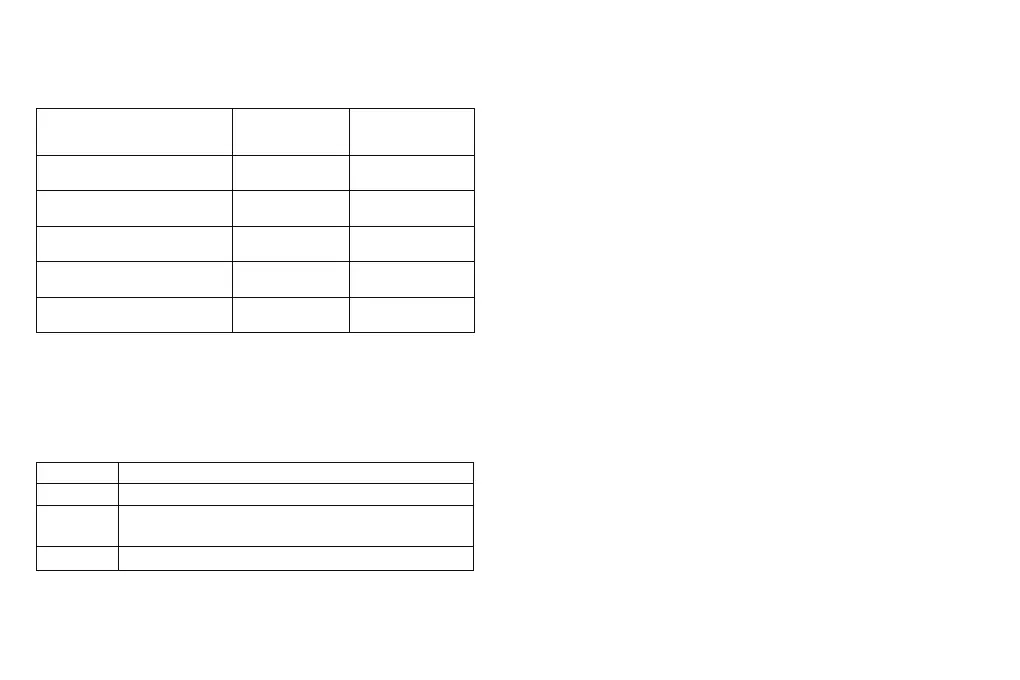
Projection Distance Reference
Note: Projection size and distance are calculated according to projection ratio, which
may have a deviation and subject to actual status.
Cleaning Method
Please make sure the power plug is unplugged before cleaning.
Do not use pesticides or other volatile chemicals on the projector or lens. Do not let
rubber or vinyl products contacts the projector for a long time, which will damage the
coating and make it peeled off.
· Clean the Projector
1. Wipe with a soft, dry cotton cloth. If it’s dirtied seriously, we can wipe with soft cloth
that stuck with diluted neutral detergent, then dry with a clean and dry cloth. Please
pay more attention if used with chemical fiber cloth.
2. Don’t use thinner, benzene or any other solvents to avoid quality reduction or coating
peeling off etc.
3. A brush can be inserted into the front of the vacuum cleaner to remove dirt inside the
vents. Please don’t use vacuum cleaner with no connector, or clean with vents directly.
4. Please don’t scrape the machine with nails or any other hard objects so as to avoid
scratches.
· Lens Cleaning
1. Clean lens with the same method for camera lens: please use professional blow dryer
or cleaning paper for glasses, ensure lens are not scratched.
· Inlet and Outlet Dust Cleaning
1. Dust in the inlet and outlet will prevent ventilation and increase the in
ternal
temperature, which will cause defect.
2. Disconnect power line after turn off the projector.
3. Clean the exterior with an electric vacuum cleaner, please install brush head adapter
on the vacuum cleaner first. Kindly take note: don’t use vacuum cleaner with no
connector or brush.
U Disk Support Format
File Type
Picture
Video
Audio
Note: Specific operation contents are subject to actual situation due to irregular
update of the product system.
File format supported
JPG/PNG/BMP
AVI,DAT,FLV,MKV,MOV,MPG,MPEG,MP4,RM,RMVB,SWF,
3GP,TS,VOB
AMR,FLAC,M4A,MP3,MP2,OGG,WAV
Projection size (under status of
no keystone correction / Inch)
Screen length *
width (m)
Lens ~ screen (m)
40
60
80
100
120
0.89*0.5
1.33*0.75
1.77*1.0
2.21*1.25
2.66*1.49
1.33
2.0
2.67
3.33
4.0
14



 To Next Page