External Equipment Connections
DVD Setup
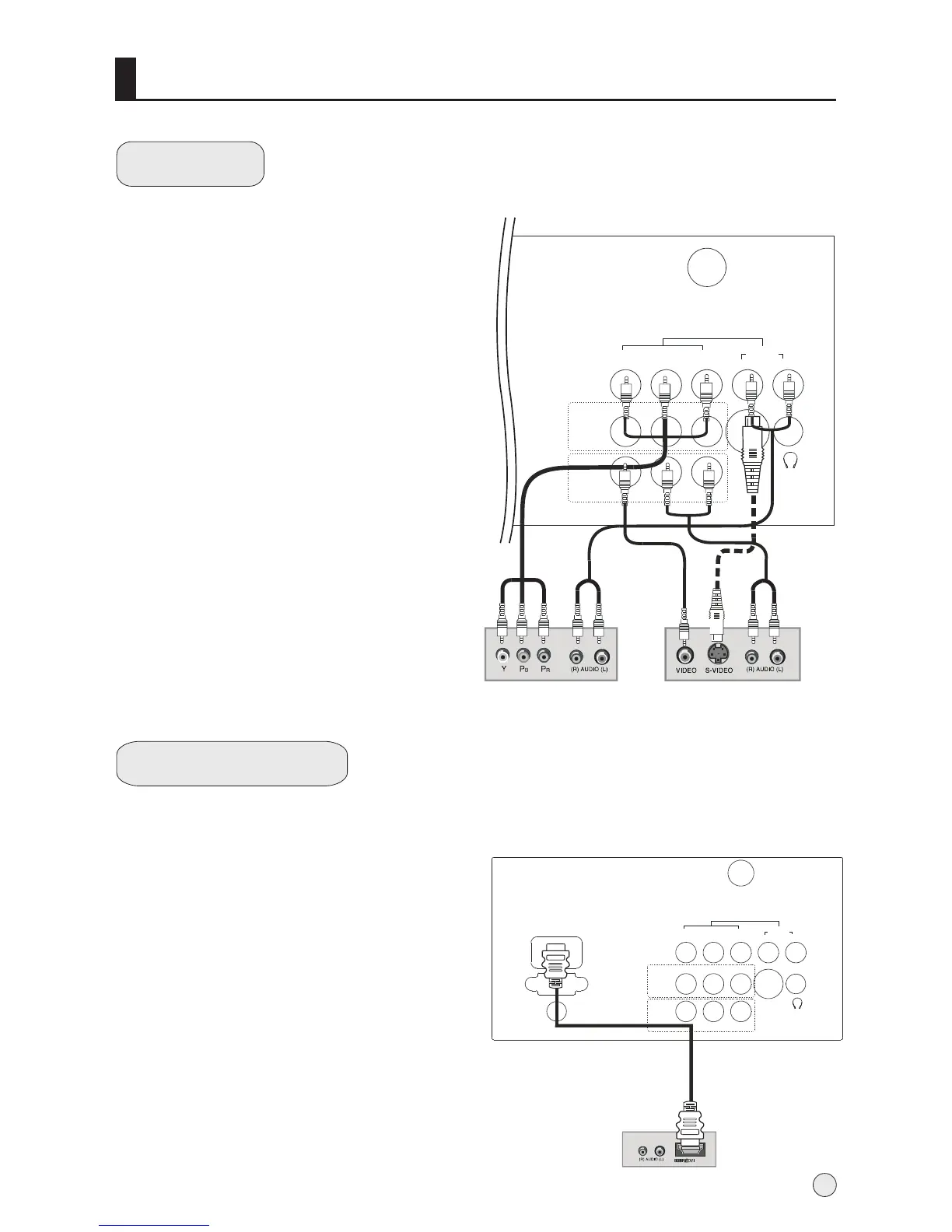
How to connect
1. Connect the DVD video outputs (Y, Pb/Cb,
Pr/Cr) to the COMPONENT (Y, Pb/Cb, Pr/Cr)
input jacks on the TV and connect the DVD
audio outputs to the AUDIO jacks on the TV,
as shown in the figure.
2. If your DVD only has an S-Video output jack,
connect this to the S-VIDEO input on the TV
and Connect the DVD audio outputs to the AV
IN jacks on the TV, as shown in the figure.
NOTE: If your DVD player does not have
component video output, use S-Video.
How to use
1. Turn on the DVD player, insert a DVD.
2. Use the S-Video button on the remote
control to select S-VIDEO or YPbPr/YCbCr
mode.
3. Press Play button on external equipment
for program play.
4. Refer to the DVD player's manual for
operating instructions.
HDMI or DVI Setup
-To watch digitally broadcast programs,
purchase and connect a digital set-top
box.
How to connect
Use the TV`s COMPONENT (Y, Pb/Cb,
Pr/Cr) INPUT jacks, VGA or HDMI port for
video connections, depending on your
set-top box connections available.
Then, make the corresponding audio
connections.
How to use
1. Turn on the digital set-top box.
(Refer to the owner`s manual for the digital set-top box.)
2. Use TV/AV on the remote control to select VGA or HDMI
(Y, Pb/Cb, Pr/Cr) mode.
3. Press Play button on external equipment for program play.
10
S-VEDIO
VEDIO
L R
AV IN
AV OUT
ANT.
Y
Pb/Cb Pr/Cr
AUDIO
L
R
COMPONENT IN
PC
AUDIO
IN
PC IN
HDMI
S-VEDIO
VEDIO
L R
AV IN
AV OUT
ANT.
Y
Pb/Cb Pr/Cr
AUDIO
L
R
COMPONENT IN
DVD
or



 To Next Page