http://www.wansview.com
18
3.4.2 Multi-Device Setting
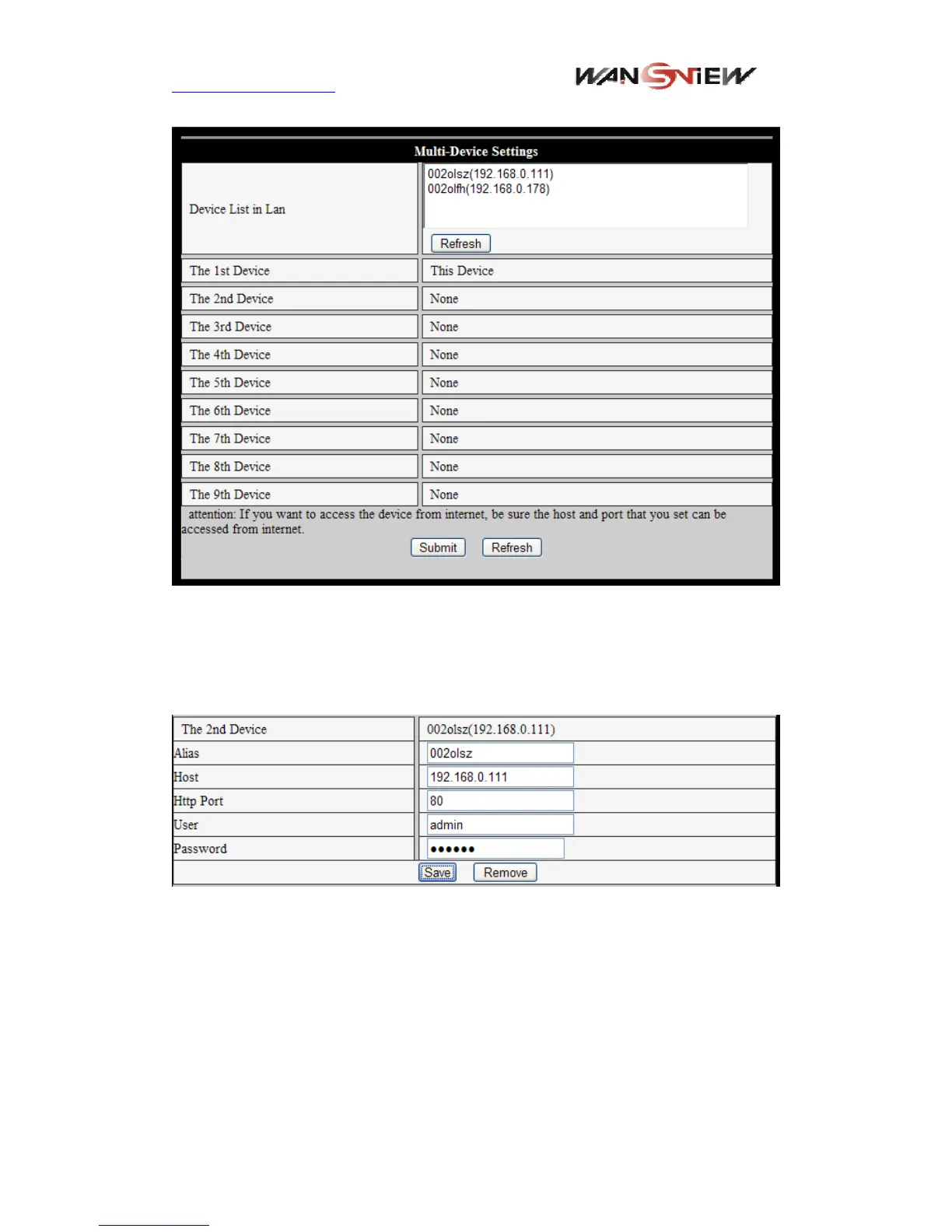
Figure 21 Multi-device setting
As Figure 21, User can add 9 devices the maximum to view the device simultaneously.
Click “refresh” button to check the device in the LAN. When click a device, will popup
setting dialogue box and input the device info, as figure 22 and click “save” to add device.
After that, must click “Submit” button in figure 21 to save device.
Figure 22 Add device
3.4.3 Other settings
You can choose open or close indicator LED. If set PTZ center on start ‘Yes’, when start
device, Pan/Tilt will move to center and then stop. You can also set the Horizontal patrol
rounds and vertical patrol rounds, when you click patrol on the ‘view’ interface, it will
round according to your setting rounds. You can also set PTZ speed, 0 means fastest.



 To Next Page