3.1 Wi-Fi Setup
Chapter3 Setup Mode
Note: The camera can only support 2.4Ghz Wi-Fi, it doesn’t support 5Ghz Wi-Fi.
① Place the camera near the router within 3 feet and power on the camera with the attached
power cord. Make your phone use the 2.4G Wi-Fi.
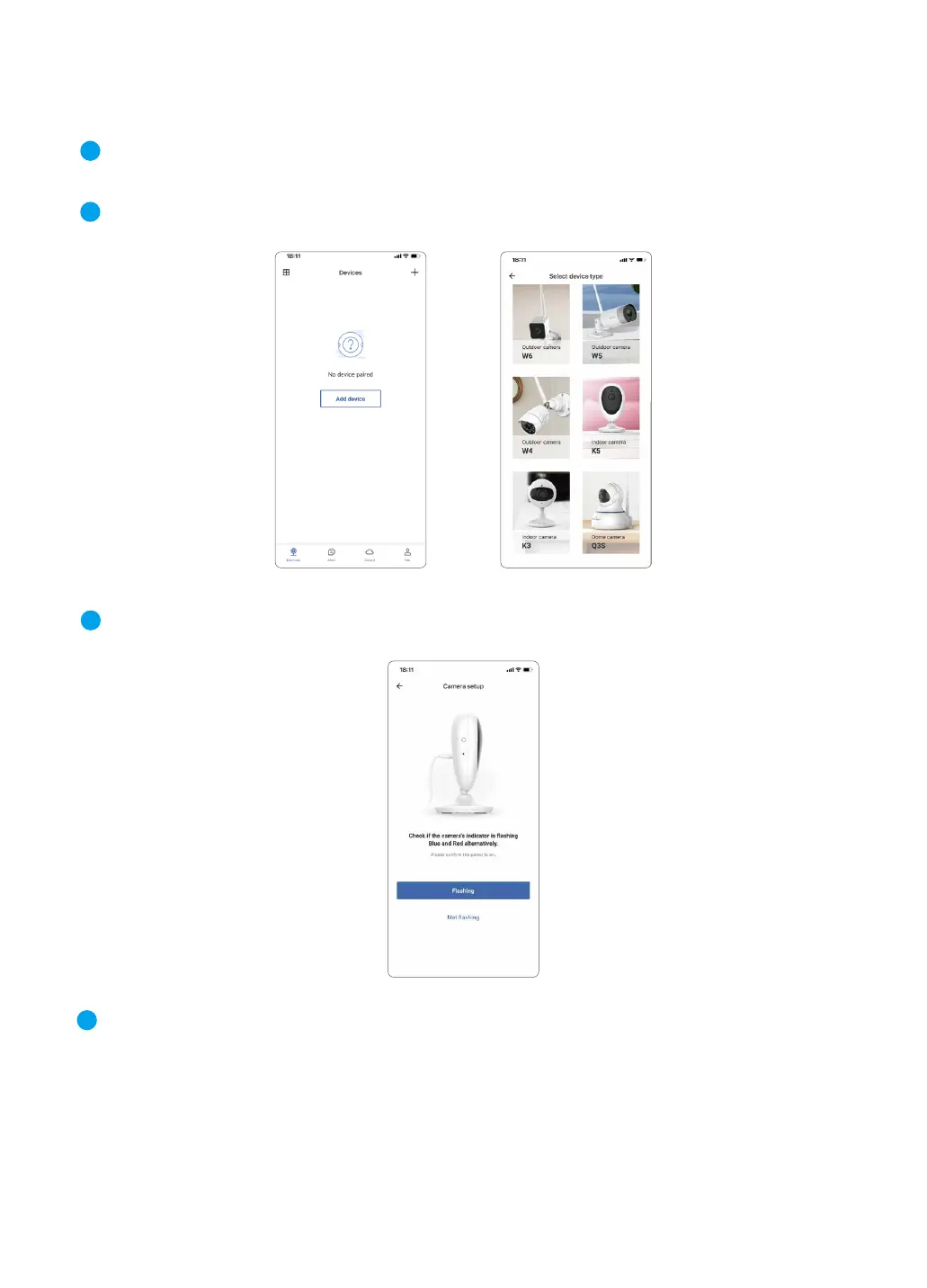
② Tap 【Add Device】 on the APP, and choose the camera model K5
③ Check if the camera's indicator light is flashing red and blue, if yes, tap【Flashing】.
1
2
3
06
④ The Wi-Fi name will be displayed automatically, then enter the correct Wi-Fi password and
tap Next.
If Wi-Fi name is not displayed, for Android phone, please go to the Phone Setting--APP Man-
agement--Find Wansview Cloud APP--Permissions--Allow the app to get the location info.
For iPhone, please go to the Setting--Privacy--Location Services--Turn on the Location
Services--Find the Wansview Cloud app,set it as While using.
4



 To Next Page