www.wansview.com
37
5. PC Client Soware
5.1: Add Camera
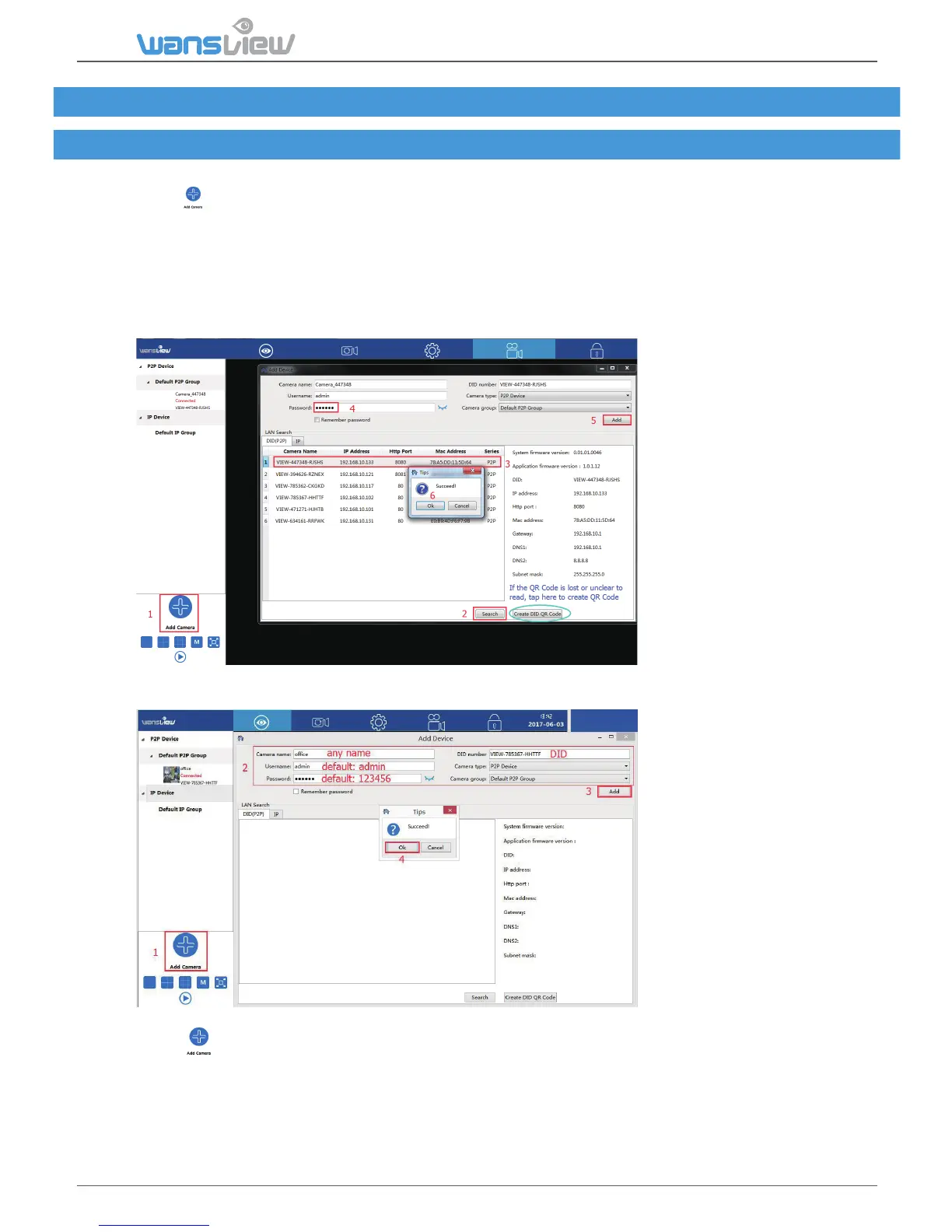
5.1.1 Add camera in Lan
1) Tap to add camera
2) Search the camera in Lan, DID number will be searched if use DID(P2P) to search, while Search
IP will get IP Address
3) Double-click the searched camera, and the camera informaon will be filled automacally.
4) Input the camera’s password (default is 123456).
5) Hit “Add”.
6) “Save Success” will appear, click “OK” to close the dialog.
5.1.2 Manually add camera (suitable for outside network)
1) Tap to add camera
2) Manually input the camera informaon.
Tips: DID number can be checked from sckers on the back of the camera. You can check the DID
from Wansview app If you have already added the camera on the mobile phone “wansview” app.
3) Hit “Add”.
4) “Save Success” will appear, click “OK” to close the dialog.



 To Next Page